







Question: StatsArray not sure what i need to be doing. import java.awt.*;import java.util.Random; //for our random number generator public class StatsArray { private int size; //how
StatsArray not sure what i need to be doing.
import java.awt.*;import java.util.Random; //for our random number generator public class StatsArray {
private int size; //how big is the arrayprivate int[ ] stats; // an array of integers //default constructorStatsArray() {
size = 10;stats = new int[size];
} public void display(Graphics g)
{
int x = 50; //coordinates for displayingint y = 40;//display the array with position numberfor(int i = 0; i
g.drawString("Stats [" + i + "] = "+ stats[i],x, (y + 15 * i) );
}
} public void fillArray(){
//fill the array with random numbers (int) in the range 0 - 100Random random = new Random();for(int i = 0; i
stats[i] = random.nextInt(101) ;
}}
public int getSum(){
//add up all the values in the arrayint total = 0;for (int i = 0; i
} public int getMax(){
//return the maximum value in the array
int maxValue = stats[0];for (int i = 0; i maxValue)maxValue = stats[i];}return maxValue;
} public int getMin(){
//return the minimum value in the arrayint minValue = stats[0];
for (int i = 0; i
} public double getAverage(){
//return the average. must be a double
return (double)getSum() / stats.length;
} public int countValues(int lowRange, int highRange){
//count how many numbers are >= lowRange and
if ( (stats[i] >= lowRange) && (stats[i]
count++;
}
}return count;
} public boolean isValueFound(int someNumber) {//check to see if someNumber is in the array
boolean found = false;for(int i = 0; (i
if (stats[i] == someNumber) {found = true;}
}return found;
} public void sortBArray() {
/*sort the array in ascending order - bubble sort*/int tempValue;for (int i = 0; i
{
if (stats[j]
stats[i] = stats[j];stats[j] = tempValue;
}
}
}
}
public void sortArray() {
/*sort the array in ascending order - selection sort*/ int tempValue;int min; for (int i = 0; i
min = i;for (int j = (i + 1); j
if (stats[j]
min = j;
}
}tempValue = stats[min];stats[min] = stats[i];stats[i] = tempValue;
}
}
}
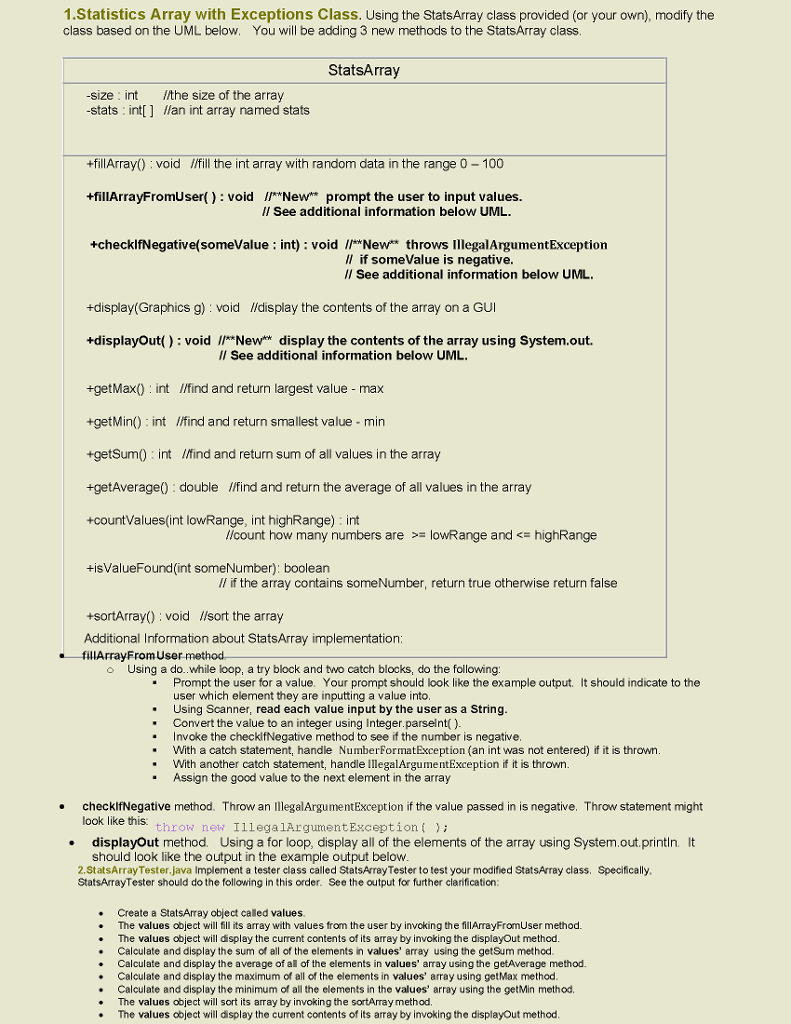
1 Statistics Array with Exceptions Class. Using the StatsArray class provided (or your own), modify the class based on the UML below. You will be adding 3 new methods to the StatsArray class StatsArray size int /the size of the array stats int llan int array named stats +fillArray0 void llfill the int array with random data in the range 0 100 +fillArrayFromUser(): void *New prompt the user to input values. ll See additional information below UML some value int) void Newt throws IllegalArgumentException ll if somevalue is negative. See additional information below UML. +display (Graphics g) void lfdisplay the contents of the array on a GUI +displayout(): void l *New display the contents of the array using System.out. ll See additional information below UML. +getMax0 nt I/find and return largest value max +getMin0 int lifind and return smallest value min +getSum0 int /Mind and return sum of all values in the array +getAverage double lifind and return the average of all values in the array +countValues(int lowRange, int highRange) int //count how many numbers are owRange and highRange +isValueFound (int someNumber): boolean ll if the array contains someNumber, return true otherwise return false +sortArray0 void //sort the array Additional Information about StatsArray implementation: fillArrayFromUser method Using a do..while loop, a try block and two catch blocks, do the following Prompt the user for a value. Your prompt should look like the example output should indicate to the user which element they are inputting a value into Using Scanner, read each value input by the user as a String Convert the value to an integer using Integer.parselnt() oke the checklfNegative method to see if the number is negative. With a catch statement, handle NumberFormatException (an int was not entered) if it is thrown With another catch statement, handle ArgumentException if it is thrown Assign the good value to the next element in the array checklfNegative method. Throw a egalArgumentException if the value passed in is negative. Throw statement might look like this throw new egal Argument Exception displayout method. Using a for loop, display all of the elements of the array using System.out.println. lt should look like the output in the example output below class called StatsArrayTester to test your modified StatsArray class. Specifically, 2.StatsArrayTester java Implement a te StatsArrayTester should do the following in this order. See the output for further clarification Create a StatsArray object caled values The values object will fill its array with values from the user by invoking the flArrayFromuser method The values object will display the current contents of its array by invoking the displayOut method Calculate and display the sum of all of the elements in values' array using the getSum method Calculate and display the average of al of the elements in values' array using the getAverage method. Calculate and display the maximum of all of the elements in values' arra using getMax method Calculate and display the minimum of all the elements in the values' array using the getMin method The values object sort its array by invoking the sortArray method The values object will display the cument contents of its array by invoking the displayOut method
Step by Step Solution
There are 3 Steps involved in it

Get step-by-step solutions from verified subject matter experts
 Study Help