







Question: Step 1: Answer Exercise 5 that is on Page 290. Make sure you answer all the elements asked in the question. The question asks you
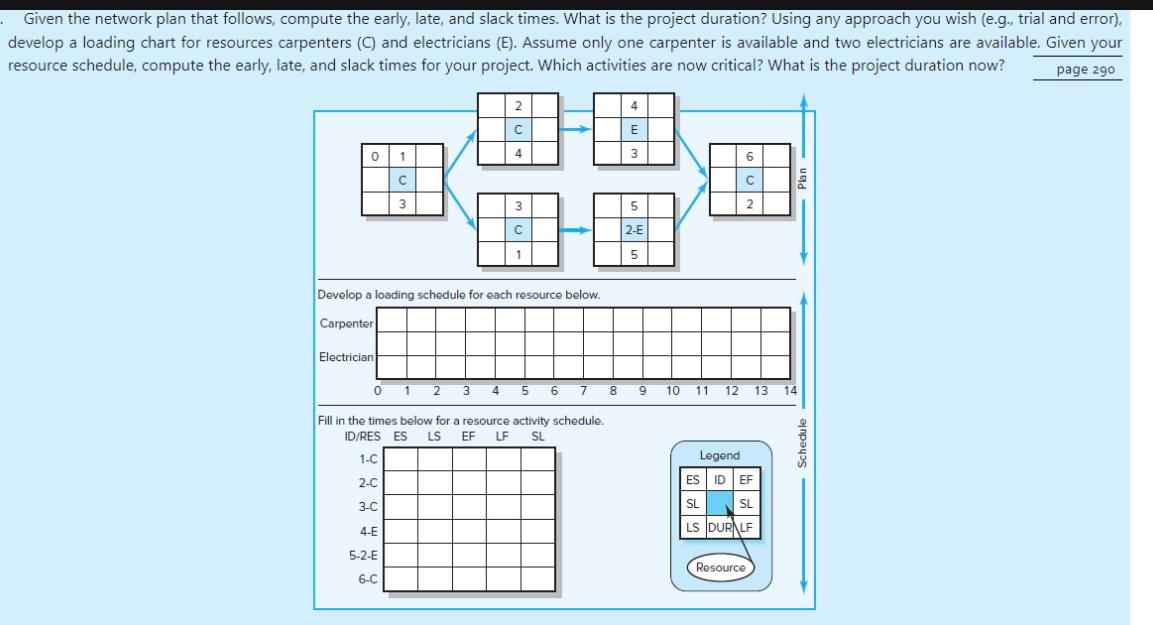
Step 1: Answer Exercise 5 that is on Page 290. Make sure you answer all the elements asked in the question. The question asks you to fill out the tables provided with the question. It also asks you to indicate which activities are critical after leveling the resources and also asks you to provide the total duration for the project. Submit your answer in a word file. You can create the tables (loading schedule and resource activity schedule tables) using Word's table functionality. (Hint: you can complete Step 1 doing all the analysis manually rather than using MS Project).
Step 2: Based on the information provided for Exercise 5 (page 290) and your findings at Step 1, create a Gantt Chart using MS Project that corresponds to the project depicted in Exercise 5 (page 290). The chart must reflect the project timeline with all the activities after resource leveling. You can enter the start date as May 8, 2023. The exercise provides duration data in numbers without providing a time unit (days or week). Assume that those duration numbers represent weeks. The project team will not work during weekends, therefore a week will consist of 5 business days.
Given the network plan that follows, compute the early, late, and slack times. What is the project duration? Using any approach you wish (e.g., trial and error), develop a loading chart for resources carpenters (C) and electricians (E). Assume only one carpenter is available and two electricians are available. Given your resource schedule, compute the early, late. and slack times for vour nroiect. Which activities are now critical? What is the project duration now
Step by Step Solution
There are 3 Steps involved in it

Get step-by-step solutions from verified subject matter experts
 Study Help