







Question: Step 1: Create a new database and name it Inventory Step 2: Use SQL CODE to create the Tables listed above begin{tabular}{|ccccc|} hline CustomerlD &
Step 1: Create a new database and name it Inventory
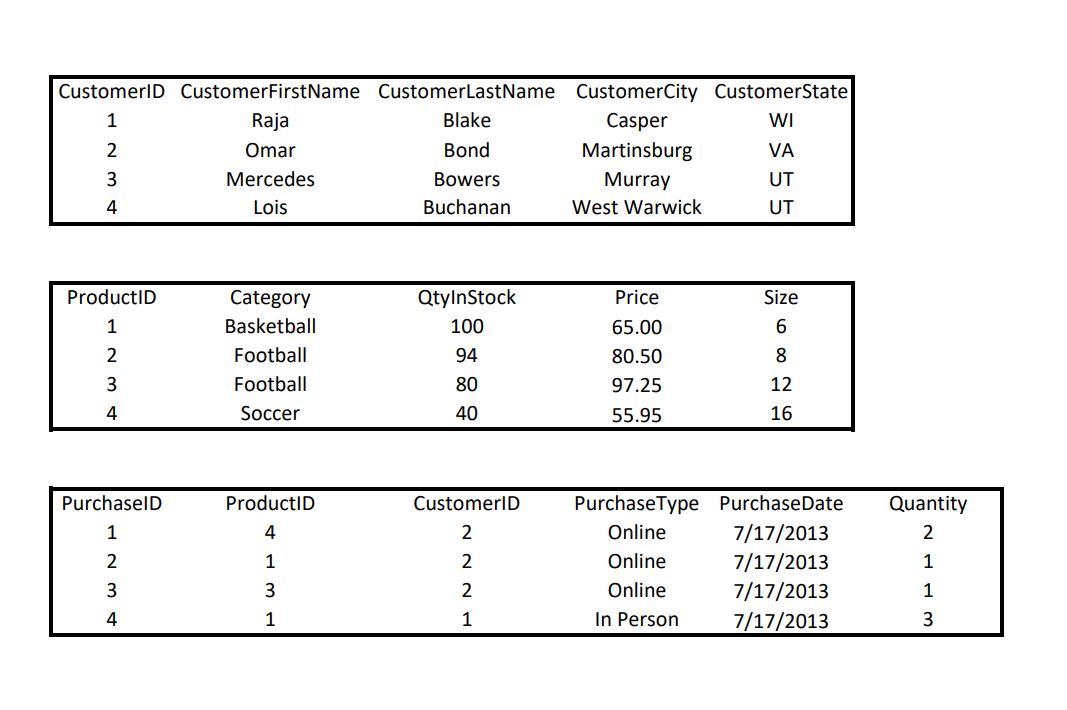
Step 2: Use SQL CODE to create the Tables listed above
\begin{tabular}{|ccccc|} \hline CustomerlD & CustomerFirstName & CustomerLastName & CustomerCity & CustomerState \\ 1 & Raja & Blake & Casper & WI \\ 2 & Omar & Bond & Martinsburg & VA \\ 3 & Mercedes & Bowers & Murray & UT \\ 4 & Lois & Buchanan & West Warwick & UT \\ \hline \end{tabular} \begin{tabular}{|ccccc|} \hline ProductID & Category & QtylnStock & Price & Size \\ 1 & Basketball & 100 & 65.00 & 6 \\ 2 & Football & 94 & 80.50 & 8 \\ 3 & Football & 80 & 97.25 & 12 \\ 4 & Soccer & 40 & 55.95 & 16 \\ \hline \end{tabular} \begin{tabular}{|cccccc|} \hline PurchaselD & ProductID & CustomerlD & PurchaseType & PurchaseDate & Quantity \\ 1 & 4 & 2 & Online & 7/17/2013 & 2 \\ 2 & 1 & 2 & Online & 7/17/2013 & 1 \\ 3 & 3 & 2 & Online & 7/17/2013 & 1 \\ 4 & 1 & 1 & In Person & 7/17/2013 & 3 \\ \hline \end{tabular}Step by Step Solution
There are 3 Steps involved in it
1 Expert Approved Answer
Step: 1 Unlock

Question Has Been Solved by an Expert!
Get step-by-step solutions from verified subject matter experts
Step: 2 Unlock
Step: 3 Unlock
 Study Help