







Question: Use SSMS to complete the following steps: Step 1 : Create a new database and name it Inventory Step 2 : Use SQL CODE to
Use SSMS to complete the following steps:
Step : Create a new database and name it Inventory
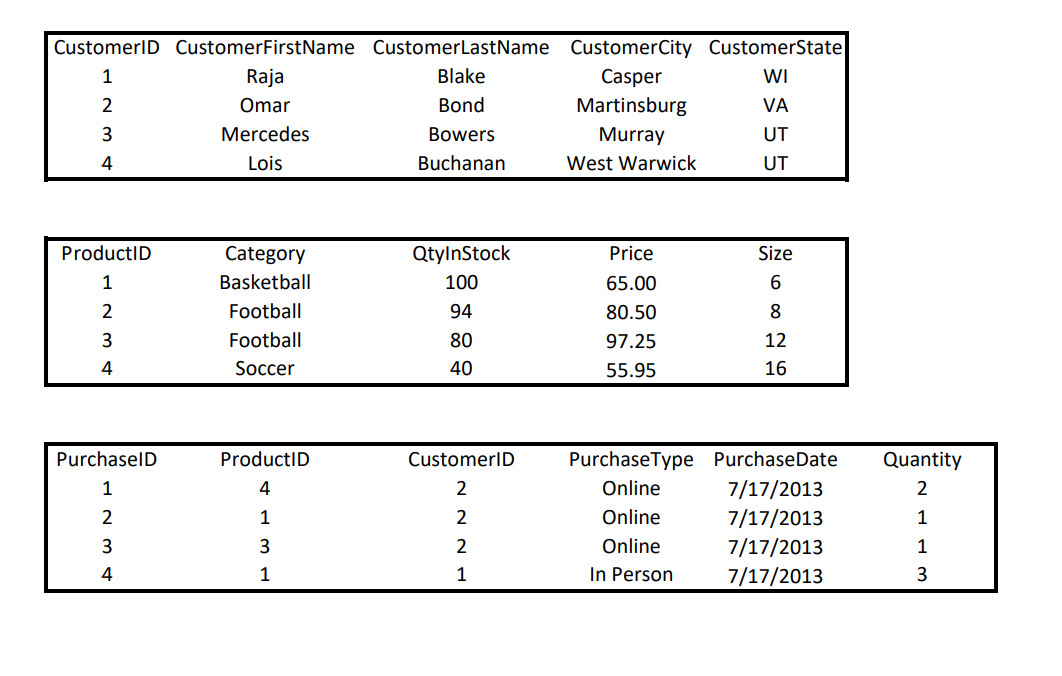
Step : Use SQL CODE to create the Tables listed in the Attached File Show me the tables in the left margin
Step : Create Database Diagram
Step : Use SQL code to INSERT the data in each table Show me the top rows in each table
Step : Create ONE QUERY to complete the following:
Step : Use an SQL Builtin Aggregate Function to calculate the number of customers. Name the new Column CustomerNumber
Step : Use an SQL Builtin Aggregate Function to calculate the total quantity in stock. Name the new Column TotalProduct
Step : Use an SQL Builtin Aggregate Function to calculate the average size. Name the new Column AverageProductSize
Step : Select All Columns from table Product and add a new column DollarValue that calculates the dollar value for each rowrecord in the inventory. This is the Formula for the new column: DollarValue QtyInStock Price
Step by Step Solution
There are 3 Steps involved in it
1 Expert Approved Answer
Step: 1 Unlock

Question Has Been Solved by an Expert!
Get step-by-step solutions from verified subject matter experts
Step: 2 Unlock
Step: 3 Unlock
 Study Help