







Question: Step 1 : Enter the journal entries into the Excel Template spreadsheet and when completed print it out. Save your completed template to your computer
Step : Enter the journal entries into the Excel Template spreadsheet and when completed print it out. Save your completed template to your computer where you can access it later to upload.
Step : Use the Excel Template Spreadsheet to answer the questions in Blackboard for the corresponding week in the content folder.
Step : Once you complete entering information into Blackboard, upload the template spreadsheet into Blackboard by clicking on the navigation pane then clicking on Practice Set.
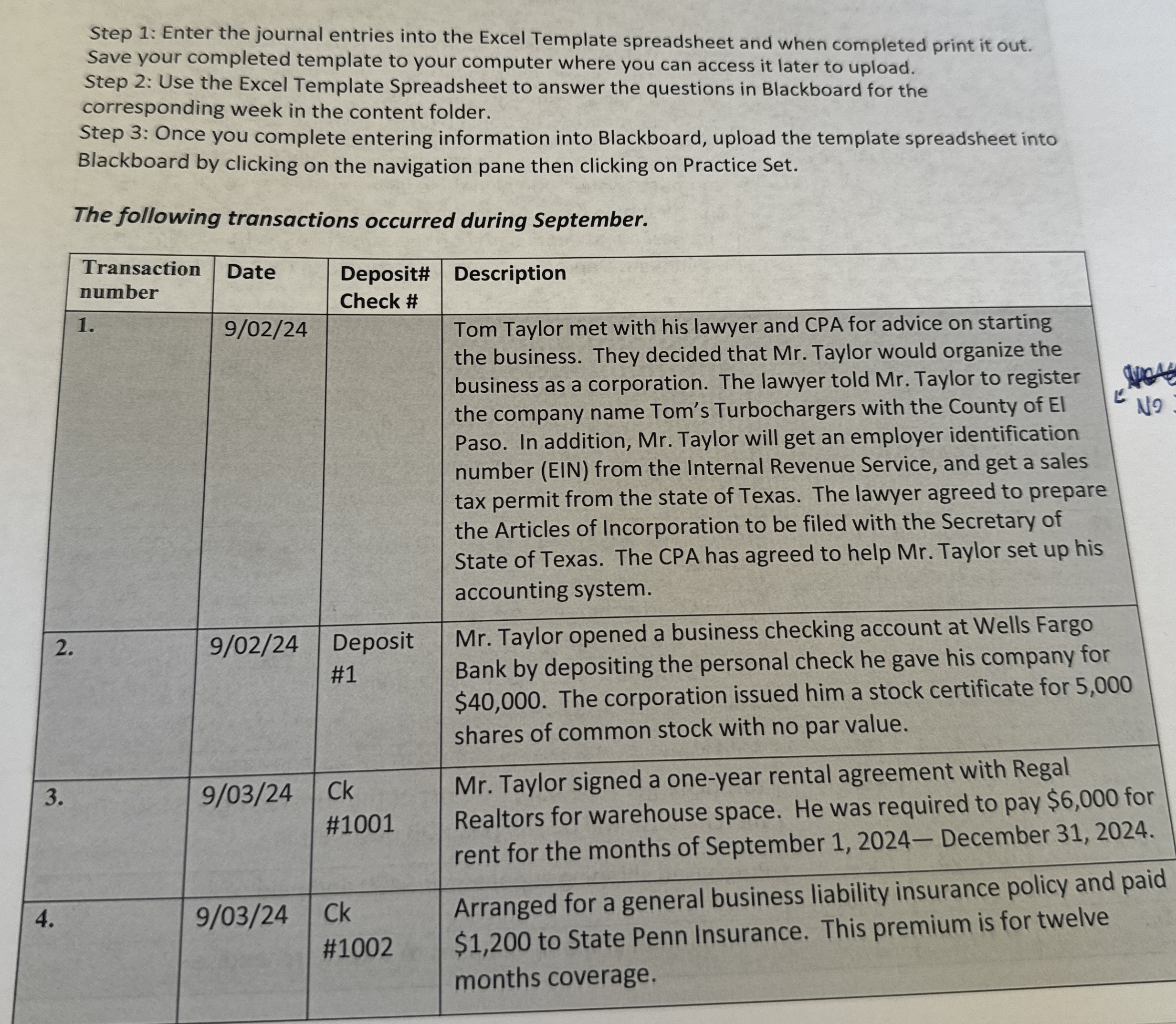
The following transactions occurred during September.
tableTransaction number,Date,tableDeposit#Check #DescriptionTom Taylor met with his lawyer and CPA for advice on starting the business. They decided that Mr Taylor would organize the business as a corporation. The lawyer told Mr Taylor to register the company name Tom's Turbochargers with the County of El Paso. In addition, Mr Taylor will get an employer identification number EIN from the Internal Revenue Service, and get a sales tax permit from the state of Texas. The lawyer agreed to prepare the Articles of Incorporation to be filed with the Secretary of State of Texas. The CPA has agreed to help Mr Taylor set up his accounting system.tableDeposit#Mr Taylor opened a business checking account at Wells Fargo Bank by depositing the personal check he gave his company for $ The corporation issued him a stock certificate for shares of common stock with no par value.tableCk#Mr Taylor signed a oneyear rental agreement with Regal Realtors for warehouse space. He was required to pay $ for rent for the months of September December tableCk#Arranged for a general business liability insurance policy and paid $ to State Penn Insurance. This premium is for twelve months coverage.
Step by Step Solution
There are 3 Steps involved in it
1 Expert Approved Answer
Step: 1 Unlock

Question Has Been Solved by an Expert!
Get step-by-step solutions from verified subject matter experts
Step: 2 Unlock
Step: 3 Unlock
 Study Help