







Question: Step 1 new project called ex32_thymeleaf which uses Spring Web, Thymeleaf, and Lombok repos. Inside, create a new POJO in a ca.sheridancollege..beans package called Course.
Step 1
new project called ex32_thymeleaf which uses Spring Web, Thymeleaf, and Lombok repos. Inside, create a new POJO in a ca.sheridancollege..beans package called Course. In Course, create a private String prefix, a private String code, and a private String name. Always a good idea to create a private Long id too - they come in handy sometimes! Lombok your Course POJO with @Data, @NoArgsConstructor, @AllArgsConstructor, and @Builder. Step 2 CourseController class in a ca.sheridancollege..controllers package. Annotate your class with @Controller! A simple, but easily forgettable step! Inside CourseController, use the following line of code at the top to store a List of Course instances. It uses a bit of Polymorphism to stuff a CopyOnWriteArrayList into a List Interface shaped hole, as we've discussed previously. No need to do any injection here today like last time though, unless you really want to and are confident you can make it work with some modifications to the code below! For today, simple and easy so we can focus on the Thymeleaf instead! List courseList = new CopyOnWriteArrayList(); Write a GET mapped method for requests to "/" called index. Make sure your method grabs a Model model instance as a parameter too! We'll need it in a sec.. your method should return to "index". Just BEFORE your return to "index" though, add your courseList instance to your model as well. model.addAttribute("courseList", courseList); Step 3 an HTML file called index.html in your resources / templates directory. This will have two parts: a table to display our courses so far, and a form where we can easily add a new one! Don't forget, we must add our Thymeleaf XML namespace to this page to have it function with Thymeleaf templating technology! Change your tag to the following: To display the courses, we need a with table headings () for each field, ideally. This part is easy. Also inside the table, but as a second row (or third or whatever - depends on what we want to display!), add the following code: Repeat for code and name, then close the row tag and table with closing tags. Step 4 Now, underneath your table, create a form. Our form should use the POST method. It needs an action, but for styling purposes, our regular action will just go to "#", otherwise known as nowhere because our server isn't there to process it yet. Meanwhile, if we're using Thymeleaf with Spring Boot, on the other hand, a th:action attribute going to @{/addCourse} should do the trick! Be mindful of the symbols in front of Thymeleaf variables! Use $ for most model attributes, and use @ for locations! Inside the form tags, we need regular fields for our Course POJO params. Here are a few you can copy if you wish: ID: Prefix: Code: Name: Step 5 This last part is easy! Back at the Controller, create a method to handle POST requests to "/addCourse", and retrieve your @RequestParams per the form. This part is on you! Create a new Course instance out of your request params, and add it to your list as follows: Course course = new Course(id, prefix, code, name); courseList.add(course); Finally, add your updated list to your model for display by Thymeleaf again, and then return to "index" as before! model.addAttribute("courseList", courseList);
| Heading! | |||||||||||
|---|---|---|---|---|---|---|---|---|---|---|---|
| 55 | PROG | ||||||||||
| 2406947 | Programming | CH | Click Here | 10 | 50.43 | Edit | Delete | Edit Subcategory | Updated Duplicity Skip | Mark as MCQ | Update and Approve | | Feb 01, 2024 | Computer Science | Image Based | Without Feedback | |
| Unlicensed copy of the Froala Editor. Use it legally by purchasing a license. The Figure displays a bouncing ball, as shown below: 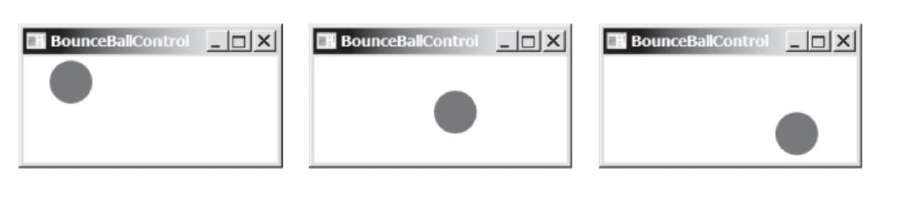 | |||||||||||
| 2656760 | Programming | N/A | Click Here | 142 | 69.747 | Edit | Delete | Edit Subcategory | Updated Duplicity Skip | Mark as MCQ | Update and Approve | | Feb 15, 2024 | Computer Science | Image Based | Without Feedback | |
| Unlicensed copy of the Froala Editor. Use it legally by purchasing a license.  | |||||||||||
| 2656884 | Programming | N/A | Click Here | 56 | 50.32 | Edit | Delete | Edit Subcategory | Updated Duplicity Skip | Mark as MCQ | Update and Approve | | Feb 15, 2024 | Computer Science | Image Based | Without Feedback | |
| Unlicensed copy of the Froala Editor. Use it legally by purchasing a license.  | |||||||||||
| 2657074 | Programming | N/A | Click Here | 26 | 62.37 | Edit | Delete | Edit Subcategory | Updated Duplicity Skip | Mark as MCQ | Update and Approve | | Feb 15, 2024 | Computer Science | Image Based | Without Feedback | |
| | |||||||||||
BounceBallControl BounceBallControl O BounceBallControl
Step by Step Solution
There are 3 Steps involved in it

Get step-by-step solutions from verified subject matter experts
 Study Help