







Question: Step 1: Using the reference table below, state which category you are interested in and explain which tool from that categom feel is the
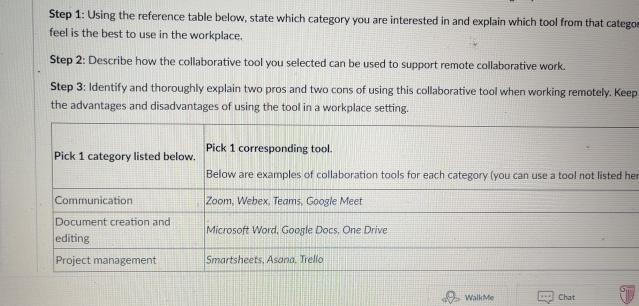
Step 1: Using the reference table below, state which category you are interested in and explain which tool from that categom feel is the best to use in the workplace. Step 2: Describe how the collaborative tool you selected can be used to support remote collaborative work. Step 3: Identify and thoroughly explain two pros and two cons of using this collaborative tool when working remotely. Keep the advantages and disadvantages of using the tool in a workplace setting. Pick 1 category listed below. Communication Document creation and editing Project management Pick 1 corresponding tool. Below are examples of collaboration tools for each category (you can use a tool not listed her Zoom, Webex, Teams, Google Meet Microsoft Word, Google Docs, One Drive Smartsheets, Asana. Trello WalkMe Chat P
Step by Step Solution
There are 3 Steps involved in it
Step 1 Selecting a Category and ToolFor this exercise I am interested in the Project management category From the tools listed under this category I b... View full answer

Get step-by-step solutions from verified subject matter experts
 Study Help