







Question: Step 4: Now go back to the Facility tab and click on the EntPart1 entity. Set the Initial Sequence property to the SequencePart1 under the
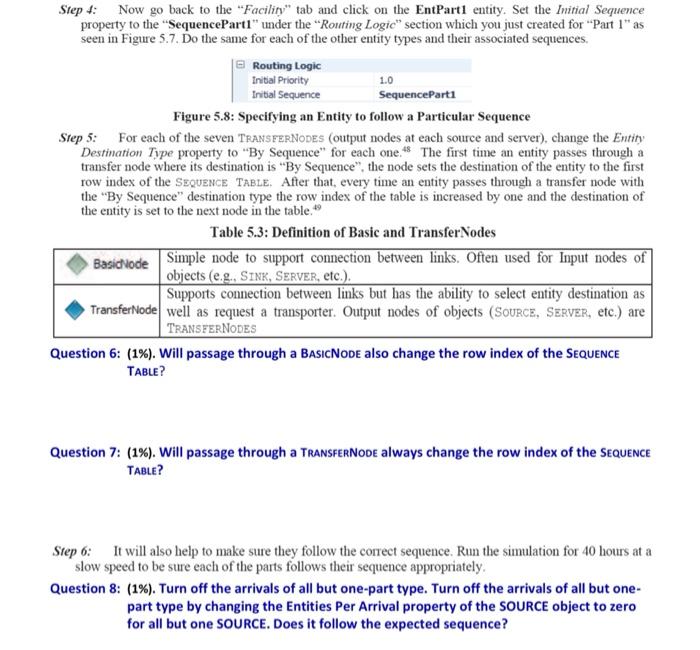
Step 4: Now go back to the "Facility" tab and click on the EntPart1 entity. Set the Initial Sequence property to the "SequencePart1" under the Routing Logic" section which you just created for "Part 1" as seen in Figure 5.7. Do the same for each of the other entity types and their associated sequences. Routing Logic Initial Priority 1.0 Initial Sequence SequenceParts Figure 5.8: Specifying an Entity to follow a Particular Sequence Step 5: For each of the seven TRANSFERNODES (output nodes at each source and server), change the Entity Destination Type property to "By Sequence" for each one48 The first time an entity passes through a transfer node where its destination is "By Sequence" the node sets the destination of the entity to the first row index of the SEQUENCE TABLE. After that, every time an entity passes through a transfer node with the "By Sequence" destination type the row index of the table is increased by one and the destination of the entity is set to the next node in the table 49 Table 5.3: Definition of Basic and Transfer Nodes Basichode Simple node to support connection between links. Often used for Input nodes of objects (e.g., SINK, SERVER, etc.). Supports connection between links but has the ability to select entity destination as TransferNode well as request a transporter. Output nodes of objects (SOURCE, SERVER, etc.) are TRANSFERNODES Question 6: (1%). Will passage through a BASICNODE also change the row index of the SEQUENCE TABLE? Question 7: (1%). Will passage through a TRANSFERNODE always change the row index of the SEQUENCE TABLE? Step 6: It will also help to make sure they follow the correct sequence. Run the simulation for 40 hours at a slow speed to be sure each of the parts follows their sequence appropriately. Question 8: (1%). Turn off the arrivals of all but one-part type. Turn off the arrivals of all but one- part type by changing the Entities Per Arrival property of the SOURCE object to zero for all but one SOURCE. Does it follow the expected sequence? Step 4: Now go back to the "Facility" tab and click on the EntPart1 entity. Set the Initial Sequence property to the "SequencePart1" under the Routing Logic" section which you just created for "Part 1" as seen in Figure 5.7. Do the same for each of the other entity types and their associated sequences. Routing Logic Initial Priority 1.0 Initial Sequence SequenceParts Figure 5.8: Specifying an Entity to follow a Particular Sequence Step 5: For each of the seven TRANSFERNODES (output nodes at each source and server), change the Entity Destination Type property to "By Sequence" for each one48 The first time an entity passes through a transfer node where its destination is "By Sequence" the node sets the destination of the entity to the first row index of the SEQUENCE TABLE. After that, every time an entity passes through a transfer node with the "By Sequence" destination type the row index of the table is increased by one and the destination of the entity is set to the next node in the table 49 Table 5.3: Definition of Basic and Transfer Nodes Basichode Simple node to support connection between links. Often used for Input nodes of objects (e.g., SINK, SERVER, etc.). Supports connection between links but has the ability to select entity destination as TransferNode well as request a transporter. Output nodes of objects (SOURCE, SERVER, etc.) are TRANSFERNODES Question 6: (1%). Will passage through a BASICNODE also change the row index of the SEQUENCE TABLE? Question 7: (1%). Will passage through a TRANSFERNODE always change the row index of the SEQUENCE TABLE? Step 6: It will also help to make sure they follow the correct sequence. Run the simulation for 40 hours at a slow speed to be sure each of the parts follows their sequence appropriately. Question 8: (1%). Turn off the arrivals of all but one-part type. Turn off the arrivals of all but one- part type by changing the Entities Per Arrival property of the SOURCE object to zero for all but one SOURCE. Does it follow the expected sequence
Step by Step Solution
There are 3 Steps involved in it

Get step-by-step solutions from verified subject matter experts
 Study Help