







Question: Step 8. Copy a Directory within the Same Directory or Copy a Directory to Another Existed Directory To copy a directory and its contents to
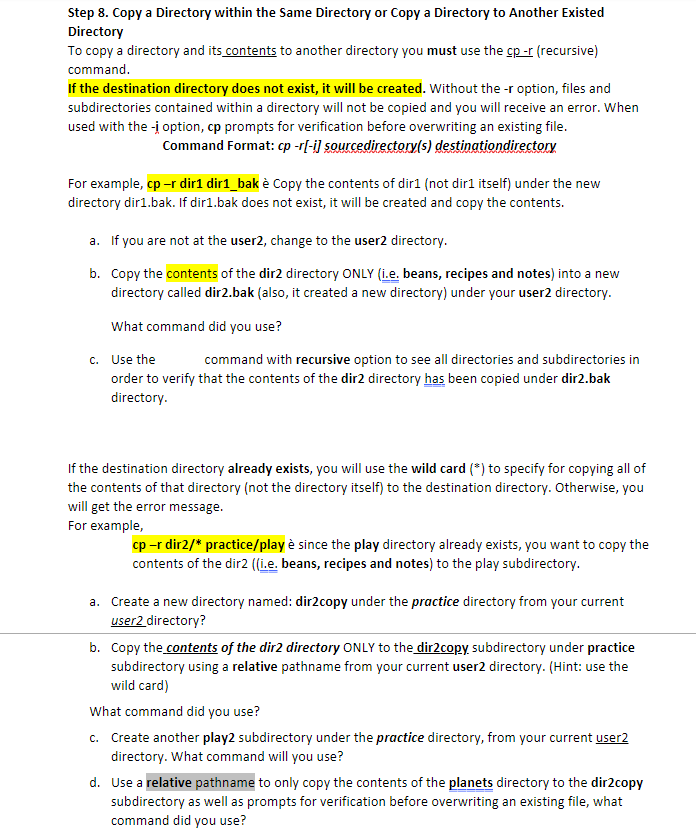
Step 8. Copy a Directory within the Same Directory or Copy a Directory to Another Existed Directory To copy a directory and its contents to another directory you must use the cp-r (recursive) command. If the destination directory does not exist, it will be created. Without the -r option, files and subdirectories contained within a directory will not be copied and you will receive an error. When used with the -i option, cp prompts for verification before overwriting an existing file. Command Format: cp -r[-i) sourcedirectory(s) destinationdirectory For example, cp -r diri dir1_bak Copy the contents of dir1 (not diri itself) under the new directory diri.bak. If dir1.bak does not exist, it will be created and copy the contents. a. If you are not at the user2, change to the user2 directory. b. Copy the contents of the dir2 directory ONLY (1.e. beans, recipes and notes) into a new directory called dir2.bak (also, it created a new directory) under your user2 directory. What command did you use? C. Use the command with recursive option to see all directories and subdirectories in order to verify that the contents of the dir2 directory has been copied under dir2.bak directory. If the destination directory already exists, you will use the wild card (*) to specify for copying all of the contents of that directory (not the directory itself) to the destination directory. Otherwise, you will get the error message. For example, cp r dir2/* practice/play since the play directory already exists, you want to copy the contents of the dir2 ((i.e. beans, recipes and notes) to the play subdirectory. a. Create a new directory named: dir2copy under the practice directory from your current user2 directory? b. Copy the contents of the dire directory ONLY to the dir2copy, subdirectory under practice subdirectory using a relative pathname from your current user2 directory. (Hint: use the wild card) What command did you use? C. Create another play2 subdirectory under the practice directory, from your current user2 directory. What command will you use? d. Use a relative pathname to only copy the contents of the planets directory to the dir2copy subdirectory as well as prompts for verification before overwriting an existing file, what command did you use
Step by Step Solution
There are 3 Steps involved in it

Get step-by-step solutions from verified subject matter experts
 Study Help