





Question: Step Instructions Points Possible 1 Start Excel. Download and open the file named 0 Student_Excel_02_SA_Debt_HW.xIsx file. Save the file as Last First_Excel_02_SA_Debt_HW. 2 Add the
Step Instructions Points Possible 1 Start Excel.
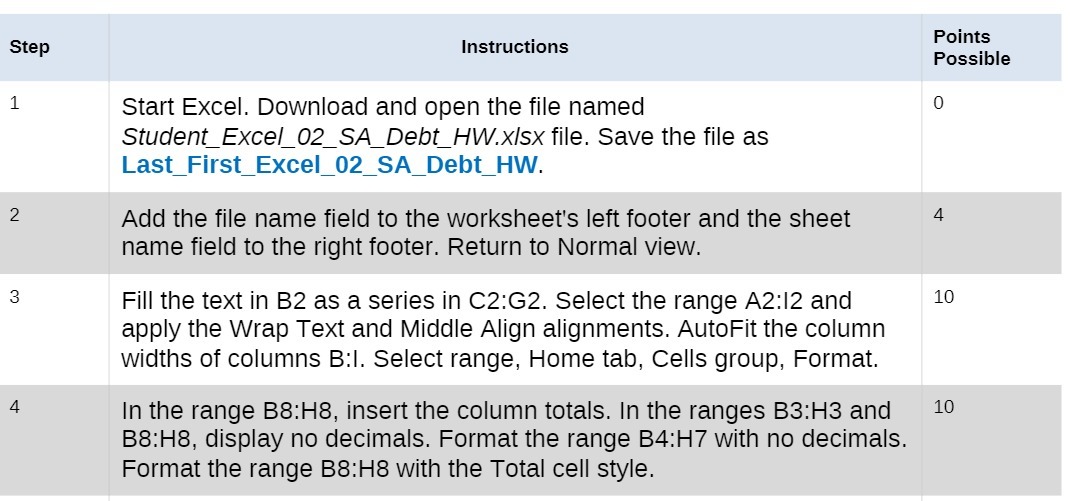
Step Instructions Points Possible 1 Start Excel. Download and open the file named 0 Student_Excel_02_SA_Debt_HW.xIsx file. Save the file as Last First_Excel_02_SA_Debt_HW. 2 Add the file name field to the worksheet's left footer and the sheet 4 name field to the right footer. Return to Normal view. Fill the text in B2 as a series in C2:G2. Select the range A2:12 and 10 apply the Wrap Text and Middle Align alignments. AutoFit the column widths of columns B:I. Select range, Home tab, Cells group, Format. 4 In the range B8:H8, insert the column totals. In the ranges B3:H3 and 10 B8:H8, display no decimals. Format the range B4:H7 with no decimals. Format the range B8:H8 with the Total cell style

Step by Step Solution

There are 3 Steps involved in it

1 Expert Approved Answer
Step: 1 Unlock blur-text-image

Question Has Been Solved by an Expert!

Get step-by-step solutions from verified subject matter experts

Step: 2 Unlock
Step: 3 Unlock

Students Have Also Explored These Related Accounting Questions!