







Question: Step Instructions Points Possible Start Excel. Open the downloaded Excel file named 1 exploring_e05_grader_al_Expenses.x/sx. Save the workbook as exploring_e05_grader_al_Expenses_LastFirst, replacing LastFirst with your 0.000 own
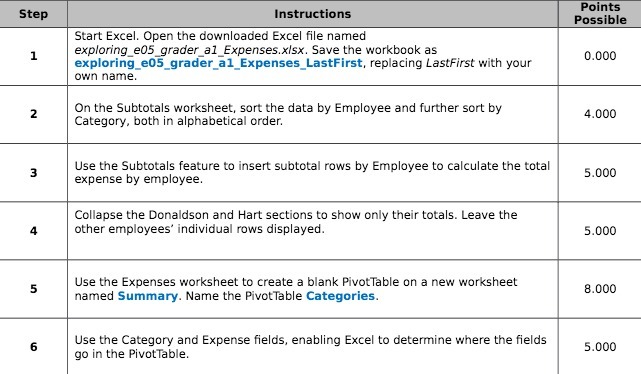
Step Instructions Points Possible Start Excel. Open the downloaded Excel file named 1 exploring_e05_grader_al_Expenses.x/sx. Save the workbook as exploring_e05_grader_al_Expenses_LastFirst, replacing LastFirst with your 0.000 own name. 2 On the Subtotals worksheet, sort the data by Employee and further sort by Category, both in alphabetical order. 4.000 3 Use the Subtotals feature to insert subtotal rows by Employee to calculate the total expense by employee. 5.000 Collapse the Donaldson and Hart sections to show only their totals. Leave the 4 other employees' individual rows displayed. 5.000 5 Use the Expenses worksheet to create a blank PivotTable on a new worksheet named Summary. Name the PivotTable Categories. 8.000 6 Use the Category and Expense fields, enabling Excel to determine where the fields go in the PivotTable. 5.000
Step by Step Solution
There are 3 Steps involved in it

Get step-by-step solutions from verified subject matter experts
 Study Help