







Question: stime & utime: Time that a process has been scheduled Information in kernel/user mode Using bash Using the files stored at /proc write a program/script
stime & utime: Time that a process has been scheduled Information in kernel/user mode
Using bash
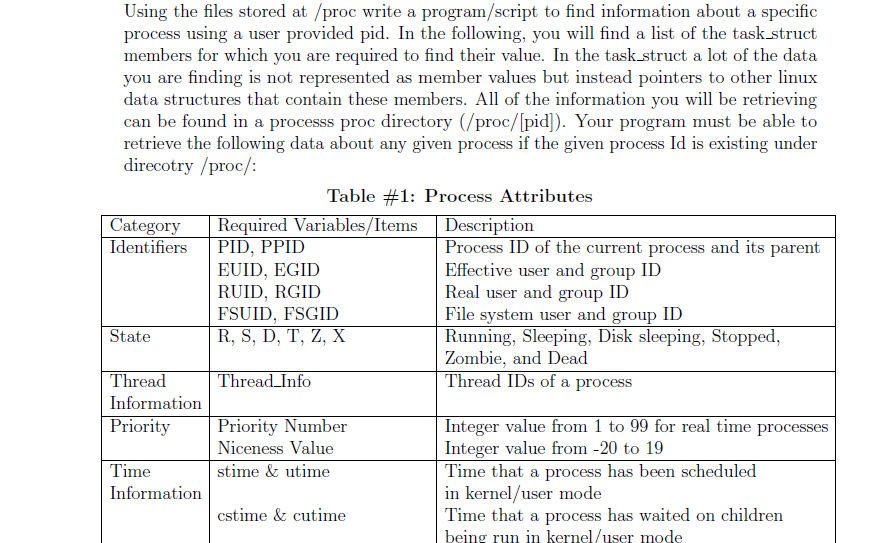
Using the files stored at /proc write a program/script to find information about a specific process using a user provided pid. In the following, you will find a list of the task struct members for which you are required to find their value. In the task struct a lot of the data you are finding is not represented as member values but instead pointers to other linux data structures that contain these members. All of the information you will be retrieving can be found in a processs proc directory (/proc/Ipid). Your program must be able to retrieve the following data about any given process if the given process Id is existing under direcotry /proc Table #1: Process Attributes Category Required Variables Items Description Identifiers ID, PPID Process ID of the current process and its parent EUID, EGID Effective user and group ID RUID, RGID Real user and group ID FSUID, FSGID File system user and group ID State R, S, D, T. Z. X Running, Sleeping, Disk sleeping, Stopped, Zombie, and Dead Thread IDs of a process Information Priority Priority Number Integer value from 1 to 99 for real time processes Integer value from -20 to 19 Niceness Value Time that a process has been scheduled Time stime & ultime Information in kernel user mode Time that a process has waited on children cstime & cutime being run in kernel /user mode
Step by Step Solution
There are 3 Steps involved in it

Get step-by-step solutions from verified subject matter experts
 Study Help