







Question: Studying Visual Basic Step 1: Program Description In this project, you will create a program that will provide the user the option of calculating the
Studying Visual Basic
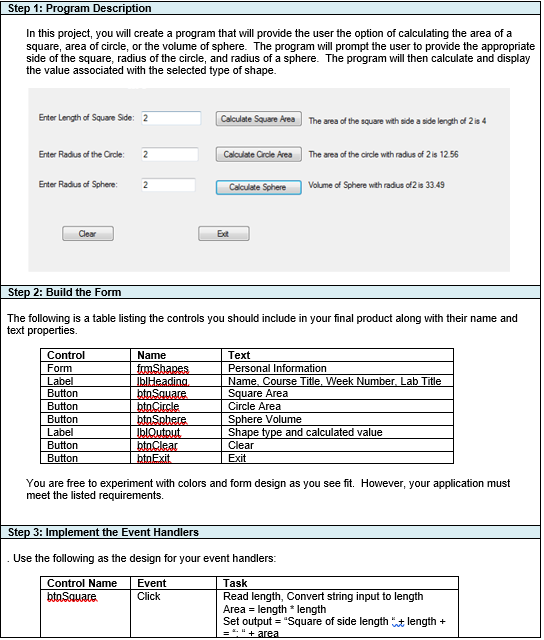
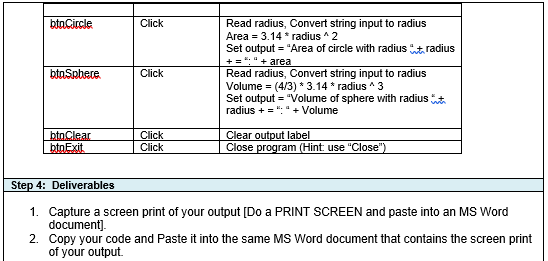
Step 1: Program Description In this project, you will create a program that will provide the user the option of calculating the area of a square, area of circle, or the volume of sphere. The program will prompt the user to provide the appropriate side of the square, radius of the circle, and radius of a sphere. The program will then calculate and display the value associated with the selected type of shape. Enter Length of Square Side 2 Calculate Square Area The area of the square with side aside length of 2 is 4 Enter Radius of the Crole: 2 Calculate Crde Area The area of the circle with radius of 2 is 1256 Enter Radius of Sphere 2 Calculate Sphere Volume of Sphere with radus df2is33.49 Clear Ext Step 2: Build the Form The following is a table listing the controls you should include in your final product along with their name and text properties Control Form Label Button Button Button Label Button Button Name fomShapes blHeading btoSquare bto Circle btoSphere IblOutput btoClear bto Exit Text Personal Information Name, Course Title. Week Number. Lab Title Square Area Circle Area Sphere Volume Shape type and calculated value Clear Exit You are free to experiment with colors and form design as you see fit. However, your application must meet the listed requirements. Step 3: Implement the Event Handlers Use the following as the design for your event handlers: Control Name bta Square Event Click Task Read length, Convert string input to length Area = length * length Set output = "Square of side length at length + = " + area bto Circle Click Read radius, Convert string input to radius Area = 3.14 * radius ^2 Set output = "Area of circle with radius radius + = "" + area Read radius, Convert string input to radius Volume = (4/3) * 3.14 * radius^3 Set output = "Volume of sphere with radius radius + = " + Volume btoSphere Click btoClear bto Exit Click Click Clear output label Close program (Hint: use "Close") Step 4: Deliverables 1. Capture a screen print of your output [Do a PRINT SCREEN and paste into an MS Word document] 2. Copy your code and paste it into the same MS Word document that contains the screen print of your output Step 1: Program Description In this project, you will create a program that will provide the user the option of calculating the area of a square, area of circle, or the volume of sphere. The program will prompt the user to provide the appropriate side of the square, radius of the circle, and radius of a sphere. The program will then calculate and display the value associated with the selected type of shape. Enter Length of Square Side 2 Calculate Square Area The area of the square with side aside length of 2 is 4 Enter Radius of the Crole: 2 Calculate Crde Area The area of the circle with radius of 2 is 1256 Enter Radius of Sphere 2 Calculate Sphere Volume of Sphere with radus df2is33.49 Clear Ext Step 2: Build the Form The following is a table listing the controls you should include in your final product along with their name and text properties Control Form Label Button Button Button Label Button Button Name fomShapes blHeading btoSquare bto Circle btoSphere IblOutput btoClear bto Exit Text Personal Information Name, Course Title. Week Number. Lab Title Square Area Circle Area Sphere Volume Shape type and calculated value Clear Exit You are free to experiment with colors and form design as you see fit. However, your application must meet the listed requirements. Step 3: Implement the Event Handlers Use the following as the design for your event handlers: Control Name bta Square Event Click Task Read length, Convert string input to length Area = length * length Set output = "Square of side length at length + = " + area bto Circle Click Read radius, Convert string input to radius Area = 3.14 * radius ^2 Set output = "Area of circle with radius radius + = "" + area Read radius, Convert string input to radius Volume = (4/3) * 3.14 * radius^3 Set output = "Volume of sphere with radius radius + = " + Volume btoSphere Click btoClear bto Exit Click Click Clear output label Close program (Hint: use "Close") Step 4: Deliverables 1. Capture a screen print of your output [Do a PRINT SCREEN and paste into an MS Word document] 2. Copy your code and paste it into the same MS Word document that contains the screen print of your output
Step by Step Solution
There are 3 Steps involved in it

Get step-by-step solutions from verified subject matter experts
 Study Help