







Question: Subject Write a complete webpage with HTML and embedded JavaScript code. At beginning, this page contains one unordered list at the top and two button
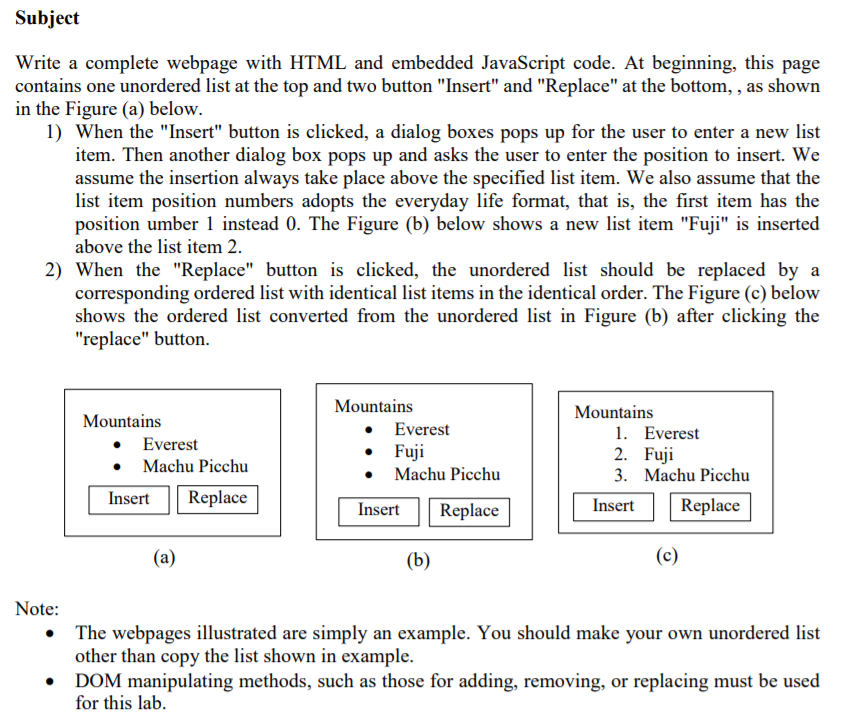
Subject Write a complete webpage with HTML and embedded JavaScript code. At beginning, this page contains one unordered list at the top and two button "Insert" and "Replace" at the bottom, , as shown in the Figure (a) below. 1) When the "Insert" button is clicked, a dialog boxes pops up for the user to enter a new list item. Then another dialog box pops up and asks the user to enter the position to insert. We assume the insertion always take place above the specified list item. We also assume that the list item position numbers adopts the everyday life format, that is, the first item has the position umber 1 instead 0. The Figure (b) below shows a new list item "Fuji" is inserted above the list item 2. 2) When the "Replace" button is clicked, the unordered list should be replaced by a corresponding ordered list with identical list items in the identical order. The Figure (c) below shows the ordered list converted from the unordered list in Figure (b) after clicking the "replace" button. Mountains Mountains Mountains Everest Everest Machu Picchu 1. Everest 2. Fuji 3. Machu Picchu Fuji Machu Picchu Insert Replace Replace Insert Replace Insert Note: The webpages illustrated are simply an example. You should make your own unordered list other than copy the list shown in example. . DOM manipulating methods, such as those for adding, removing, or replacing must be used for this lalb
Step by Step Solution
There are 3 Steps involved in it

Get step-by-step solutions from verified subject matter experts
 Study Help