







Question: Submit to Canvas (3) function files. You will need to assign variables and comment appropriately so that the when you type the help for the
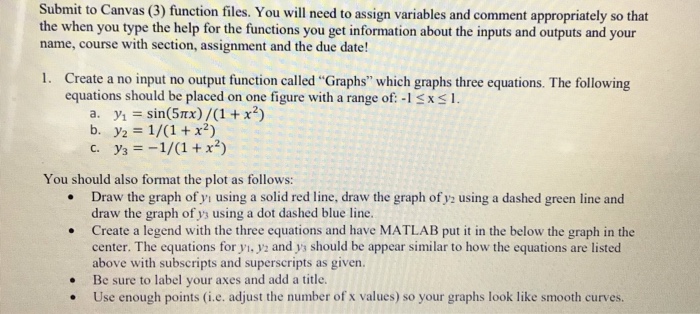
Submit to Canvas (3) function files. You will need to assign variables and comment appropriately so that the when you type the help for the functions you get information about the inputs and outputs and your name, course with section, assignment and the due date! 1. Create a no input no output function called "Graphs" which graphs three equations. The following equations should be placed on one figure with a range of:-lxs1. a. y1 sin(5x)/(1x2) b. y2 1/(1 x2) . --1/(1+12) You should also format the plot as follows: Draw the graph of yi using a solid red line, draw the graph of y2 using a dashed green line and draw the graph of ys using a dot dashed blue line. Create a legend with the three equations and have MATLAB put it in the below the graph in the center. The equations for y,y2 and y3 should be appear similar to how the equations are listed above with subscripts and superscripts as given. . .Be sure to label your axes and add a title. . Use enough points (i.e. adjust the number of x values) so your graphs look like smooth curves
Step by Step Solution
There are 3 Steps involved in it

Get step-by-step solutions from verified subject matter experts
 Study Help