







Question: Using MATLAB ENGR 1221 Application 8: Loan Calculator GUI Designed to test skills with GULS, user-defined functions. In this exercise you will create a Gul
Using MATLAB
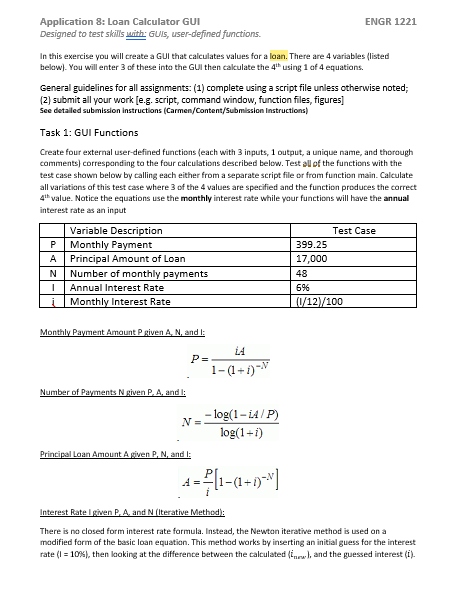
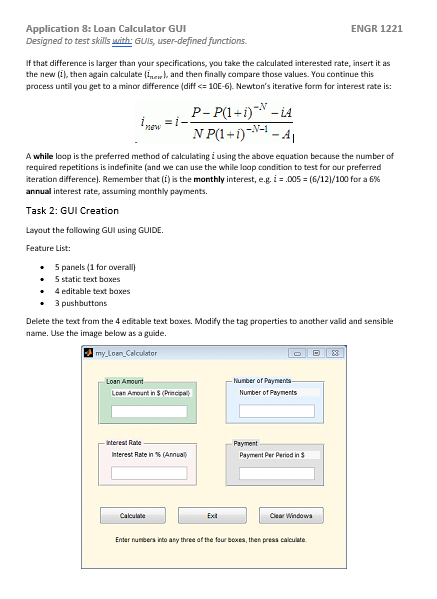
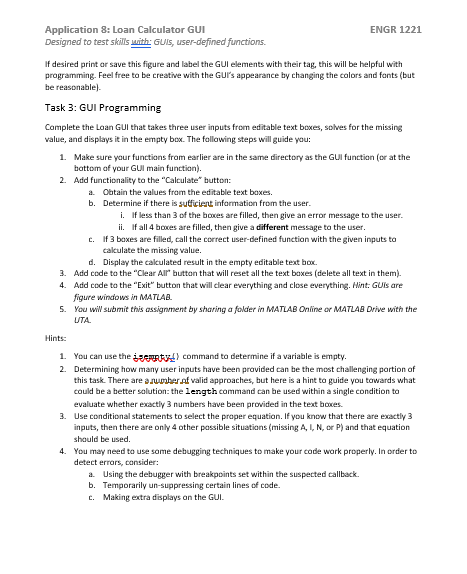
ENGR 1221 Application 8: Loan Calculator GUI Designed to test skills with GULS, user-defined functions. In this exercise you will create a Gul that calculates values for a loan. There are 4 variables listed below. You will enter 3 of these into the Gul then calculate the 4 using 1 of 4 equations. General guidelines for all assignments: (1) complete using a script file unless otherwise noted, (2) submit all your work [eg script, command window, function files, figures] See detailed submission Instructions (Carmen/Content Submission Instructions Task 1: GUI Functions Create four external user-defined functions (each with 3 inputs, 1 output, a unique name, and thorough comments) corresponding to the four calculations described below. Test all of the functions with the test case shown below by calling each either from a separate script file or from function main. Calculate all variations of this test case where 3 of the 4 values are specified and the function produces the correct 4 value. Notice the equations use the monthly interest rate while your functions will have the annual interest rate as an input Variable Description P Monthly Payment Test Case 399.25 17,000 48 A Principal Amount of Loan N Number of monthly payments Annual Interest Rate Li Monthly Interest Rate 696 10/12/100 Monthly Payment Amount P given A, N, and I: P = 1- (1-1) - Number of Payments N given P. A, and i: --log(1-LA/P) log(1-1) Principal Loan Amount A given P. N. and is 4 =?[1-(1-1)-1] Interest Rateve PA and Niterative Method There is no closed for interest rate formula. Instead, the Newton iterative method is used on a modified form of the basic loan equation. This method works by inserting an initial guess for the interest rate (1 = 10%), then looking at the difference between the calculated in and the guessed interest (1) ENGR 1221 Application 8: Loan Calculator GUI Designed to test skills with GULS, user-defined functions. If that difference is larger than your specifications, you take the calculated interested rate, insert it as the new (il, then again calculate and then finally compare those values. You continue this process until you get to a minor difference (diffc 10E-61. Newton's iterative form for interest rate is: T =- : P-P(1 - i)* - 14 N P(1+1)--- A while loep is the preferred method of calculating i using the above equation because the number of required repetitions is indefinite and we can use the while loop condition to test for our preferred iteration difference). Remember that (i) is the monthly interest, e.g. i - .005 = (6/121/100 for a 6% annual interest rate, assuming monthly payments. Task 2: GUI Creation Layout the following Gul using GUIDE. Feature List: Spanels (1 for overall 5 static text boxes 4 editable text boxes 3 pushbuttons Delete the text from the 4 editable text boxes. Modify the tag properties to another valid and sensible name. Use the image below as a guide. my Loan Calculator Loan Amount on Amount in Number of Payments Number of Payments Principal interest Rate Interest Rate in Annual Payment Per Pered in Clear Windows En estate of the four boxes, then presse ENGR 1221 Application 8: Loan Calculator GUI Designed to test skills with GUs, user-defined functions. If desired print or save this figure and label the GUI elements with their tag. this will be helpful with programming. Feel free to be creative with the Gur's appearance by changing the colors and fonts (but be reasonable Task 3: GUI Programming Complete the Loan GUI that takes three user inputs from editable text boxes, solves for the missing value, and displays it in the empty box. The following steps will guide you 1. Make sure your functions from earlier are in the same directory as the Gulfunction (or at the bottom of your Gul main function). 2. Add functionality to the "Calculate"button: a. Obtain the values from the editable text boxes. b. Determine if there is suficient information from the user. i. If less than 3 of the boxes are filled, then give an error message to the user. ii. If all 4 boxes are filled, then give a different message to the user. c. If 3 boxes are filled, call the correct user-defined function with the given inputs to calculate the missing value. d. Display the calculated result in the empty editable text book 3. Add code to the "Clear Air" button that will reset all the text boxes (delete all text in them). 4. Add code to the "Exit" button that will clear everything and close everything. Hint: GUIs are figure windows in MATLAB 5. You wiw submit this assignment by sharing a folder in MATLAB Online or MATLAB Drive with the UTA Hints 1. You can use the sent command to determine if a variable is empty. 2. Determining how many user inputs have been provided can be the most challenging portion of this task. There are a valid approaches, but here is a hint to guide you towards what could be a better solution: the length command can be used within a single condition to evaluate whether exactly 3 numbers have been provided in the text boxes 3. Use conditional statements to select the proper equation. If you know that there are exactly inputs, then there are only 4 other possible situations (missing ALN or P) and that equation should be used 4. You may need to use some debugging techniques to make your code work properly. In order to detect errors, consider: a Using the debugger with breakpoints set within the suspected callback b. Temporarilyun-suppressing certain lines of code. c. Making extra displays on the GUL ENGR 1221 Application 8: Loan Calculator GUI Designed to test skills with GULS, user-defined functions. In this exercise you will create a Gul that calculates values for a loan. There are 4 variables listed below. You will enter 3 of these into the Gul then calculate the 4 using 1 of 4 equations. General guidelines for all assignments: (1) complete using a script file unless otherwise noted, (2) submit all your work [eg script, command window, function files, figures] See detailed submission Instructions (Carmen/Content Submission Instructions Task 1: GUI Functions Create four external user-defined functions (each with 3 inputs, 1 output, a unique name, and thorough comments) corresponding to the four calculations described below. Test all of the functions with the test case shown below by calling each either from a separate script file or from function main. Calculate all variations of this test case where 3 of the 4 values are specified and the function produces the correct 4 value. Notice the equations use the monthly interest rate while your functions will have the annual interest rate as an input Variable Description P Monthly Payment Test Case 399.25 17,000 48 A Principal Amount of Loan N Number of monthly payments Annual Interest Rate Li Monthly Interest Rate 696 10/12/100 Monthly Payment Amount P given A, N, and I: P = 1- (1-1) - Number of Payments N given P. A, and i: --log(1-LA/P) log(1-1) Principal Loan Amount A given P. N. and is 4 =?[1-(1-1)-1] Interest Rateve PA and Niterative Method There is no closed for interest rate formula. Instead, the Newton iterative method is used on a modified form of the basic loan equation. This method works by inserting an initial guess for the interest rate (1 = 10%), then looking at the difference between the calculated in and the guessed interest (1) ENGR 1221 Application 8: Loan Calculator GUI Designed to test skills with GULS, user-defined functions. If that difference is larger than your specifications, you take the calculated interested rate, insert it as the new (il, then again calculate and then finally compare those values. You continue this process until you get to a minor difference (diffc 10E-61. Newton's iterative form for interest rate is: T =- : P-P(1 - i)* - 14 N P(1+1)--- A while loep is the preferred method of calculating i using the above equation because the number of required repetitions is indefinite and we can use the while loop condition to test for our preferred iteration difference). Remember that (i) is the monthly interest, e.g. i - .005 = (6/121/100 for a 6% annual interest rate, assuming monthly payments. Task 2: GUI Creation Layout the following Gul using GUIDE. Feature List: Spanels (1 for overall 5 static text boxes 4 editable text boxes 3 pushbuttons Delete the text from the 4 editable text boxes. Modify the tag properties to another valid and sensible name. Use the image below as a guide. my Loan Calculator Loan Amount on Amount in Number of Payments Number of Payments Principal interest Rate Interest Rate in Annual Payment Per Pered in Clear Windows En estate of the four boxes, then presse ENGR 1221 Application 8: Loan Calculator GUI Designed to test skills with GUs, user-defined functions. If desired print or save this figure and label the GUI elements with their tag. this will be helpful with programming. Feel free to be creative with the Gur's appearance by changing the colors and fonts (but be reasonable Task 3: GUI Programming Complete the Loan GUI that takes three user inputs from editable text boxes, solves for the missing value, and displays it in the empty box. The following steps will guide you 1. Make sure your functions from earlier are in the same directory as the Gulfunction (or at the bottom of your Gul main function). 2. Add functionality to the "Calculate"button: a. Obtain the values from the editable text boxes. b. Determine if there is suficient information from the user. i. If less than 3 of the boxes are filled, then give an error message to the user. ii. If all 4 boxes are filled, then give a different message to the user. c. If 3 boxes are filled, call the correct user-defined function with the given inputs to calculate the missing value. d. Display the calculated result in the empty editable text book 3. Add code to the "Clear Air" button that will reset all the text boxes (delete all text in them). 4. Add code to the "Exit" button that will clear everything and close everything. Hint: GUIs are figure windows in MATLAB 5. You wiw submit this assignment by sharing a folder in MATLAB Online or MATLAB Drive with the UTA Hints 1. You can use the sent command to determine if a variable is empty. 2. Determining how many user inputs have been provided can be the most challenging portion of this task. There are a valid approaches, but here is a hint to guide you towards what could be a better solution: the length command can be used within a single condition to evaluate whether exactly 3 numbers have been provided in the text boxes 3. Use conditional statements to select the proper equation. If you know that there are exactly inputs, then there are only 4 other possible situations (missing ALN or P) and that equation should be used 4. You may need to use some debugging techniques to make your code work properly. In order to detect errors, consider: a Using the debugger with breakpoints set within the suspected callback b. Temporarilyun-suppressing certain lines of code. c. Making extra displays on the GUL
Step by Step Solution
There are 3 Steps involved in it

Get step-by-step solutions from verified subject matter experts
 Study Help