







Question: Suppose you make a square selection on an image using the Rectangular Marquee Tool. You then click the Intersect mode button and then change to
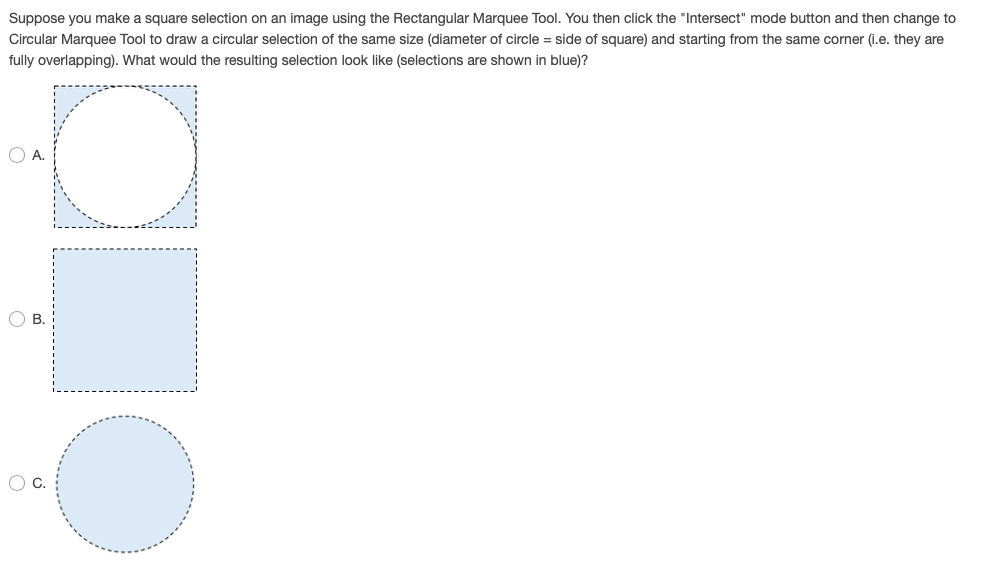
Suppose you make a square selection on an image using the Rectangular Marquee Tool. You then click the "Intersect" mode button and then change to Circular Marquee Tool to draw a circular selection of the same size (diameter of circle = side of square) and starting from the same corner (i.e. they are fully overlapping). What would the resulting selection look like (selections are shown in blue)? I--- --- OB. OC
Step by Step Solution
There are 3 Steps involved in it
1 Expert Approved Answer
Step: 1 Unlock

Question Has Been Solved by an Expert!
Get step-by-step solutions from verified subject matter experts
Step: 2 Unlock
Step: 3 Unlock
 Study Help