







Question: Switch Names and Surnames Write a function SwitchNames that takes a n x 1 string array, each cell consists of a name and a surname,
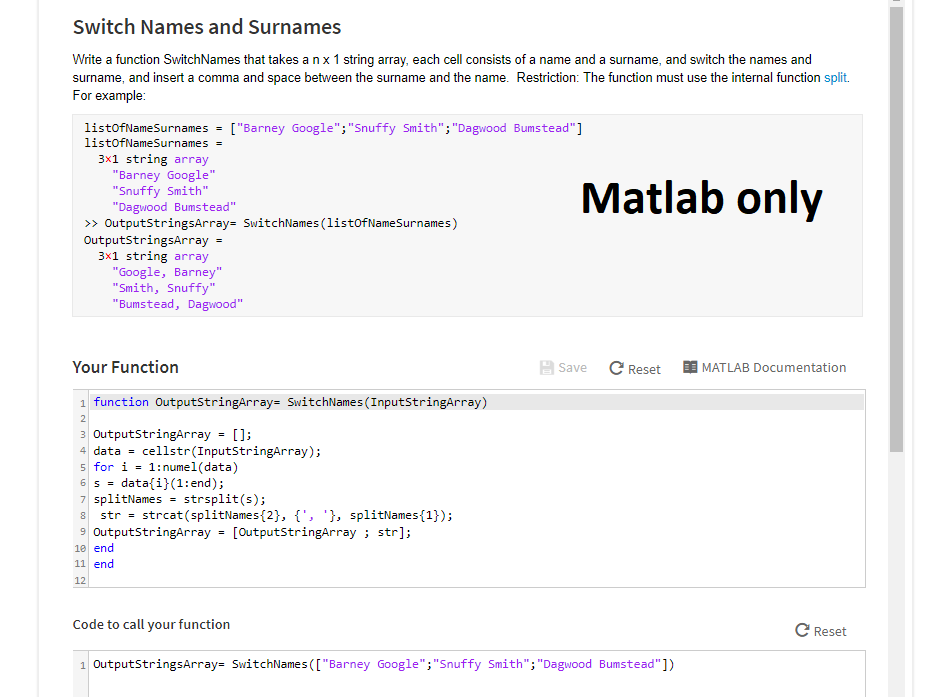
Switch Names and Surnames Write a function SwitchNames that takes a n x 1 string array, each cell consists of a name and a surname, and switch the names and surname, and insert a comma and space between the surname and the name. Restriction: The function must use the internal function split. For example listofNameSurnames listofNameSurnames ["Barney Google", "Snuffy Smith", "Dagwood Bumstead"] 3x1 string array "Barney Google" Snuffy Smith "Dagwood Bumstead" Matlab only > OutputStringsArray- SwitchNames (listofNameSurnames) OutputstringsArray 3x1 string array Google, Barney" "Smith, Snuffy "Bumstead, Dagwood" Your Function Save C Reset MATLAB Documentation 1 function OutputStringArray- SwitchNames (InputstringArray) 3OutputstringArray []; 4 data cellstr(InputstringArray); s for i -1:numel(data) 65 = data(i)(1:end); 7 splitNames strsplit(s); 8 str strcat (splitNames(2), {', '), splitNames(1)); 9 OutputstringArray = [OutputStringArray ; str]; 1e end 11 end 12 Code to call your function C Reset 1 OutputStringsArray- SwitchNames([ "Barney Google";"Snuffy Smith";"Dagwood Bumstead"])
Step by Step Solution
There are 3 Steps involved in it

Get step-by-step solutions from verified subject matter experts
 Study Help