







Question: System Animation Time Event Now Event Calendar Process Description Event Event Entity # Time Type Entity 2 arrives and enters 9.98 2) 9.01 Arr
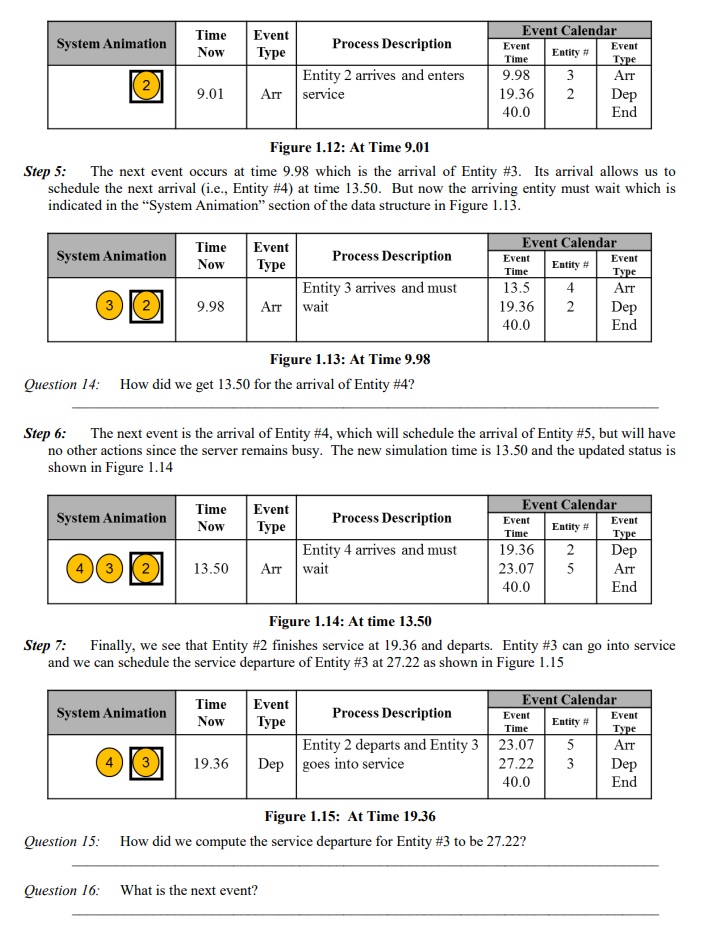
System Animation Time Event Now Event Calendar Process Description Event Event Entity # Time Type Entity 2 arrives and enters 9.98 2) 9.01 Arr service 19.36 40.0 32 3 Arr 2 Dep End Figure 1.12: At Time 9.01 Step 5: The next event occurs at time 9.98 which is the arrival of Entity # 3. Its arrival allows us to schedule the next arrival (i.e., Entity #4) at time 13.50. But now the arriving entity must wait which is indicated in the "System Animation" section of the data structure in Figure 1.13. Time Event Event Calendar System Animation Process Description Event Event Now Entity # Time Type Entity 3 arrives and must 13.5 4 Arr 3 2 9.98 Arr wait 19.36 2 Dep 40.0 End Figure 1.13: At Time 9.98 Question 14: How did we get 13.50 for the arrival of Entity #4? Step 6: The next event is the arrival of Entity #4, which will schedule the arrival of Entity #5, but will have no other actions since the server remains busy. The new simulation time is 13.50 and the updated status is shown in Figure 1.14 System Animation Time Now Event Event Calendar Process Description Event Event Entity # Entity 4 arrives and must Time 19.36 Type 2 Dep 3 2 13.50 Arr wait 23.07 5 Arr 40.0 End Figure 1.14: At time 13.50 Step 7: Finally, we see that Entity #2 finishes service at 19.36 and departs. Entity #3 can go into service and we can schedule the service departure of Entity #3 at 27.22 as shown in Figure 1.15 System Animation Time Now Event Event Calendar Process Description Event Event Entity # Time Type Entity 2 departs and Entity 3 23.07 5 Arr 3 19.36 Dep goes into service 27.22 3 Dep 40.0 End Figure 1.15: At Time 19.36 Question 15: How did we compute the service departure for Entity #3 to be 27.22? Question 16: What is the next event?
Step by Step Solution
There are 3 Steps involved in it

Get step-by-step solutions from verified subject matter experts
 Study Help