







Question: table [ [ 1 , table [ [ Download and open the file named Excel _ BU 0 2 _ PS 2 _
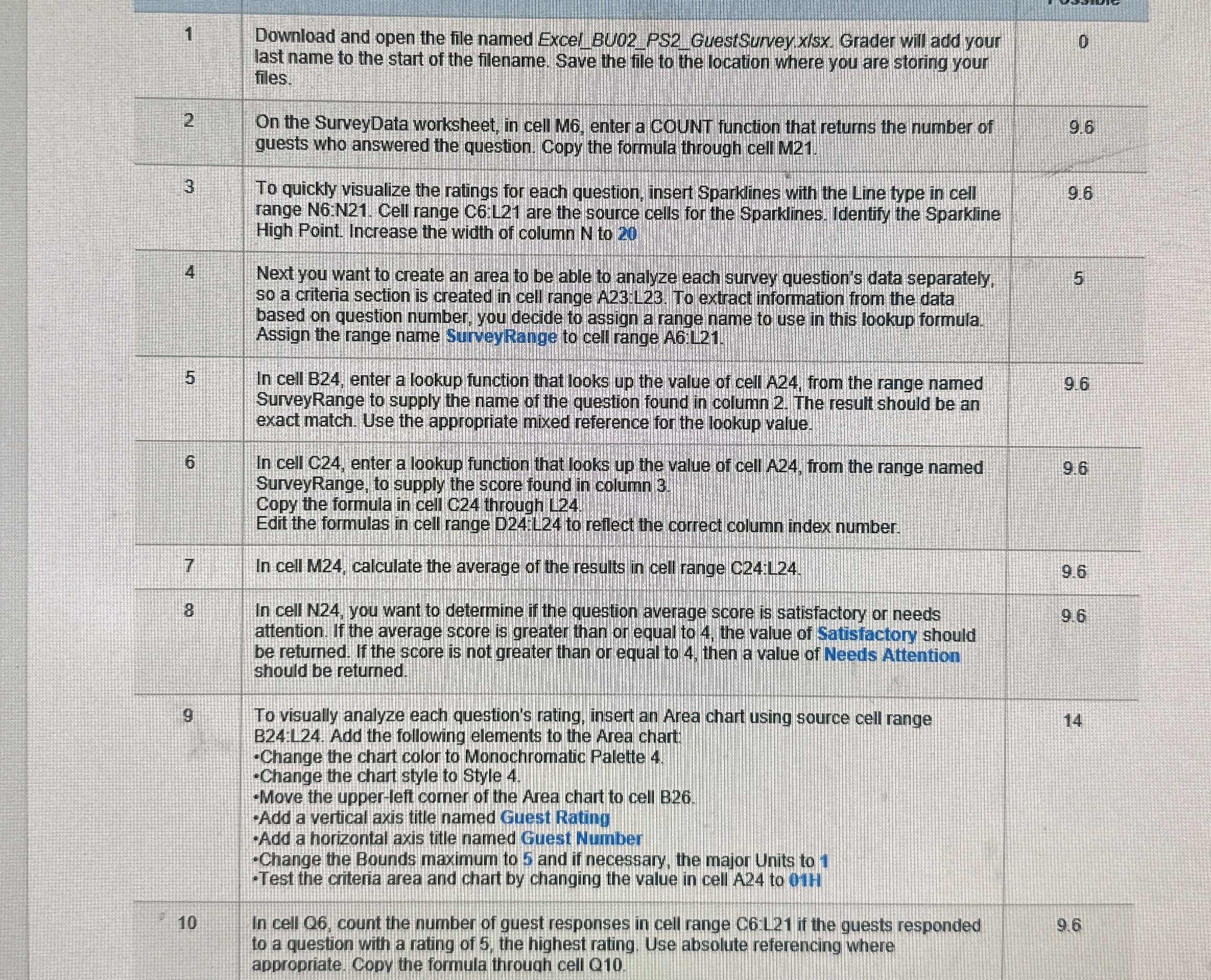
tabletableDownload and open the file named ExcelBUPSGuestSurvey.xlsx Grader will add yourlast name to the start of the filename. Save the file to the location where you are storing yourfilestableOn the SurveyData worksheet, in cell M enter a cOUNT function that returns the number ofguests who answered the question. Copy the formula through cell MtableTo quickly visualize the ratings for each question, insert Sparklines with the Line type in cellrange N:N Cell range C:L are the source cells for the Sparkines. Identify the SparkineHigh Point. Increase the width of column N to tableNext you want to create an area to be able to analyze each survey question's data separately,so a criteria section is created in cell range A To extract information from the databased on question number, you decide to assign a range name to use in this lookup formula.Assign the range name SurveyRange to cell range A:LtableIn cell B enter a lookup function that looks up the value of cell A from the range namedSurveyRange to supply the name of the question found in column The result should be anexact match. Use the appropriate mixed reference for the lookup value.tableIn cell C enter a lookup function that looks up the value of cell A from the range namedSurveyRange to supply the score found in column Copy the formula in cell C through LEdit the formulas in cell range D:L to reflect the correct column index number.In cell M calculate the average of the results in cell range C:LtableIn cell N you want to determine if the question average score is satisfactory or needsattention If the average score is greater than or equal to the value of Satisfactory shouldbe returned. If the score is not greater than or equal to then a value of Needs Attentionshould be returned.tableTo visually analyze each question's rating, insert an Area chart using source cell rangeB:L Add the following elements to the Area chart: Change the chart color to Monochromatic Palette Change the chart style to Style Move the upperleft comer of the Area chart to cell BAdd a vertical axis title named Guest RatingAdd a horizontal axis title named Guest NumberChange the Bounds maximum to and if necessary, the major Units to Test the criteria area and chart by changing the value in cell A to HtableIn cell O count the number of guest responses in cell range CL if the guests respondedto a question with a rating of the highest rating. Use absolute referencing whereappropriate Copy the formula throuqh cell Q
Step by Step Solution
There are 3 Steps involved in it
1 Expert Approved Answer
Step: 1 Unlock

Question Has Been Solved by an Expert!
Get step-by-step solutions from verified subject matter experts
Step: 2 Unlock
Step: 3 Unlock
 Study Help