







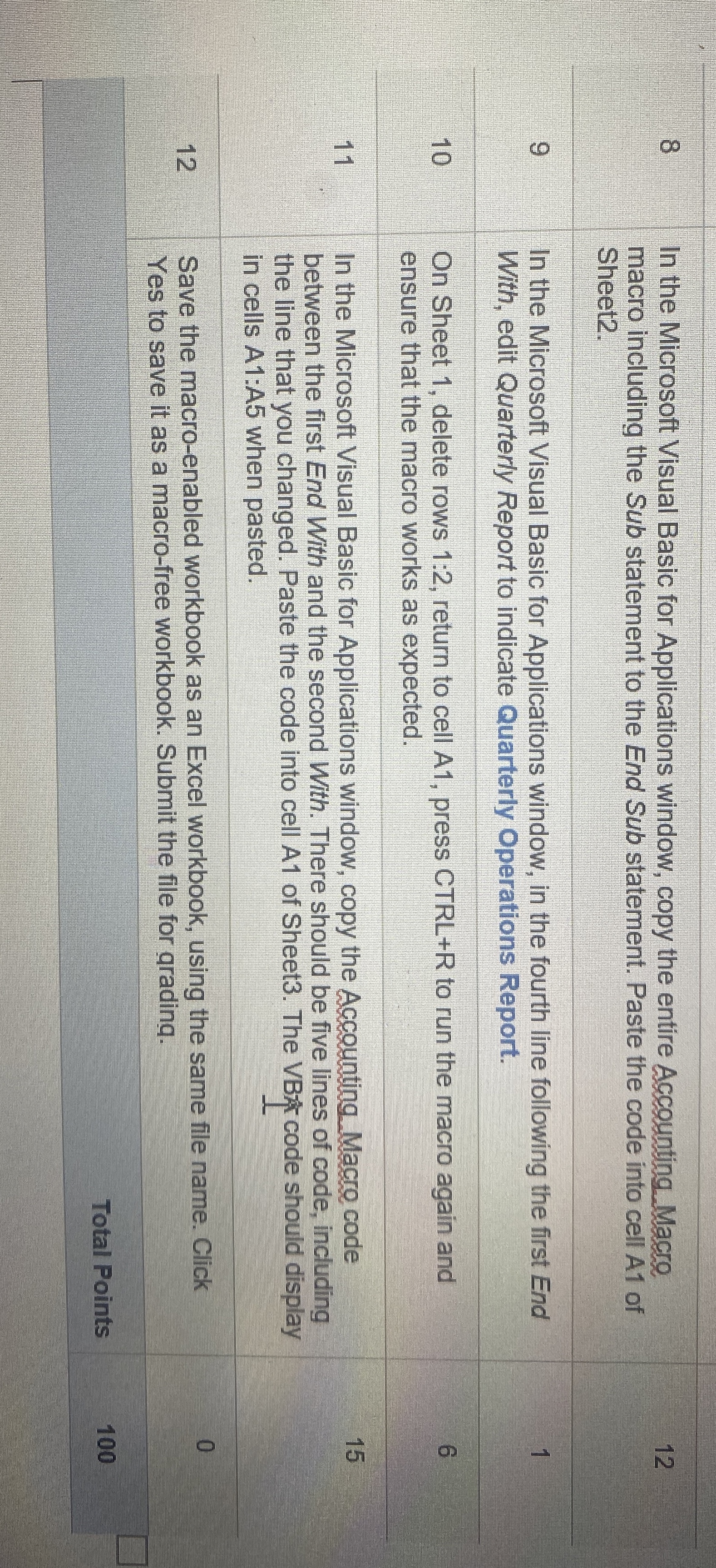
Question: table [ [ 8 , In the Microsoft Visual Basic for Applications window, copy the entire Accounting. Macro macro including the Sub statement to
tableIn the Microsoft Visual Basic for Applications window, copy the entire Accounting. Macro macro including the Sub statement to the End Sub statement. Paste the code into cell A of SheetIn the Microsoft Visual Basic for Applications window, in the fourth line following the first End With, edit Quarterly Report to indicate Quarterly Operations Report.,On Sheet delete rows : return to cell A press CTRLR to run the macro again and ensure that the macro works as expected.,In the Microsoft Visual Basic for Applications window, copy the Accounting Macro code between the first End With and the second With. There should be five lines of code, including the line that you changed. Paste the code into cell A of Sheet The VB code should display in cells A:A when pasted.,Save the macroenabled workbook as an Excel workbook, using the same file name. Click Yes to save it as a macrofree workbook. Submit the file for qrading.,Total Points,
Step by Step Solution
There are 3 Steps involved in it
1 Expert Approved Answer
Step: 1 Unlock

Question Has Been Solved by an Expert!
Get step-by-step solutions from verified subject matter experts
Step: 2 Unlock
Step: 3 Unlock
 Study Help