







Question: Take a reference from primefaces create the classes ParentChildRelation.java which declares the variables or items used with get and set methods, a service class which
Take a reference from primefaces create the classes ParentChildRelation.java which declares the variables or items used with get and set methods, a service class which consists of init() method to input the values for the items inside the ParentChildRelation Class using ArrayList.
write the java code for below parent child relation with hardcoded values and try displaying in datatable list using xhtml, the catch is the child data will be in Map with key pair values and we need to display in same order as first record for that unit appears,
One point of time one table contains listing of only one unit, and columns for one unit remains same.
Explicitly add the values using init() method from a service class..
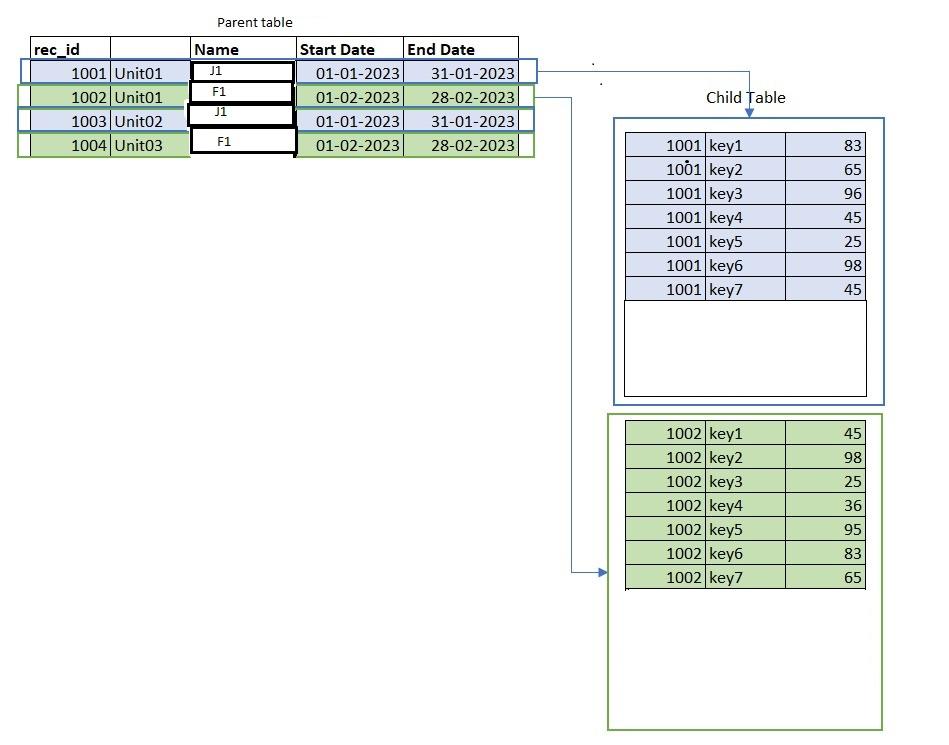
Parent table \begin{tabular}{|c|l|c|c|c|} \hline rec_id & & Name & Start Date & End Date \\ \hline 1001 & Unit01 & J1 & 01012023 & 31012023 \\ \hline 1002 & Unit01 & F1 & 01022023 & 28022023 \\ \hline 1003 & Unit02 & J1 & 01012023 & 31012023 \\ \hline 1004 & Unit03 & F1 & 01022023 & 28022023 \\ \hline \end{tabular} \begin{tabular}{|l|l|r|} \hline 1001 & key1 & 83 \\ \hline 10001 & key2 & 65 \\ \hline 1001 & key3 & 96 \\ \hline 1001 & key4 & 45 \\ \hline 1001 & key5 & 25 \\ \hline 1001 & key6 & 98 \\ \hline 1001 & key7 & 45 \\ \hline \multicolumn{2}{|l}{} & \\ \hline \end{tabular} \begin{tabular}{|r|l|r|} \hline 1002 & key1 & 45 \\ \hline 1002 & key2 & 98 \\ \hline 1002 & key3 & 25 \\ \hline 1002 & key4 & 36 \\ \hline 1002 & key5 & 95 \\ \hline 1002 & key6 & 83 \\ \hline 1002 & key7 & 65 \\ \hline \end{tabular}
Step by Step Solution
There are 3 Steps involved in it

Get step-by-step solutions from verified subject matter experts
 Study Help