







Question: Take the HTML (javascript) on the botom of this page and process the order using JSP.The JSP design is completely up to you but a
Take the HTML (javascript) on the botom of this page and process the order using JSP.The JSP design is completely up to you but a basic JSP might look like this in the image on bottom.
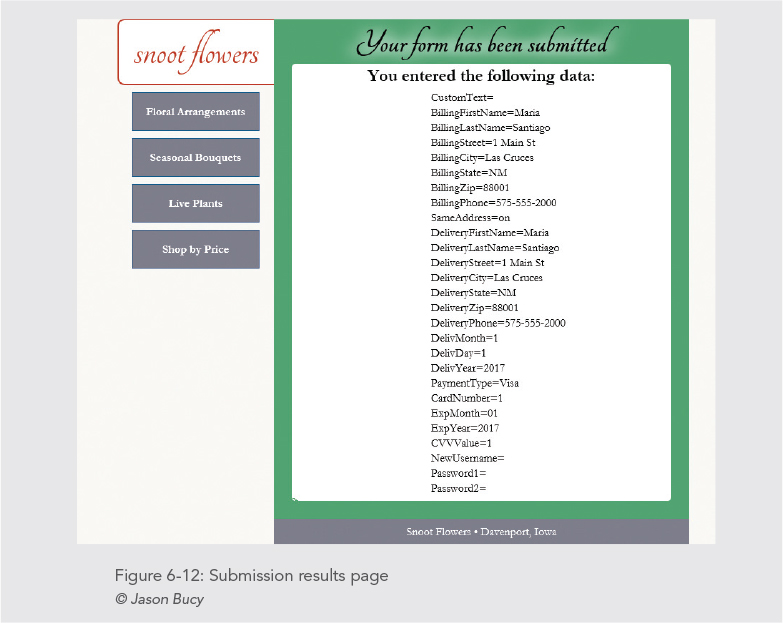
CSS:
/* apply a natural box layout model to all elements */ * { -moz-box-sizing: border-box; -webkit-box-sizing: border-box; box-sizing: border-box; } /* reset rules */ html, body, div, span, applet, object, iframe, h1, h2, h3, h4, h5, h6, p, blockquote, pre, a, abbr, acronym, address, big, cite, code, del, dfn, em, img, ins, kbd, q, s, samp, small, strike, strong, sub, sup, tt, var, b, u, i, center,div dl, dt, dd, ol, ul, li, fieldset, form, label, legend, table, caption, tbody, tfoot, thead, tr, th, td, article, aside, canvas, details, embed, figure, figcaption, footer, header, hgroup, menu, nav, output, ruby, section, summary, time, mark, audio, video { margin: 0; padding: 0; border: 0; font-size: 100%; font: inherit; vertical-align: baseline; } /* HTML5 display-role reset for older browsers */ article, aside, details, figcaption, figure, footer, header, hgroup, menu, nav, section { display: block; }
body { line-height: 1; width: 800px; margin: 0 auto; font-family: garamond, 'times new roman', times, serif; background: rgb(246,245,242); }
ol, ul { list-style: none; }
blockquote, q { quotes: none; }
blockquote:before, blockquote:after, q:before, q:after { content: ''; content: none; }
table { border-collapse: collapse; border-spacing: 0; }
a:link, a:visited { text-decoration: none; color: inherit; }
a:hover { text-decoration: none; color: inherit; }
a:active { text-decoration: none; color: inherit; } /* container for header and nav */ div.container { float: left; } /* page header */ header { border: 2px solid rgb(190,50,38); border-right: none; padding: 30px 10px; text-align: center; line-height: 1.8em; background: white; width: 219px; float: left; -moz-border-radius-topleft: 10px; -webkit-border-top-left-radius: 10px; border-top-left-radius: 10px; -moz-border-radius-bottomleft: 10px; -webkit-border-bottom-left-radius: 10px; border-bottom-left-radius: 10px; }
header h1 { font-family: tangerine, cursive; font-size: 48pt; text-transform: lowercase; color: rgb(190,50,38); }
header h1 img { display: inline-block; } /* remove blank space for descenders below image */ #accent img { display: block; } /* navigation */ nav { width: 219px; padding: 10px; float: left; clear: left; }
nav ul li { width: 179px; min-height: 50px; padding: 10px; margin: 0 0 10px 10px; line-height: 2.0em; font-weight: bold; font-size: 16px; background: rgb(124,124,136); color: white; text-align: center; border: 1px solid rgb(0,89,132); }
nav ul li:hover { background: rgb(0,89,132); } /* main content */ article { background: #4DA375; width: 581px; float: right; padding: 10px; }
article h2 { font-size: 48px; font-weight: bold; text-align: center; font-family: tangerine, cursive; text-shadow: 10px 0px 17px white, -10px 0px 17px white; }
article div.results { background: white; border-radius: 5px; margin: 5px 15px 15px; padding: 5px 30px; }
article h3 { font-size: 18pt; font-weight: bold; text-align: center; padding-bottom: 10px; }
article div.results p { margin-left: 35%; padding-bottom: 5px; }
#errorText { display: none; text-align: center; padding: 10px; margin: 0 auto; margin: 15px 15px 0; background: rgb(124,124,136); color: white; border: 2px solid rgb(190,50,38); } /* form */ form { width: 561px; margin: 0 auto; padding-bottom: 15px; }
fieldset { position: relative; padding: 5px 30px 70px 30px; background: white; border-radius: 5px; margin-left: 15px; margin-right: 15px; margin-bottom: 25px; }
fieldset:last-of-type { margin-bottom: 0; }
legend { font-weight: bold; font-size: 36px; font-family: tangerine, cursive; position: absolute; padding: 10px 0; }
input, label, select, textarea, fieldset p, div.errorMessage, #ccNumErrorMessage, #cvvErrorMessage { position: relative; top: 50px; line-height: 1.2em; }
label, input { display: block; }
#expMoLabel, #expYrLabel { position: absolute; left: -10000px; }
#buttonContainer { width: 100%; text-align: center; }
#orderButton { margin: 0 auto; font-family: tangerine, cursive; font-size: 24px; top: 15px; -webkit-appearance: none; display: inline-block; }
fieldset.checks input, div.checks input { float: none; margin-right: 20px; }
fieldset.checks textarea { margin-left: 21px; width: 90%; height: 50px; }
fieldset.text label { width: 8em; text-align: right; float: left; clear: left; margin-right: 10px; margin-top: 5px; }
fieldset.text input, fieldset.text select { margin-top: 5px; margin-right: 5px; }
fieldset div.errorMessage, #ccNumErrorMessage, #cvvErrorMessage { display: none; color: red; margin-top: 10px; }
#ccNumErrorMessage, #cvvErrorMessage { margin-left: 8.5em; }
div.checks label { width: auto; text-align: left; float: none; clear: none; }
div.inline label, div.inline input, div.inline select, div.inline div { display: inline-block; float: none; text-align: center; width: auto; }
div.inline option { text-align: left; }
#billFName, #billLName, #delivFName, #delivLName, #billCity, #delivCity, #billPhone, #delivPhone { width: 15em; }
#billStreet, #delivStreet, #billEmail, #delivEmail { width: 20em; }
#billZip, #delivZip { width: 10em; }
#ccNum { width: 16em; }
#cvv { width: 4em; } /* footer */ footer { width: 581px; color: white; background: rgb(124,124,136); font-size: 16px; padding: 10px; text-align: center; float: right; }
ul.checkbox { margin: 0; padding: 0; margin-left: 20px; list-style: none; }
ul.checkbox li input { margin-right: .25em; }
ul.checkbox li { border: 1px transparent solid; }
ul.checkbox li label { margin-left: 24px; margin-top: -19px; }
.hide { display: none; }
.show { display: block; }
HTML:
Happy Flowers
Your form has been submitted
our form has been submitte snoot flowers You entered the following data CustomText- Floral Arrangements Billing FirstName Maria BillingLastName Santiago Billing Street 1 Main St Seasonal Bouquets Billing City Las Cruces Billing State NM Billing zip 88001 Live Plants Billing Phone 575-555-2000 Same Address on DeliveryLastName Santiago Shop by Price Deliver Street 1 Main St Deliterycity Las Cruces Deliver State NM Delivery Zip 88001 DeliveryPhone 575-555-2000 DelivMonth 1 DelivDay 1 DelivYear 2017 PaymentType Viga CardNumber-1 Exp Month 01 Exp Year 2017 New Username Password 1- Password2 Snoot Flowers Davenport, Iowa Figure 6-12: Submission results page Jason Bucy our form has been submitte snoot flowers You entered the following data CustomText- Floral Arrangements Billing FirstName Maria BillingLastName Santiago Billing Street 1 Main St Seasonal Bouquets Billing City Las Cruces Billing State NM Billing zip 88001 Live Plants Billing Phone 575-555-2000 Same Address on DeliveryLastName Santiago Shop by Price Deliver Street 1 Main St Deliterycity Las Cruces Deliver State NM Delivery Zip 88001 DeliveryPhone 575-555-2000 DelivMonth 1 DelivDay 1 DelivYear 2017 PaymentType Viga CardNumber-1 Exp Month 01 Exp Year 2017 New Username Password 1- Password2 Snoot Flowers Davenport, Iowa Figure 6-12: Submission results page Jason Bucy
Step by Step Solution
There are 3 Steps involved in it
1 Expert Approved Answer
Step: 1 Unlock

Question Has Been Solved by an Expert!
Get step-by-step solutions from verified subject matter experts
Step: 2 Unlock
Step: 3 Unlock
 Study Help