







Question: Take the table application that we worked on (attached) and modify ( so that it looks like table_out_new.png) it so that it produces the attached
Take the table application that we worked on (attached) and modify ( so that it looks like table_out_new.png) it so
that it produces the attached output. Use font-size:40px to enlarge the text in some of the indicated cells.
Create a border around the table and ude text-align:center to center the text in the data filelds.
table1.txt
.product { color:rgb(0,255,255); text-align:center; text-decoration:underline; background-color:yellow; } .facts { background-color:pink; } .fat { font-style:italic; color:rgb(0,0,255); background-color: yellow; } table{ color:rgb(0,0,255); /* background-color:brown;*/} th{ color:rgb(255,0,255); font-style:italic;}
table1.css
.product { color:rgb(0,255,255); text-align:center; text-decoration:underline; background-color:yellow; } .facts { background-color:pink; } .fat { font-style:italic; color:rgb(0,0,255); background-color: yellow; } table{ color:rgb(0,0,255); /* background-color:brown;*/} th{ color:rgb(255,0,255); font-style:italic;}TABLE with STYLE SHEET CISC_2350_CSS_HEADING_pp70.txt
| Product | Size (oz) | Caffeine (mg) | Fat (g) |
|---|---|---|---|
| Green Tea | 8 | 20 | 0 |
| Dark Chocolate | 2 | 20 | 19 |
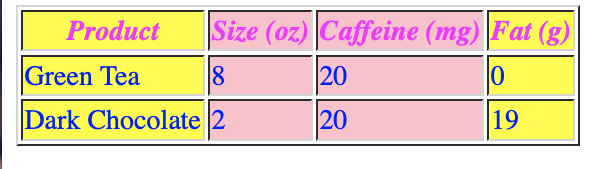
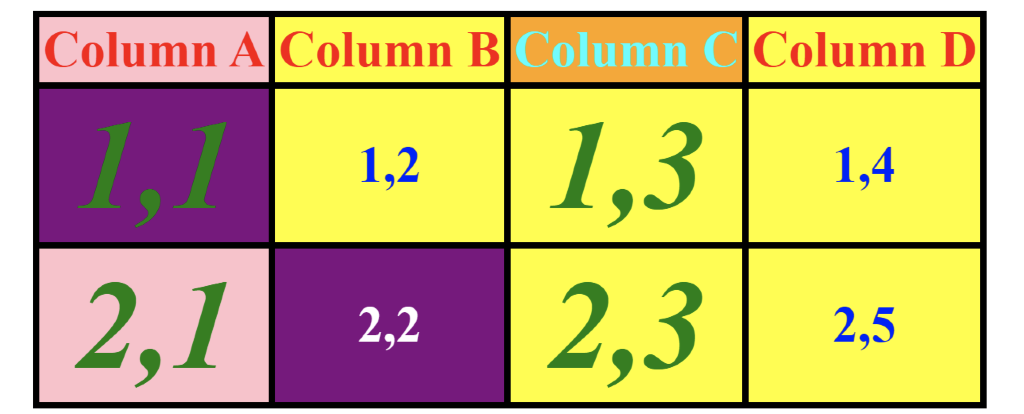
Product Size (oz) Caffeine (mg) Fat (g) Green Tea 8 20 10 Dark Chocolate 2 20 19 Column A Column B Column C Column D 1,2 1,11 2,1 1,3 1,4 2,3 2,2 2,5
Step by Step Solution
There are 3 Steps involved in it
1 Expert Approved Answer
Step: 1 Unlock

Question Has Been Solved by an Expert!
Get step-by-step solutions from verified subject matter experts
Step: 2 Unlock
Step: 3 Unlock
 Study Help