







Question: Task 1 ( 8 marks ) In the provided file Student.java in the downloaded project, create a new Student class with the following fields, studentID,
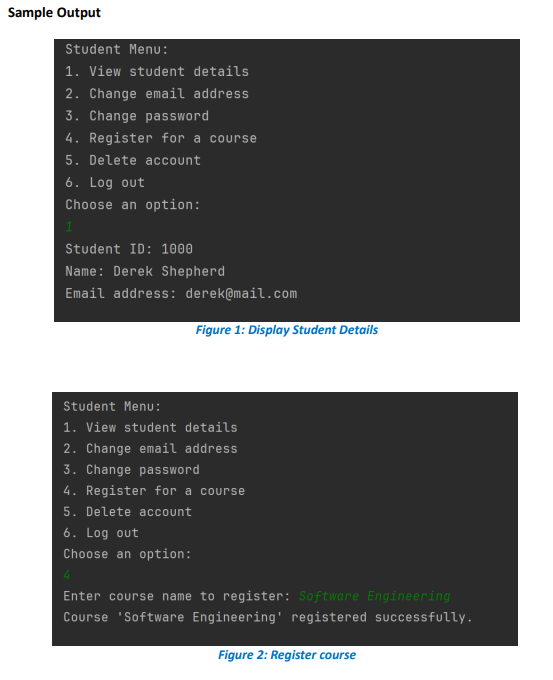
Task marks In the provided file Student.java in the downloaded project, create a new Student class with the following fields, studentID, fullName, email and password. marks Please keep in mind that a student can change their email address or password at any time, their studentID should remain the same for as long as they are registered in the system. Each student's studentID should be unique, and assigned in increasing numerical order with each new registration, starting from Implement the following for the Student class: A parameter default constructor with sensible default values, and a parameterized nondefault constructor with sensible parameters. marks Appropriate getter and setter methods for each field. marks A toString method to display the student details, formatted appropriately. Please refer to the sample output below. Figure mark Task marks In the AssignmentDriver class, write code that does the following, when the program is run: Initialises an empty ArrayList of Student objects. mark Display a main menu, which allows the user to select from the following options. The program should continue to run until Option is selected. marks Register a new student. Login as an existing student. Exit the system. If Option is selected, the student should be prompted to enter the name, email and password. A new Student object containing their details should be added to the list of students. If the registration is successful, the student should be informed that their registration is successful, before returning them to the main menu. marks If Option is selected, the student should be prompted to login by entering their email address and password with a maximum of three attempts. If after the third attempt, no match for their emailpassword has been found, an appropriate error message should be printed and the student should be returned to the main menu. If the student logs in successfully, they should be presented with a new menu, with the following options: marks
View student details, which displays all the information associated with that student in the system. Change email address, which allows the student to change their email address and updates their details in the system. Please refer to Task below for the email address requirement. Change password, which allows the student to change their password and updates their details in the system. Please refer to Task below for the password requirement. Register for a course, which allows the student to enter a course that they would like to register for. Please refer to the sample output below. Figure Delete account, which if selected, will prompt the student for confirmation, then remove their details from the ArrayList and return them to the main menu. Log out, which returns the student to the main menu. Task marks Upgrade your system to include the following validation checks in the AssignmentDriver class. Write a method called validateEmail in the AssignmentDriver class. This method should take an email address as its parameter, and return a boolean value. It should check the provided email address to ensure it contains a character before and after @ If the email address meets these criteria, the method should return true. Otherwise, it should return false. For example, the strings hello@world@ and student@monash.edu should all return true, but the strings helloworldjohn@ and @monash.edu should all return false. marks Write a method called validatePassword in the AssignmentDriver class. This method should take a password as its parameter, and return a boolean value. It should check the provided password to ensure it: o is at least characters in length, o contains at least one number, one symbol and o contains a mix of upper and lowercase characters. If it meets these three conditions, it should return true, otherwise it should return false. marks Update the rest of your program so these validation checks are performed when a student first registers, and when they update their email address or password. If the student gives an invalid email address or password, they should be given an appropriate error message and prompted to try again. marks Note: Please ensure to include proper documentation in your program.
Figure : Display Student Details
Student Menu:
View student details
Change email address
Change password
Register for a course
Delete account
Log out
Choose an option:
Enter course name to register: Software Engineering
Course 'Software Engineering' registered successfully.
Step by Step Solution
There are 3 Steps involved in it
1 Expert Approved Answer
Step: 1 Unlock

Question Has Been Solved by an Expert!
Get step-by-step solutions from verified subject matter experts
Step: 2 Unlock
Step: 3 Unlock
 Study Help