







Question: Task 1 : Create a VIEW named MAJOR _ CUSTOMER. It consists of the customer ID , first name, last name, balance, credit limit ,
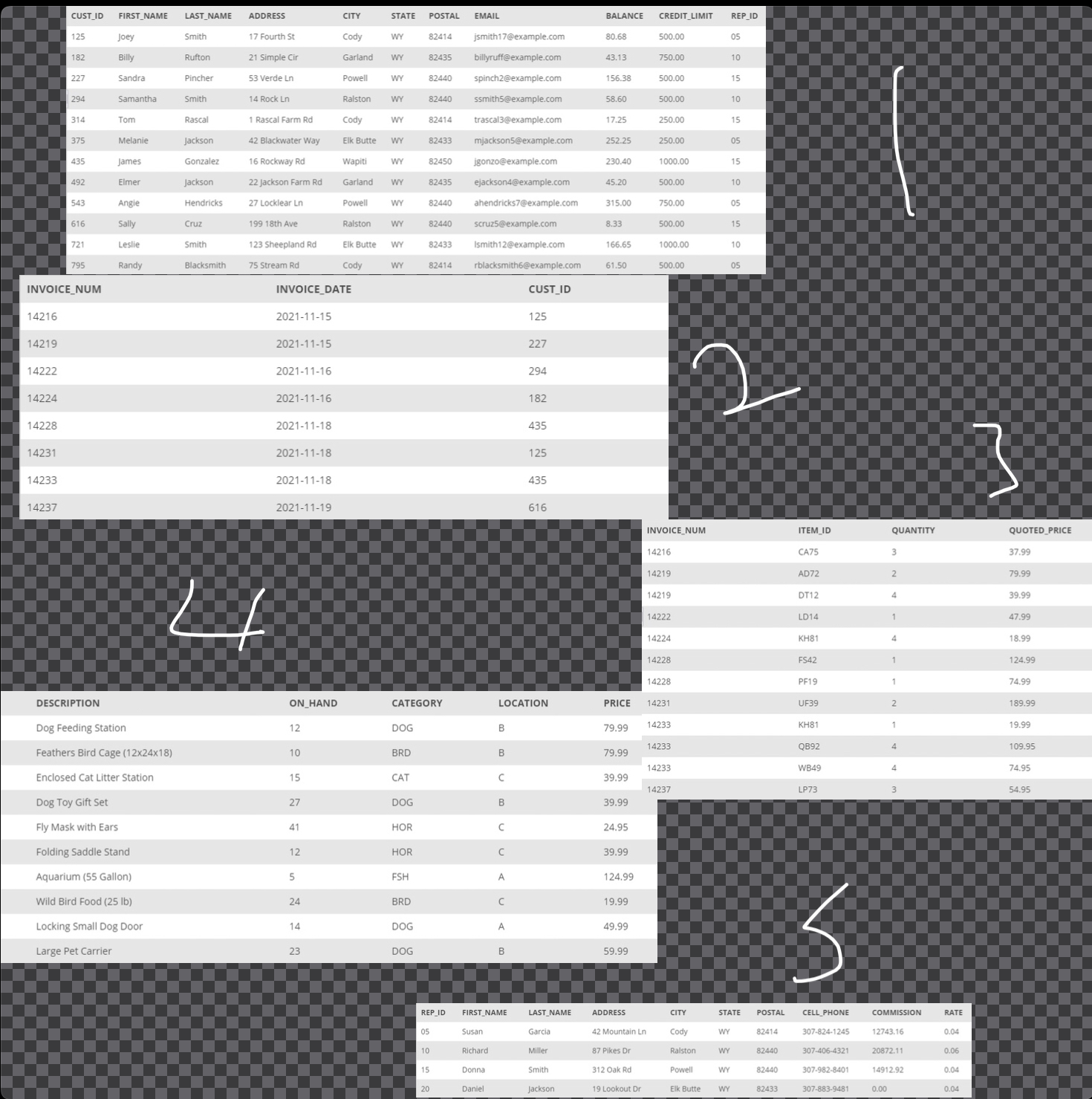
Task : Create a VIEW named MAJORCUSTOMER. It consists of the customer ID first name, last name, balance, credit limit and rep ID for every customer whose credit limit is $ or less.
Task : Write and execute the command to retrieve the customer ID first name, and last name of each customer in the MAJORCUSTOMER VIEW with a balance that exceeds the credit limit
Task : Without using the MAJORCUSTOMER VIEW, retrieve the customer ID first name, and last name for every customer whose credit limit is $ or less.
Task : Create a VIEW named ITEMINVOICE. It consists of the item ID description, price, invoice number, invoice date, quantity, and quoted price for all invoice lines currently on file.
Task : Write and execute the command to retrieve the item ID description, invoice number, and quoted price for all invoices in the ITEMINVOICE VIEW for items with a quoted prices that exceed $
Task : Repeat Task without using the ITEMINVOICE VIEW to retrieve the item ID description, price, invoice number, invoice date, quantity, and quoted price for all items with a quoted price that exceed $
Task : Create a view named INVOICETOTAL. It consists of the invoice number and invoice total for each invoice currently on file. The invoice total is the sum of the number of units ordered multiplied by the quoted price on each invoice line for each invoice. Sort the rows by invoice number. Use TOTALAMOUNT as the name for the invoice total. From The Textbook, A Guide to SQLth edition
Step by Step Solution
There are 3 Steps involved in it
1 Expert Approved Answer
Step: 1 Unlock

Question Has Been Solved by an Expert!
Get step-by-step solutions from verified subject matter experts
Step: 2 Unlock
Step: 3 Unlock
 Study Help