







Question: Task 1 - Creating Your Own Personal Webpage Your first task is to create a personal webpage. Your personal web page should contain the following
Task 1 - Creating Your Own Personal Webpage Your first task is to create a personal webpage. Your personal web page should contain the following items: 1. Your name at the top of the page as an
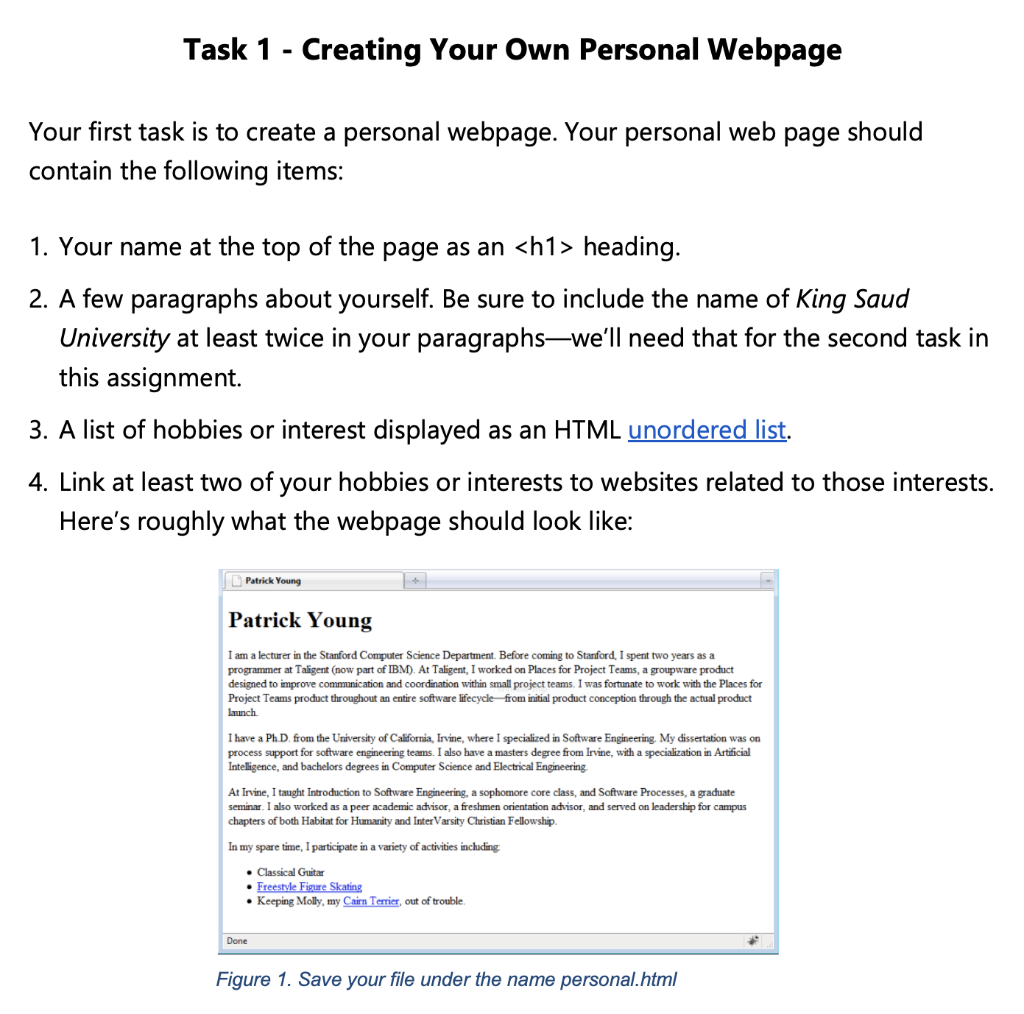
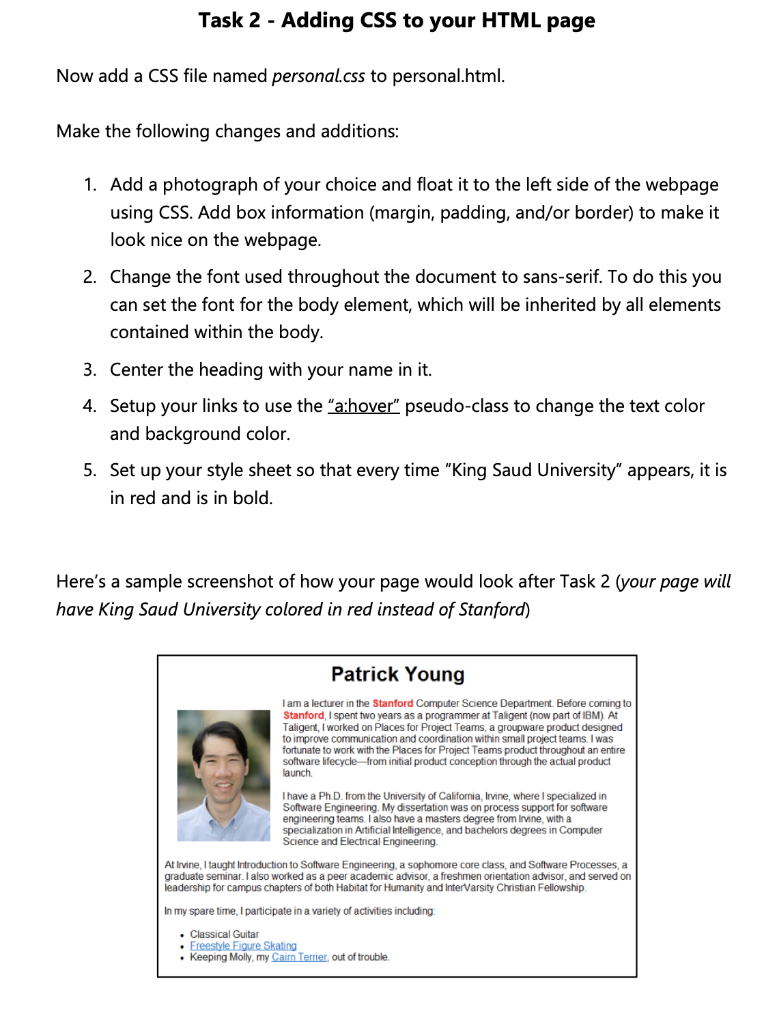
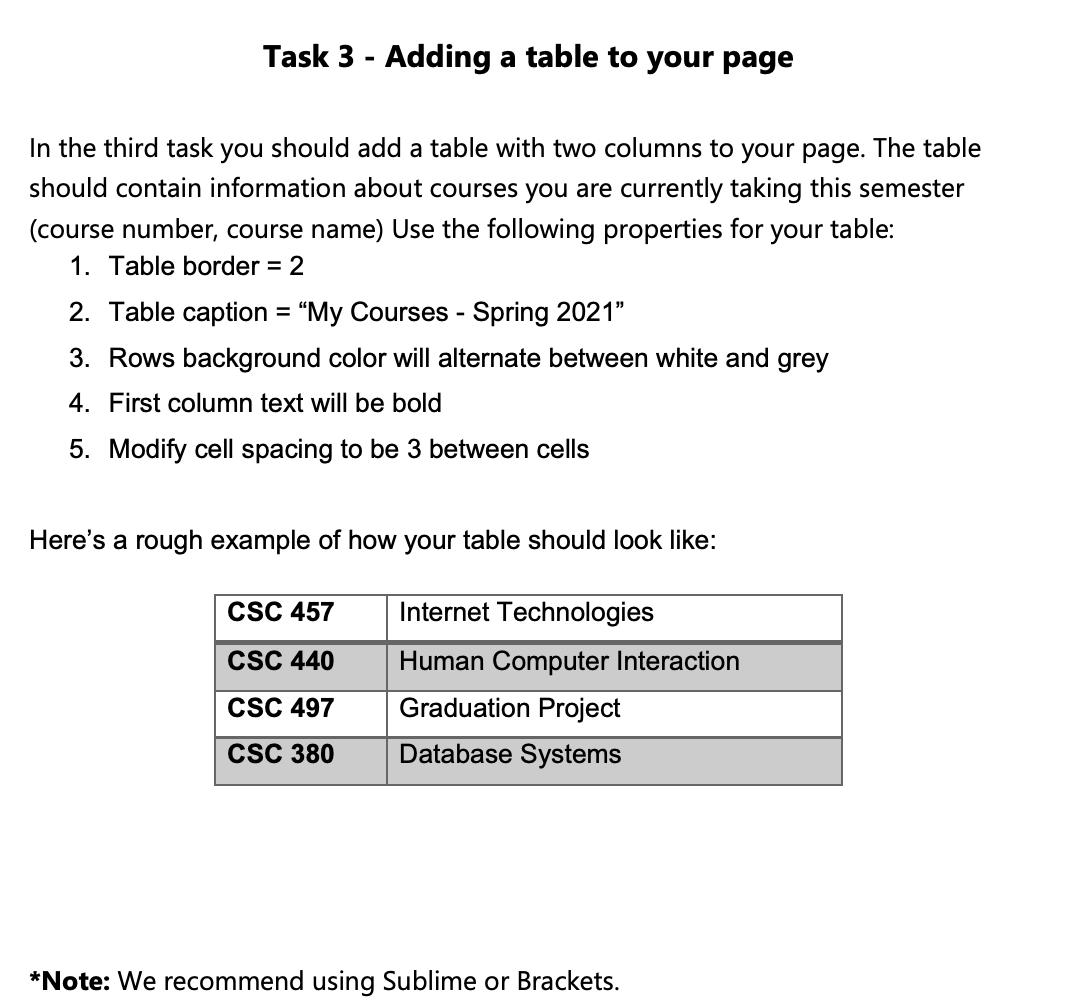
heading. 2. A few paragraphs about yourself. Be sure to include the name of King Saud University at least twice in your paragraphswe'll need that for the second task in this assignment. 3. A list of hobbies or interest displayed as an HTML unordered list. 4. Link at least two of your hobbies or interests to websites related to those interests. Here's roughly what the webpage should look like: Patrick Young Patrick Young I am a lecturer in the Stanford Computer Science Department. Before coming to Stanford, I spent two years as a programmer at Taligent (now part of IBM). At Taligent, I worked on Places for Project Teams, a groupware product designed to improve communication and coordination within small project teams. I was fortunate to work with the Places for Project Teams product throughout an entire software lifecycle from initial product conception through the actual product Launch I have a Ph.D. from the University of California, Irvine, where I specialized in Software Engineering. My dissertation was on process support for software engineering teams. I also have a masters degree from Irvine, with a specialization in Artificial Intelligence, and bachelors degrees in Computer Science and Electrical Engineering At Irvine, I taught Introduction to Software Engineering, a sophomore core class, and Software Processes, a graduate seminar. I also worked as a peer academic advisor, a freshmen orientation advisor, and served on leadership for campus chapters of both Habitat for Humanity and Inter Varsity Christian Fellowship In my spare time, I participate in a variety of activities including Classical Guitar . Freestyle Figure Skating Keeping Molly, my Cairn Terrier, out of trouble. Done Figure 1. Save your file under the name personal.html Task 2 - Adding CSS to your HTML page Now add a CSS file named personal.css to personal.html. Make the following changes and additions: 1. Add a photograph of your choice and float it to the left side of the webpage using CSS. Add box information (margin, padding, and/or border) to make it look nice on the webpage. 2. Change the font used throughout the document to sans-serif. To do this you can set the font for the body element, which will be inherited by all elements contained within the body. 3. Center the heading with your name in it. 4. Setup your links to use the "a:hover" pseudo-class to change the text color and background color. 5. Set up your style sheet so that every time "King Saud University" appears, it is in red and is in bold. Here's a sample screenshot of how your page would look after Task 2 (your page will have King Saud University colored in red instead of Stanford) Patrick Young I am a lecturer in the Stanford Computer Science Department. Before coming to Stanford, I spent two years as a programmer at Taligent (now part of IBM). At Taligent, I worked on Places for Project Teams, a groupware product designed to improve communication and coordination within small project teams. I was fortunate to work with the Places for Project Teams product throughout an entire software lifecycle-from initial product conception through the actual product launch I have a PhD. from the University of California, Irvine, where I specialized in Software Engineering. My dissertation was on process support for software engineering teams. I also have a masters degree from Irvine, with a specialization in Artificial Intelligence, and bachelors degrees in Computer Science and Electrical Engineering At Irvine, I taught Introduction to Software Engineering, a sophomore core class, and Software Processes, a graduate seminar. I also worked as a peer academic advisor, a freshmen orientation advisor, and served on leadership for campus chapters of both Habitat for Humanity and InterVarsity Christian Fellowship In my spare time. I participate in a variety of activities including Classical Guitar Freestyle Figure Skating Keeping Molly, my Caim Terrier, out of trouble. Task 3 - Adding a table to your page In the third task you should add a table with two columns to your page. The table should contain information about courses you are currently taking this semester (course number, course name) Use the following properties for your table: 1. Table border = 2 2. Table caption = My Courses - Spring 2021" 3. Rows background color will alternate between white and grey 4. First column text will be bold 5. Modify cell spacing to be 3 between cells Here's a rough example of how your table should look like: CSC 457 CSC 440 Internet Technologies Human Computer Interaction Graduation Project Database Systems CSC 497 CSC 380 *Note: We recommend using Sublime or Brackets
Step by Step Solution
There are 3 Steps involved in it
1 Expert Approved Answer
Step: 1 Unlock

Question Has Been Solved by an Expert!
Get step-by-step solutions from verified subject matter experts
Step: 2 Unlock
Step: 3 Unlock
 Study Help