







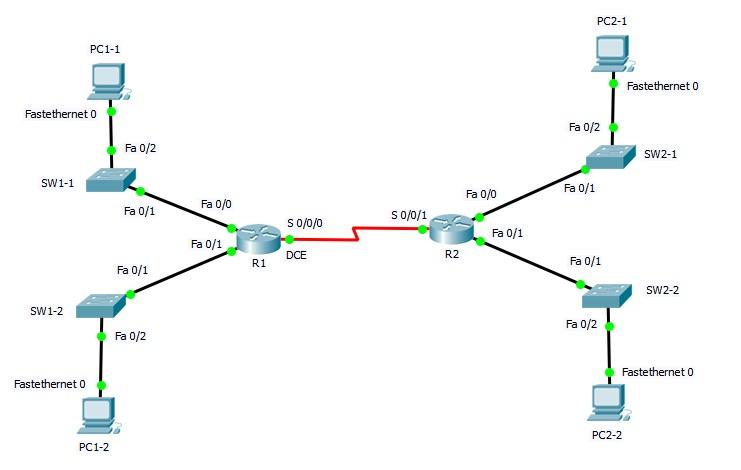
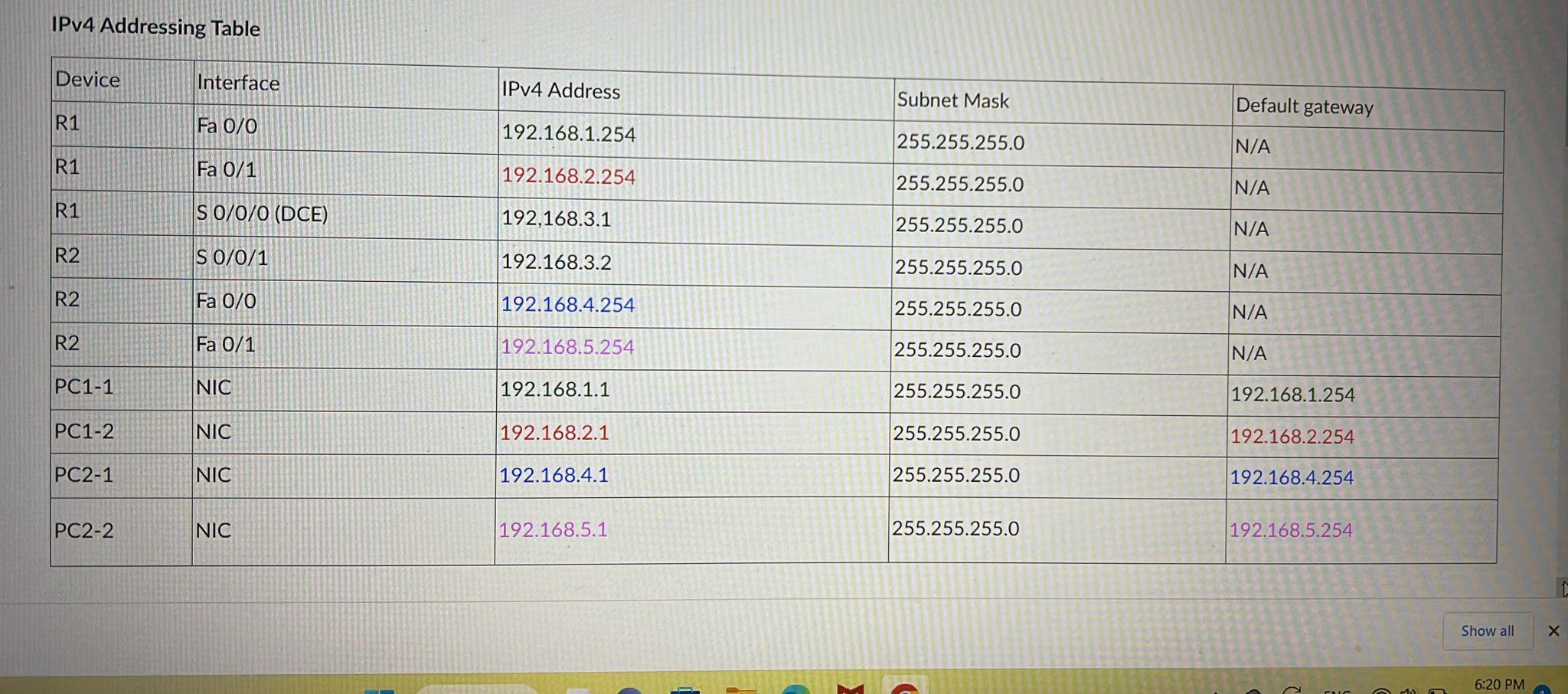
Question: Task 1 how Use Addressing Table information to configure the internetwork. how Use 64000 for Clock Rate of S 0/0/0 of R1. R1
Task 1
- how Use Addressing Table information to configure the internetwork.
- how Use 64000 for Clock Rate of S 0/0/0 of R1.
- R1
Task 3
- Copy the Running-config file to Startup-config file.
Task 4
Display the configurations by using following show commands on R1:
- how show running-config
- how show startup-config
- how show IP interface brief
- how show ip route
Task 5
Display the configurations by using following show commands on R2:
- how show running-config
- how show startup-config
- how show IP interface brief
- how show ip route
Note: how show the all commands and how can must be performed in PEM.
- How many routes are displayed in R1 routing table?
- What types of routes are they?
- How do you assign default gateway to SW1-1?
- Why do you need to assign default gateway to that switch?
SW1-1(config)#ip default-gateway 192.168.1.254
- how assign the default gateway to SW1-1
- How do you secure privileged EXEC mode with CLASS as password?
- How do you secure privileged EXEC mode with Cisco as secret?
What is the difference between the above two?
- how configure the above 2 on SW1-1 and show run to observe the difference.
Fastethernet 0 SW1-1 SW1-2 PC1-1 Fastethernet 0 PC1-2 Fa 0/2 Fa 0/1 Fa 0/1 Fa 0/2 Fa 0/0 Fa 0/1 R1 S 0/0/0 DCE S 0/0/1 R2 Fa 0/0 Fa 0/1 PC2-1 Fa 0/2 Fa 0/1 Fa 0/1 Fa 0/2 Fastethernet 0 PC2-2 SW2-1 SW2-2 Fastethernet 0
Step by Step Solution
There are 3 Steps involved in it
1 Expert Approved Answer
Step: 1 Unlock

Question Has Been Solved by an Expert!
Get step-by-step solutions from verified subject matter experts
Step: 2 Unlock
Step: 3 Unlock
 Study Help