







Question: Task 1 - Memory Information Make sure your output follows the structure as seen in the screen-shot below. For this task you will need to
Task 1 - Memory Information
Make sure your output follows the structure as seen in the
screen-shot below. For this task you will need to create a C++ program to read mem-
ory information about the system, you should use the filename called "meminfo.cpp"
and the target executable "meminfo".
There are several ways one can detect system
memory information in a Linux environment. One method is to do it programmatically
by reading a special file within the system, the other method is to make use of a certain
executable ("free") that you will call in your C++ code and perform the necessary data
manipulation.
You should chose only one of the mentioned approaches in your solution.
Things to note:
1. You must make use of a subprocess call (eg. popen) if you choose the executable
route.
2. Your program must display the sizes of each segment in "Human Readable" bytes.
Your program should show the closest range to dierent sizes for example, 1020
bytes, or 13.65 KB, etc.
3. Make use of fixed 2 decimal points for each value.
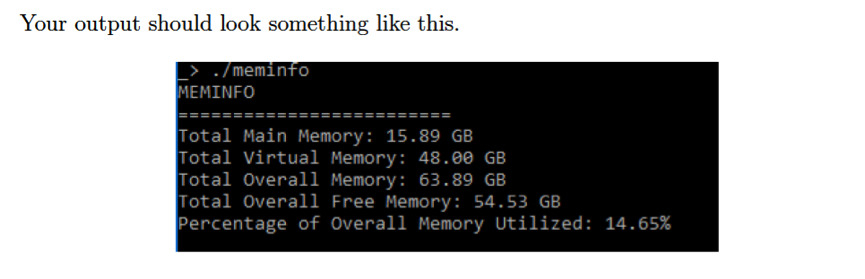
Your output should look something like this. /meminfo EMINFO Total Main Memory: 15.89 GB Total Virtual Memory: 48.80 GB Total Overall Memory: 63.89 GB Total Overall Free Memory: 54.53 GB Percentage of Overall Memory Utilized : 14.65% Your output should look something like this. /meminfo EMINFO Total Main Memory: 15.89 GB Total Virtual Memory: 48.80 GB Total Overall Memory: 63.89 GB Total Overall Free Memory: 54.53 GB Percentage of Overall Memory Utilized : 14.65%
Step by Step Solution
There are 3 Steps involved in it

Get step-by-step solutions from verified subject matter experts
 Study Help