





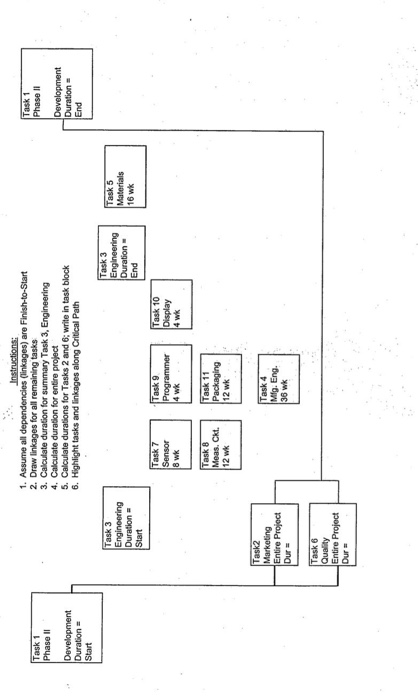
Question: Task 1 Phase II Phase II 1. Assume all dependencies (linkages) are Finish-to-Start 2. Draw linkages for all remaining tasks 3. Calculate duration for summary
Task 1 Phase II Phase II 1. Assume all
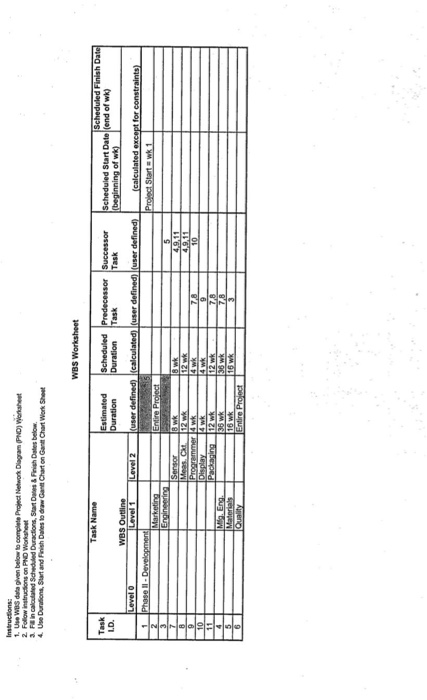
Task 1 Phase II Phase II 1. Assume all dependencies (linkages) are Finish-to-Start 2. Draw linkages for all remaining tasks 3. Calculate duration for summary Task 3, Engineering 4. Calculate duration for entire project 5. Calculate durations for Tasks 2 and 6; write in task block 6. Highlight tasks and linkages along Critical Path Development Duration Start Development Duration End Task 3 Engineering Duration Task 3 Engineering Duration Task 5 Materials 16 wk Start Task 7 Programmer Task 10 Display 4 wk Task 8 Meas. Ckt. 12 wk Task 11 Packaging 12 wk Task2 Marketing Entire Project Dur Task 4 Mfg. Eng. 36 wk Task 6 Quality Entre Project Instructions: 1. Use WBS data given below to complete Project Network Diagram (PND) Worksheet 2. Follow instructions on PRO Worksheet 3. Finalouated Scheduled Duractions, Start Dates & FinishDates below. 4. Use Duration Start and Finish ales to draw Gantt Chart on Gantt Chart Work Sheet WBS Worksheet Task Name LD Estimated Duration Scheduled Duration Task Predecessor Successor Task Scheduled Finish Date Scheduled StartDateend of wk) (beginning of wk) Level 2 user defined) lealculated) Iluser defined) luser defined) WBS Outline Level 1 Phase II - Development Marketing Engineering (calculated except for constrain Prolet Start = wk 1 Entire Pro T- HO Sensor sk Meas. Cut 12 Wk Programmer Display Packaging Mig Eng Ales SR - Instructions: After completing WBS and PND Worksheets, draw bars for each task in Gantt Chart below Identify tasks along Critical Path by different type bar shading Identity summary tasks and non-summary tasks by different type bar line Show Legend to identity bar shading GANTT CHART (1 BLOCK 4 WK) Task Task Name WEEK ENDING NUMBER 16202428 3236 Phase - Development Marketing Engineering Sensor Meas. Ckt. Programmer Display Packaging Mfg. Eng. Materials Quality Task 1 Phase II Phase II 1. Assume all dependencies (linkages) are Finish-to-Start 2. Draw linkages for all remaining tasks 3. Calculate duration for summary Task 3, Engineering 4. Calculate duration for entire project 5. Calculate durations for Tasks 2 and 6; write in task block 6. Highlight tasks and linkages along Critical Path Development Duration Start Development Duration End Task 3 Engineering Duration Task 3 Engineering Duration Task 5 Materials 16 wk Start Task 7 Programmer Task 10 Display 4 wk Task 8 Meas. Ckt. 12 wk Task 11 Packaging 12 wk Task2 Marketing Entire Project Dur Task 4 Mfg. Eng. 36 wk Task 6 Quality Entre Project Instructions: 1. Use WBS data given below to complete Project Network Diagram (PND) Worksheet 2. Follow instructions on PRO Worksheet 3. Finalouated Scheduled Duractions, Start Dates & FinishDates below. 4. Use Duration Start and Finish ales to draw Gantt Chart on Gantt Chart Work Sheet WBS Worksheet Task Name LD Estimated Duration Scheduled Duration Task Predecessor Successor Task Scheduled Finish Date Scheduled StartDateend of wk) (beginning of wk) Level 2 user defined) lealculated) Iluser defined) luser defined) WBS Outline Level 1 Phase II - Development Marketing Engineering (calculated except for constrain Prolet Start = wk 1 Entire Pro T- HO Sensor sk Meas. Cut 12 Wk Programmer Display Packaging Mig Eng Ales SR - Instructions: After completing WBS and PND Worksheets, draw bars for each task in Gantt Chart below Identify tasks along Critical Path by different type bar shading Identity summary tasks and non-summary tasks by different type bar line Show Legend to identity bar shading GANTT CHART (1 BLOCK 4 WK) Task Task Name WEEK ENDING NUMBER 16202428 3236 Phase - Development Marketing Engineering Sensor Meas. Ckt. Programmer Display Packaging Mfg. Eng. Materials Quality
Step by Step Solution

There are 3 Steps involved in it

1 Expert Approved Answer
Step: 1 Unlock blur-text-image

Question Has Been Solved by an Expert!

Get step-by-step solutions from verified subject matter experts

Step: 2 Unlock
Step: 3 Unlock

Students Have Also Explored These Related General Management Questions!