







Question: Task 1: Router on a stick You will need to adapt the configuration on both Newton and Einstein and configure the Heisenberg and Schrodinger switches
Task 1: Router on a stick
You will need to adapt the configuration on both Newton and Einstein and configure the Heisenberg and Schrodinger switches to complete this task.
You will need to VLSM the network,
VLSM for 4 further subnets on Newton and 32 on Einstein.
On Newton:
- Create two sub interfaces, for VLANs 10 and 20. - Enable dot1q trunking for each sub interface.
(1 mark)
- Using VLSM, split 172.16.0.0/24 into (see above selection method) further subnets. VLAN 10 will be in Subnet 0, VLAN 20 will be in Subnet 1. Create suitable interface IP addresses and subnet masks to reflect this configuration requirement.
(1 mark)
On Heisenberg:
- Create VLANS 10 and 20, associate interfaces 6 thru 12 with VLAN 10 and associate interfaces 13 thru 18 with VLAN 20.
(1 mark)
- Enable dot1q trunking for VLANs 10 and 20 via Fa0/5.
(1 mark)
Working on PC0 as per figures 2 and 4:
- Connect PC0 to Fa0/6 and give it an IP address within Newtons Subnet 0, Ping from PC0 to 99.0.0.1 [Newton].
(1 mark)
On Einstein:
- Create two sub interfaces, via Gi0/0/1 for VLANs 10 and 20 - enable dot1q trunking for each sub interface.
(1 mark)
- Using VLSM, split 192.168.0.0/24 into (see above selection method) further subnets. VLAN 10 will be in Subnet 0, VLAN 20 will be in Subnet 1. Create suitable interface IP addresses and subnet masks to reflect this configuration requirement.
(1 mark)
On Schrodinger:
- Create VLANS 10 and 20, associate interfaces 6 thru 12 with VLAN 10 and associate interfaces 13 thru 18 with VLAN 20.
(1 mark)
- Enable dot1q trunking for VLANs 10 and 20 via Fa0/5.
(1 mark)
Working on PC1 as per figures 2 and 4:
- Connect PC1 to Fa0/18 and give it an IP address within Einsteins Subnet 1, Ping from PC1 to 99.0.0.2 [Einstein].
(1 mark)
Note: at this stage, you can only successfully ping the nearest router from each PC
Task 2: Static and default routes (10 marks)
This must be completed on both routers only. Create a static routed network that will allow full connectivity for the topology seen in Figures 2 and 3. You will need to create a manually converged system. To accomplish this, you must:
- Configure Einstein to point to Newton with a default route.
(2 marks)
- Configure Newton to point to Einstein with a default route.
(2 marks)
- Configure on each router, static routes for the local, VLSMed subnets for VLANs 10 and 20. (4 marks)
- Ensure (and prove) that each PC is be able to ping each other. (1 mark)
Then add a loopback interface to Einstein, using the following commands
enable
configure terminal
interface Loopback0
ip address 123.0.0.1 255.255.255.0
no shutdown
Also add another loopback interface to Newton, using the following commands
enable
configure terminal
interface Loopback0
ip address 100.0.0.1 255.255.255.0
no shutdown
Adapt your network and prove that you can ping 123.0.0.1 and 100.0.0.1 from both PCs.
Task 3: LAN Security (5 marks)
Work on both switches for this activity, secure all unallocated interfaces (you will need to review the topology) by:
- Putting all of them into VLAN 123 and enabling port-security for all interfaces in VLAN123
(1 mark)
- Setting the maximum number of MAC addresses (that can be stored) to 2 per port on Fa0/19 thru Fa0/20
(1 mark)
- Manually adding the following MAC addresses to each respective port:
(1 mark)
- For Heisenberg:
Fa0/19 c001.c15c.0120
Fa0/20 c001.c15c.0121
- For Schrodinger:
Fa0/19 c001.c15c.0122
Fa0/20 c001.c15c.0123
- For Heisenberg:
- Make each Fa0/19 and Fa0/20 port sticky
(1 mark)
- Also, set the violation mode on each interface to restrict
(1 mark)
Task 4: DHCP (5 marks)
Add DHCP to the both the Newton and Einstein routers, where:
- You must change each PC to a dynamic IP address
(1 mark)
- PC0 is changed to receive a DHCP address from Newton.
- PC1 is changed to receive a DHCP address from Einstein
- Each DHCP pool must issue the relevant VLSMed sub-interface address as the default router.
(1 mark)
- The subnet mask is as required, for the VLSMed subnet for each device.
(1 mark)
- The DNS address issued is 12.34.56.78
(1 mark)
- PC0 and PC1 is still able to ping 123.0.0.1 and 100.0.0.1
(1 mark)
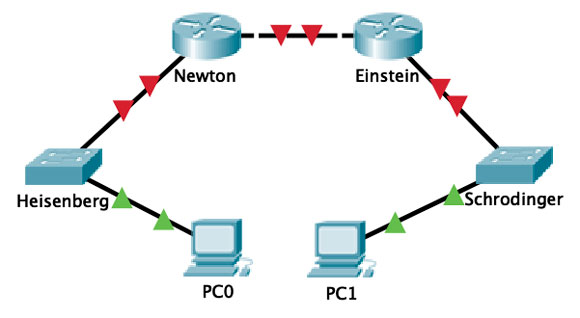
Newton Einstein Heisenberg Schrodinger PCO PC1
Step by Step Solution
There are 3 Steps involved in it

Get step-by-step solutions from verified subject matter experts
 Study Help