







Question: Task 1 . Subnet Deliverable - In the worksheet please feel out the following chart. Provide the subnets for the three networks with the correct
Task Subnet
Deliverable In the worksheet please feel out the following chart.
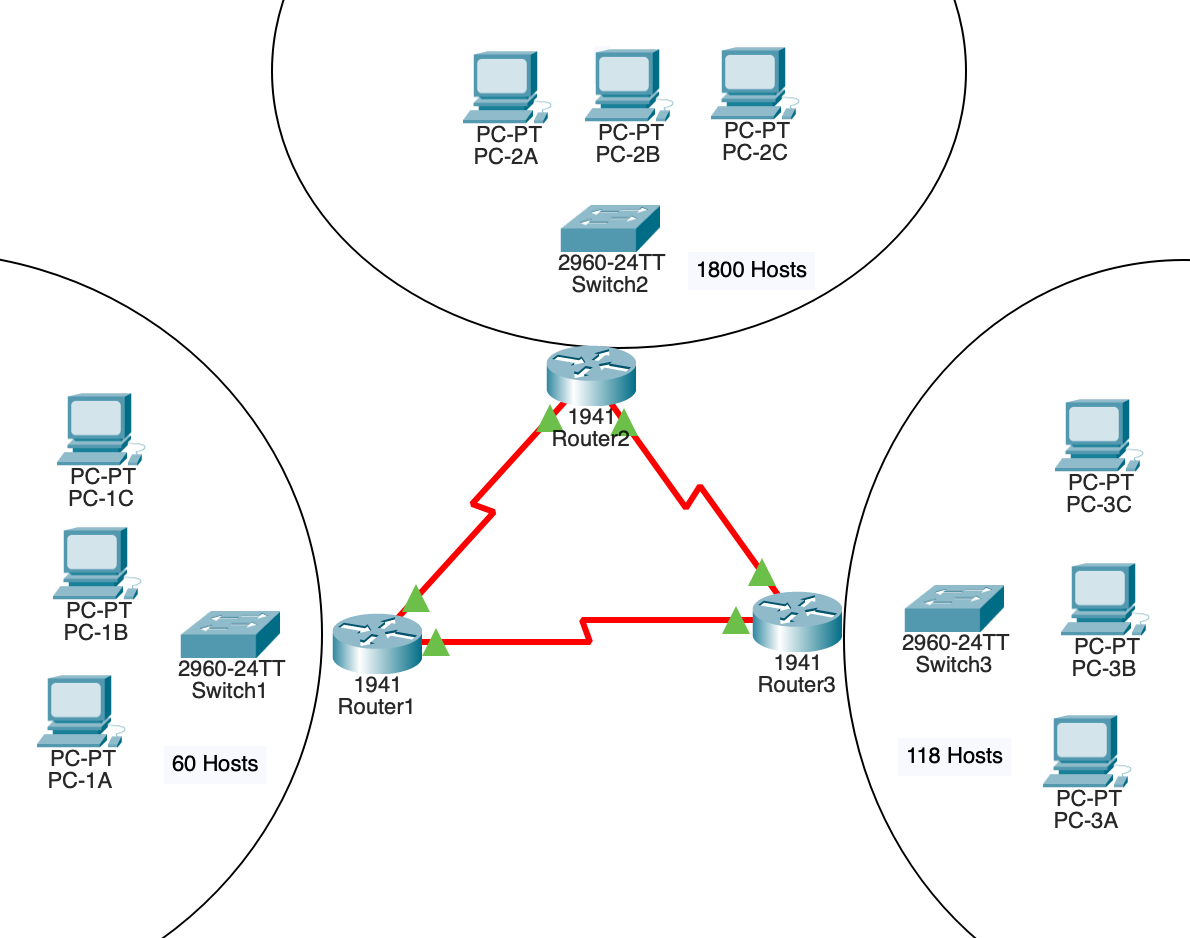
Provide the subnets for the three networks with the correct subnets. Fill the information requested by write the responses in the worksheet downloaded above.
Task Wiring up the devices
Deliverable Configure the following items in the Project Main file in Packet Tracer.
Using the following guidelines, wiring up the correct connections.
The last port on a switch should be wired to the Gig port of the associated router.
Device A should be wired to the first usable port of the associated switch.
Device B should be wired to the second usable port of the associated switch.
Device C should be wired to the third usable port of the associated switch.
Task Perform no DNS lookup
Deliverable Configure the following items in the Project Main file in Packet Tracer.
On each device issue the command used to disables DNS lookup.
Task Set a Banner
Deliverable Configure the following items in the Project Main file in Packet Tracer.
Please set this banner on all devices. Banner: No Unauthorized User are allowed access
Task Setting Hostnames
Deliverable Configure the following items in the Project Main file in Packet Tracer.
On each device, set the hostname to the device as seen below:
Task Setting Passwords & Basic Security
Deliverable Configure the following items in the Project Main file in Packet Tracer.
On all devices set a secret password of cisco
On all devices also set both a line and VTY password to class
On all devices set secure password services.
Task Setting IP Interfaces
Deliverable In the worksheet please feel out the following chart.
Deliverable Configure the following items in the Project Main file in Packet Tracer.
On all devices set the corresponding IP addresses; routers and computers.
Make sure to enable or turn on the interfaces that are being using.
Also, complete the chart below.
Configure the Addressing using the following guidelines:
Assign the first usable IP to the routers gig interface
Assign the second usable IP to PCXA
Assign the third usable IP to PCXB
Assign the fourth usable IP to PCXC
Assign the last usable address to the switches SVI interface
Task Configure basic switch functionality
Deliverable Configure the following items in the Project Main file in Packet Tracer.
On each switch please turn off all unused interfaces.
On each switch please set the default gateway.
On each switch please set the SVI interface.
Task Ping
Deliverable In the worksheet please feel out the following chart.
Task MAC Address Chart
Deliverable In the worksheet please feel out the following chart.
Step by Step Solution
There are 3 Steps involved in it
1 Expert Approved Answer
Step: 1 Unlock

Question Has Been Solved by an Expert!
Get step-by-step solutions from verified subject matter experts
Step: 2 Unlock
Step: 3 Unlock
 Study Help