







Question: Task 1 (Write Code to Implement Caesar Cipher) Important Note: just like any task assigned, many students panic when asked to write code and start
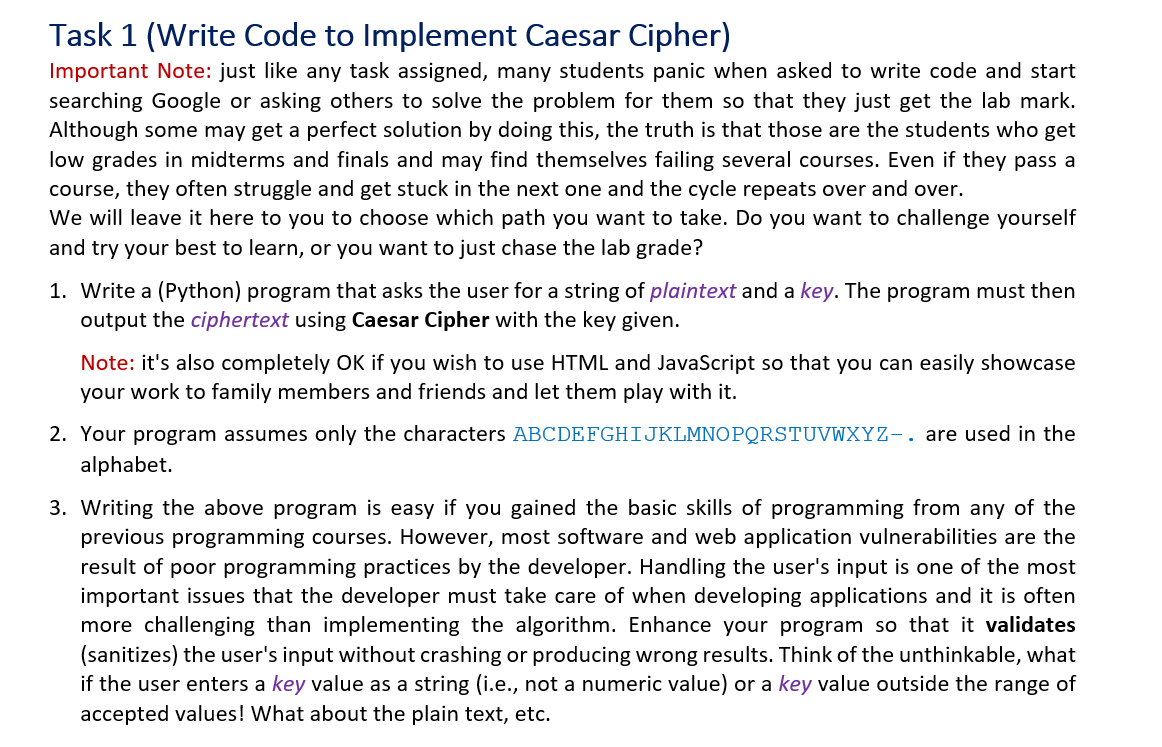
Task 1 (Write Code to Implement Caesar Cipher) Important Note: just like any task assigned, many students panic when asked to write code and start searching Google or asking others to solve the problem for them so that they just get the lab mark. Although some may get a perfect solution by doing this, the truth is that those are the students who get low grades in midterms and finals and may find themselves failing several courses. Even if they pass a course, they often struggle and get stuck in the next one and the cycle repeats over and over. We will leave it here to you to choose which path you want to take. Do you want to challenge yourself and try your best to learn, or you want to just chase the lab grade? 1. Write a (Python) program that asks the user for a string of plaintext and a key. The program must then output the ciphertext using Caesar Cipher with the key given. Note: it's also completely OK if you wish to use HTML and JavaScript so that you can easily showcase your work to family members and friends and let them play with it. 2. Your program assumes only the characters ABCDEFGHIJKLMNOPQRSTUVWXYZ- . are used in the alphabet. 3. Writing the above program is easy if you gained the basic skills of programming from any of the previous programming courses. However, most software and web application vulnerabilities are the result of poor programming practices by the developer. Handling the user's input is one of the most important issues that the developer must take care of when developing applications and it is often more challenging than implementing the algorithm. Enhance your program so that it validates (sanitizes) the user's input without crashing or producing wrong results. Think of the unthinkable, what if the user enters a key value as a string (i.e., not a numeric value) or a key value outside the range of accepted values! What about the plain text, etc
Step by Step Solution
There are 3 Steps involved in it

Get step-by-step solutions from verified subject matter experts
 Study Help