







Question: TASK 1 You are a project coordinator in a power line installation company. You are required to make an excel spread sheet cost calculator. This
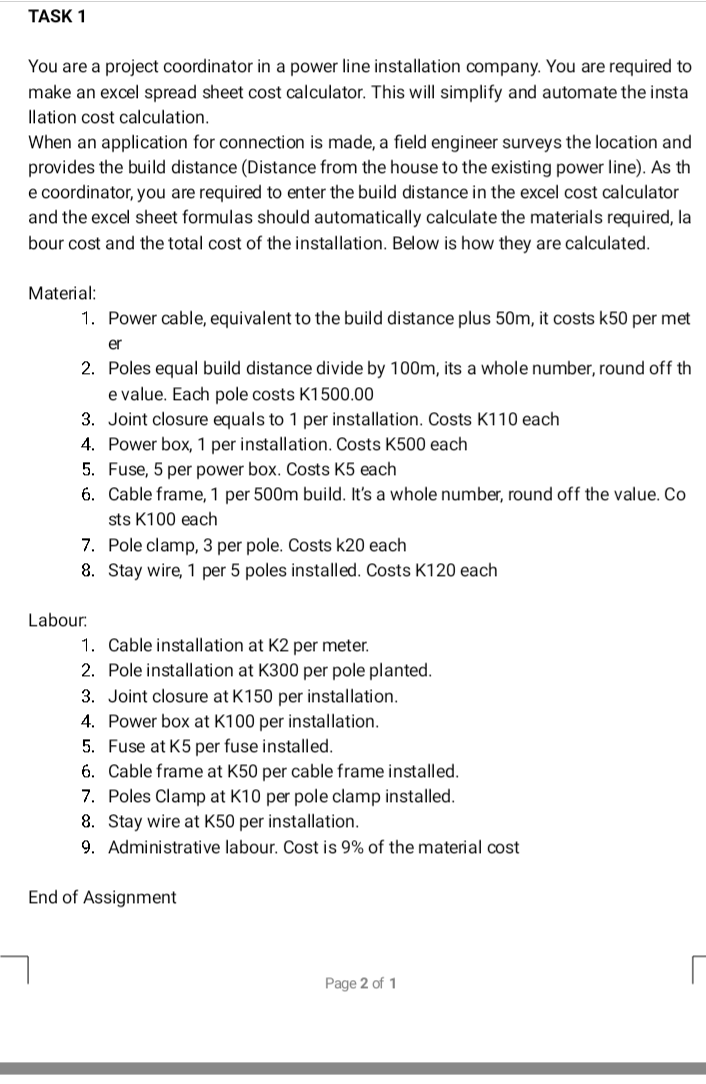
TASK 1 You are a project coordinator in a power line installation company. You are required to make an excel spread sheet cost calculator. This will simplify and automate the insta llation cost calculation. When an application for connection is made, a field engineer surveys the location and provides the build distance (Distance from the house to the existing power line). As th e coordinator, you are required to enter the build distance in the excel cost calculator and the excel sheet formulas should automatically calculate the materials required, la bour cost and the total cost of the installation. Below is how they are calculated. Material: 1. Power cable, equivalent to the build distance plus 50m, it costs k50 per met er 2. Poles equal build distance divide by 100m, its a whole number, round off th e value. Each pole costs K1500.00 3. Joint closure equals to 1 per installation. Costs K110 each 4. Power box, 1 per installation. Costs K500 each 5. Fuse, 5 per power box. Costs K5 each 6. Cable frame, 1 per 500m build. It's a whole number, round off the value. Co sts K100 each 7. Pole clamp, 3 per pole. Costs k20 each 8. Stay wire, 1 per 5 poles installed. Costs K120 each Labour 1. Cable installation at K2 per meter. 2. Pole installation at K300 per pole planted. 3. Joint closure at K150 per installation. 4. Power box at K100 per installation. 5. Fuse at K5 per fuse installed. 6. Cable frame at 650 per cable frame installed. 7. Poles Clamp at K10 per pole clamp installed. 8. Stay wire at K50 per installation. 9. Administrative labour. Cost is 9% of the material cost End of Assignment Page 2 of 1
Step by Step Solution
There are 3 Steps involved in it

Get step-by-step solutions from verified subject matter experts
 Study Help