







Question: Task 2 ( of 2 ) Loading data into Matlab is a fairly simple process based on MATLAB's built - in functions / commands .
Task of
Loading data into Matlab is a fairly simple process based on MATLAB's builtin functionscommands
Download the file ExamGrades.txt from the Canvas Page where you accessed this assignment
document. Put the file in the same folder where you will be developing and executing your MATLAB
script. Next, create a script called HWpTaskUCusername.m which begins with the following
two lines of code:
clear;
Exam readmatrixExamGradestxt;
The readmatrix command will bring in the Exam scores for students and store the values for each
student in a D Array called Exam. Your task is to analyze the Exam data. Specifically, your script
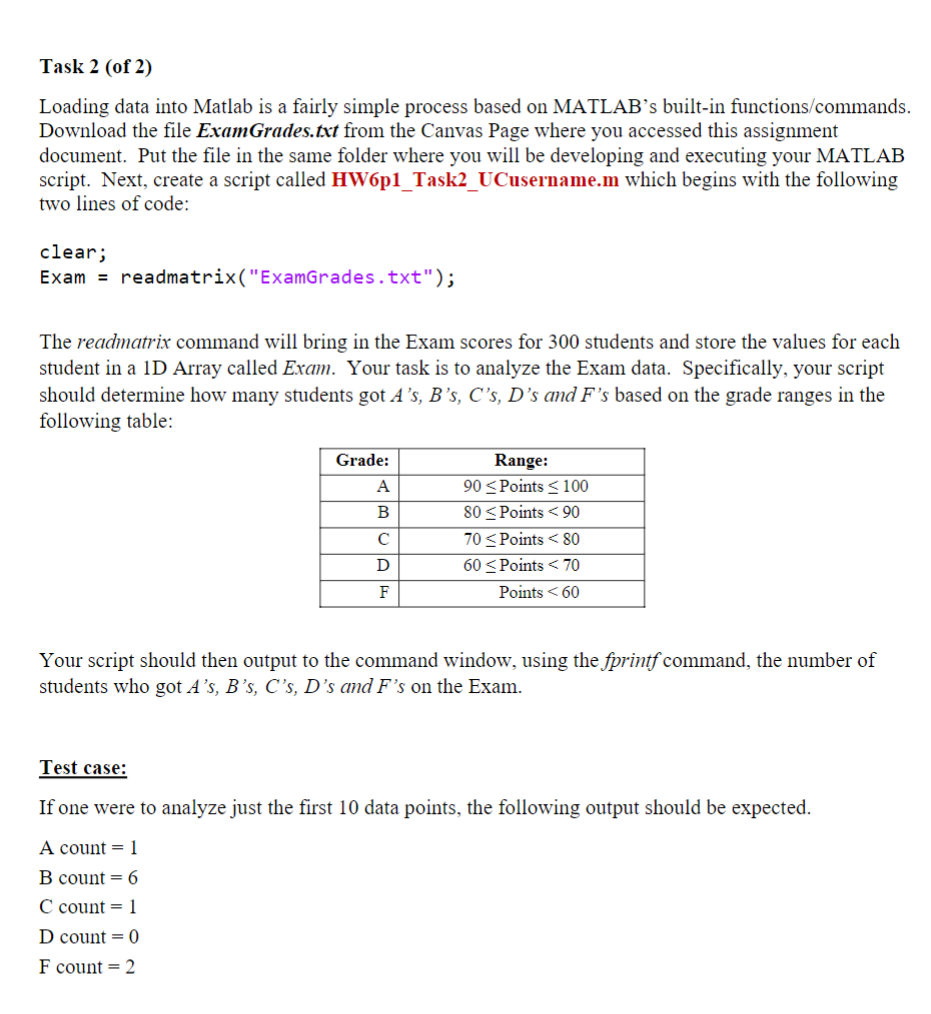
should determine how many students got ssss and s based on the grade ranges in the
following table:
Your script should then output to the command window, using the fprintf command, the number of
students who got ssss and s on the Exam.
Test case:
If one were to analyze just the first data points, the following output should be expected.
A count
B count
C count
D count
F count
Step by Step Solution
There are 3 Steps involved in it
1 Expert Approved Answer
Step: 1 Unlock

Question Has Been Solved by an Expert!
Get step-by-step solutions from verified subject matter experts
Step: 2 Unlock
Step: 3 Unlock
 Study Help