







Question: Task 4 Run the functions you have defined in Tasks 1 and 2 at least 2 5 times each for different values of N (
Task
Run the functions you have defined in Tasks and at least times each for different values of N and plot the average run time vs compression ratio N Which function runs faster? Why? How does the algorithm scale with compression factor Which of these: logarithmic, exponential, quadratic, or linear In this homework, you will implement a basic compression method for images that will reduce the number of values in color scales
RGB to a compression factor.
In MATLAB, images can be represented with dimensional arrays where the first dimension represents height, the second
dimension represents width, and the third dimension represents the color components RGB The values in this array can be
between with representing the lowest intensity for the color. The compression method you will implement in this homework
will reduce the number of values that the color intensities can take to the compression factor such that instead of using values
to represent the color intensity, the compressed image will use only distinct intensity values should be a power of In
implementation, the original intensity range will be divided into subranges, and the values in each subrange will be
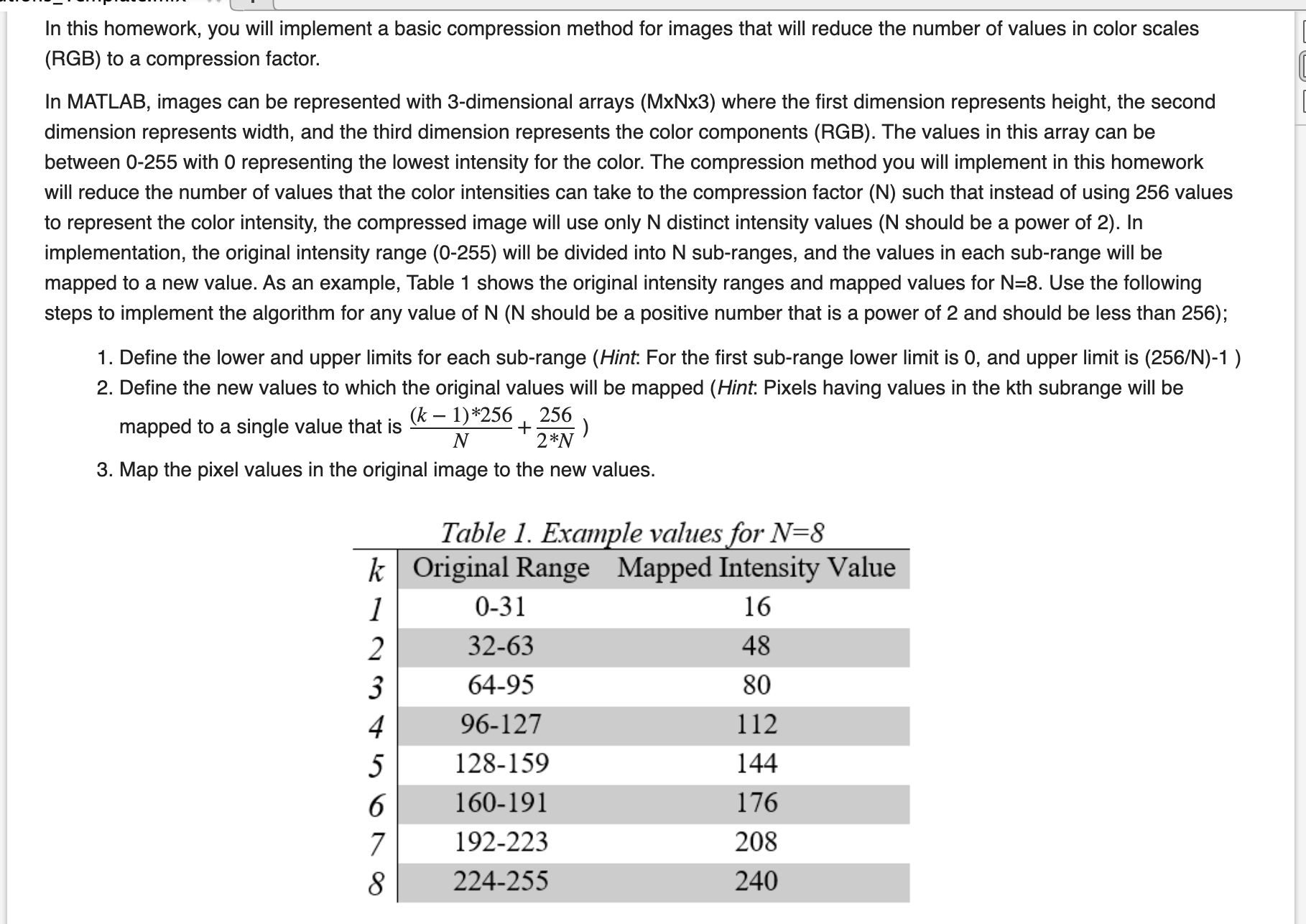
mapped to a new value. As an example, Table shows the original intensity ranges and mapped values for Use the following
steps to implement the algorithm for any value of should be a positive number that is a power of and should be less than ;
Define the lower and upper limits for each subrange Hint: For the first subrange lower limit is and upper limit is N
Define the new values to which the original values will be mapped Hint: Pixels having values in the kth subrange will be
mapped to a single value that is :
Map the pixel values in the original image to the new values.
Table Example values for
Step by Step Solution
There are 3 Steps involved in it
1 Expert Approved Answer
Step: 1 Unlock

Question Has Been Solved by an Expert!
Get step-by-step solutions from verified subject matter experts
Step: 2 Unlock
Step: 3 Unlock
 Study Help