







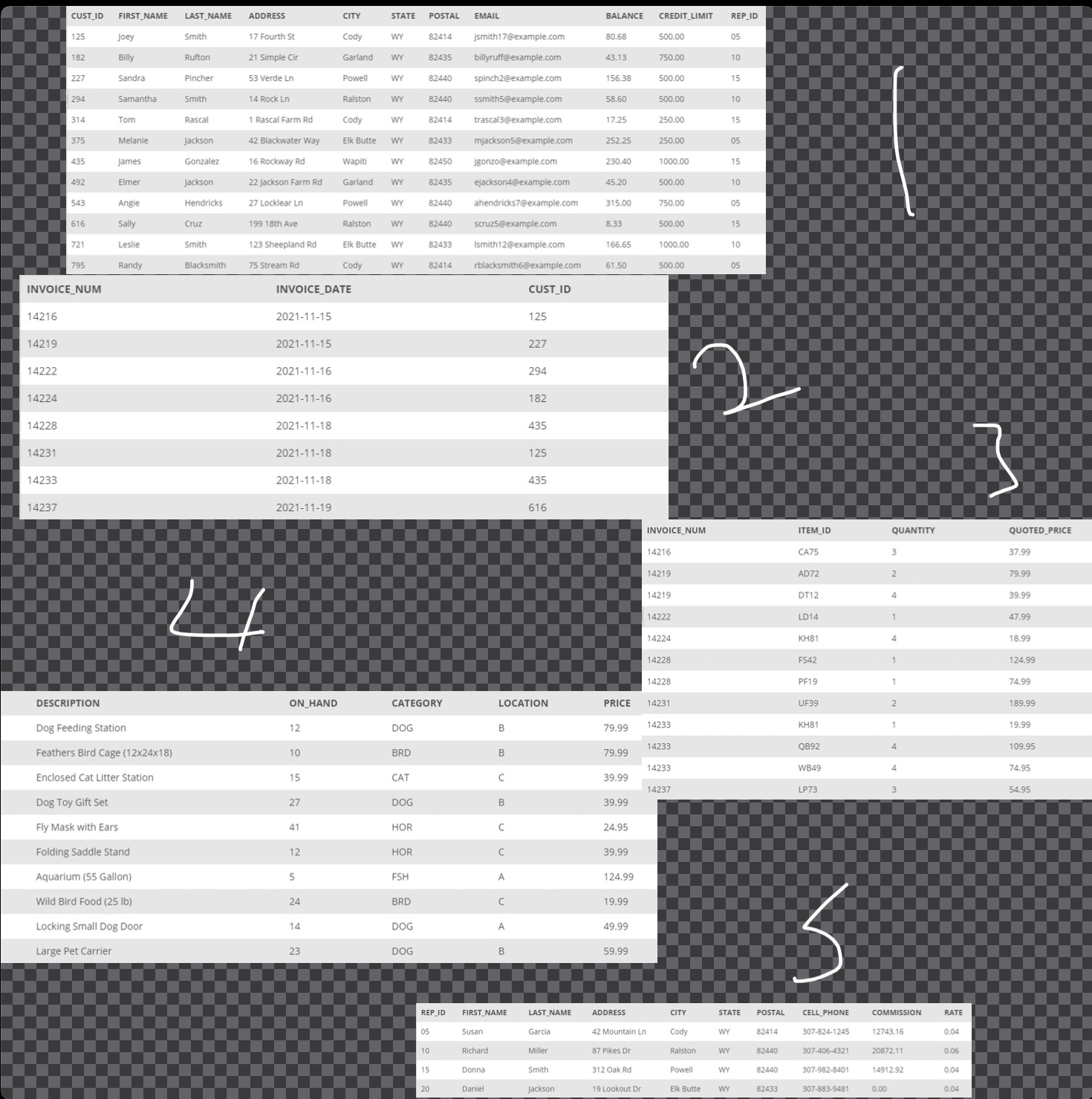
Question: Task 8 : Using the INVOICE _ TOTAL VIEW write and execute the command to retrieve the invoice number and invoice total for only those
Task : Using the INVOICETOTAL VIEW write and execute the command to retrieve the invoice number and invoice total for only those orders totaling more than $
Task : Repeat Task without using the INVOICETOTAL VIEW.
Task : List all the tables contained within the system catalog, but only display the first records with a TABLETYPE of SYSTEM VIEW.
Task : List all the columns contained within the system catalog, but only display the first records that are in the KimTay TABLESCHEMA.
Task : List all the views contained within the system catalog, but only display the first records.
Task : Write the command to display only tables within the system catalog that have the KimTay TABLESCHEMA and are of the type BASE TABLE. Display only the following columns: TABLESCHEMA, TABLENAME, TABLETYPE.
Task : Create an index named ITEMINDEX on the ITEMID column in the INVOICELINE table.
Task : Create an index named ITEMINDEX on the CATEGORY column in the ITEM table.
Task : Create an index named ITEMINDEX on the CATEGORY and LOCATION columns in the ITEM table.
Task : Create an index named ITEMINDEX on the CATEGORY and LOCATION columns in the ITEM table. List categories in descending order.
Task : Delete the index named ITEMINDEX
Task : List every table that you have created thus far. Display the TABLESCHEMA and TABLENAME columns.
Task : List every column in the ITEM table and its associated data type.
Task : Alter the INVOICELINE table by adding the INVOICENUM column as a foreign key referencing the INVOICENUM column in the INVOICES table. From The Textbook of A Guide to SQL th edition
Step by Step Solution
There are 3 Steps involved in it
1 Expert Approved Answer
Step: 1 Unlock

Question Has Been Solved by an Expert!
Get step-by-step solutions from verified subject matter experts
Step: 2 Unlock
Step: 3 Unlock
 Study Help