







Question: Task: CHRM Reference: 23. User Interface Prototypes Use Justinmind to create a user interface (UI) prototype for the Information Technology Service Desk (ITSD). The goal
Task: CHRM Reference: 23. User Interface Prototypes
Use Justinmind to create a user interface (UI) prototype for the Information Technology Service Desk (ITSD).
The goal is to create wireframe mockups of the main web forms in the application.
See the interviews in the ITSD case study to find out what needs to be captured for each form.
Model the forms listed in the assignment 2 marking scheme and shown in the screen capture below.
Be sure to include all necessary inputs for each form.
Select an appropriate widget (e.g. input text field, list box, check box...) for each input.
Enter demonstration/example values for all inputs. For list boxes and select lists enter at least three demonstration/example values.
Implement navigation so that a person who clicks on the Justinmind Simulate button can click back and forth through all of the forms.
Layout and align labels, inputs and buttons/links in an orderly fashion. This is a systems design course, not a web design course, so plain but professional forms with the necessary inputs are sufficient.
You can use a "switchboard" form like the one below as the main form, or use another approach to navigation that you prefer.
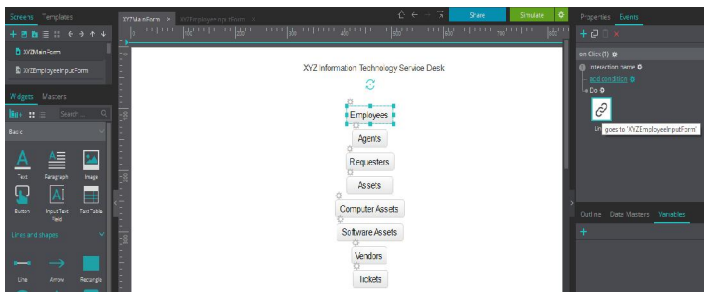
Additional Requirements:
Prefix the name of your screens with XYZ (e.g., XYZMainForm, where X, Y, Z are the first letters of the last name of each team member).
Prefix the screen title of all screens with XYZ (e.g., XYZ Information Technology Service Desk)
Prepare a PDF document named XYZ_ITSD_UI.pdf that contains screenshots of: o Justinmind XYZMainForm similar to the above screenshot (list all the screens on the left and show the onClick event details for the Employees button/link on the right) o Simulate your prototype and take exactly one screenshot for each screen in your prototype
FOLLOWING ARE THE INTERVIEWS REQUIRED FOR MAKING THE PROTOTYPES ((ONLY NEED ON THE FOLLOWING THREE CATEGORIES))
INTERVIEWS: ASSETS
| Question 1 | What are your requirements for tracking assets with the new system? |
We would like to track tangible IT assets like computers (laptops, workstations and servers), printers, switches, routers and access points. We don't want to track non-IT assets like furniture. The company already has off-the-shelf asset management software that can be used for things like that.
| Question 2 | What are your requirements for tracking IT assets? |
There is a basic set of information that we need to capture for all assets. Each asset is of a certain type, and we also have to capture type-specific information.
| Question 3 | What is the basic information that must be recorded for all assets? |
The first thing that comes to mind is a unique asset number.
| Question 4 | We can use a simple sequential number (1, 2, 3) as the asset number. What else? |
The new system must store the product name, product type, manufacturer name, vendor name, procurement method, date obtained, cost, the business impact of the asset, the state of the asset, depreciation method, and the location and department it was purchased for.
| Question 5 | We already covered locations and departments when we talked about business organization. What are the values for "product type"? |
There are many product types. We need to be able to maintain the list of product types. Product type "Software" is particularly important, because we need to track additional information for software.
|
| Question 6 | What do you mean by "business impact"? |
Business impact is a way of indicating how important the asset is to the company. The default impact is "Low".
| |||||
| Question 7 | What states can an asset be in? |
"On order" is for assets that have been ordered but have not yet arrived. "In Store" is for assets that are kept in storage and allocated as needed, for example printer cartridges. "In Use" is for assets that are currently being used by an employee or department. "Missing" is for assets that were not found the last time an audit was done. "Expired" is for assets that the business still has but no longer uses. "Disposed" is for assets that the business has sold or discarded. The default asset state is "On Order".
| |||||||||
| Question 8 | What do you mean by "procurement method"? |
This refers to the method we use to obtain the asset. The default value is "Buy".
| |||||
| Question 9 | Can you clarify "depreciation"? |
Depreciation is the accounting term for writing off an asset's value over its useful life. The way depreciation is done effects taxes and financial statements.
The new system must implement various techniques for calculating depreciation. The default useful life for each type of depreciation is 5 years. It must be possible to change useful life for individual assets.
The default method is "Not Applicable" because some types of assets are not depreciated.
| |||||||
| Question 10 | What about vendors? |
We need to have a list of vendors, because we typically obtain several assets from each vendor. Each vendors will need to be given a unique number, and we'll need to store the vendor number for each asset. We can use a simple sequential integer (1,2,3) as the vendor id number. The address should include province/state and country. For each vendor the system needs to store vendor name, address, phone number and email. The phone number could be a toll-free number, and it may have an extension. Not every vendor has an email address we can use to contact them.
That's the general information we need to capture for assets. That leaves type-specific information.
INTERVIES: COMPUTER ASSETS
| Question 1 | In a previous meeting we talked about the general information that is required to track assets. You mentioned that there is type-specific information for certain assets, so let's cover that today. |
The new system will have to capture type-specific information about computers, starting with the computer type.
| Question 2 | What are the computer types? |
Laptop, desktop and server. Each computer type has a code. The default type is "Desktop".
| |||||
| Question 3 | What else needs to be stored? |
There are a lot of other details that need to be recorded: operating system, service pack, memory, processor, processor manufacturer, CPU speed and number of cores.
Yes, network adapter details need to be recorded: IP address, MAC address, default gateway, SSID, subnet mask, and the address of a DHCP server. This is all the information that needs to be captured for computer assets.
| Question 12 | OK, thanks for explaining how computer assets need to be tracked with the new system. |
| Question 1 | What are your requirements for tracking software with the new system? |
Software is basically an asset, so we need to capture all the same information that we capture for any asset, and we need to collect extra information as well. We need to keep track of software type, software category and license type.
| Question 2 | We already talked about assets, so let's talk about the extra information required for software. What are the software types? |
The types include "excluded" for software the IT department doesn't support, "proprietary" for purchased commercial software and "custom" for internally developed software.
| ||||||||
| Question 3 | What are the software categories? |
This must be a list of categories that we choose to organize software. The new system must let us maintain software categories.
| ||||||||
| Question 4 | What about software licenses? |
We need to keep track of license type. There are many types of licenses, so we need to be able to maintain the list of license types. The default license type is "Individual".
|
| Question 5 | Is there anything else the new system needs to store for software? |
That's everything.
| Question 6 | Thanks for taking the time to explain your requirements for tracking software assets. |
| Question 1 | What are your requirements for tracking assets with the new system? |
XY2 nformaton Techno ogy Serioe Desk Ndgets Waspers Employees . Agens Req esters Assets Computer fssets Sotware Assets vendors Outi ne Date Masters Var atle ard shapes Line XY2 nformaton Techno ogy Serioe Desk Ndgets Waspers Employees . Agens Req esters Assets Computer fssets Sotware Assets vendors Outi ne Date Masters Var atle ard shapes Line
Step by Step Solution
There are 3 Steps involved in it

Get step-by-step solutions from verified subject matter experts
 Study Help