







Question: Task Using the data provided on page 3 of this document (a total of 4 variables and 20 cases: n=20), complete the following tasks: O
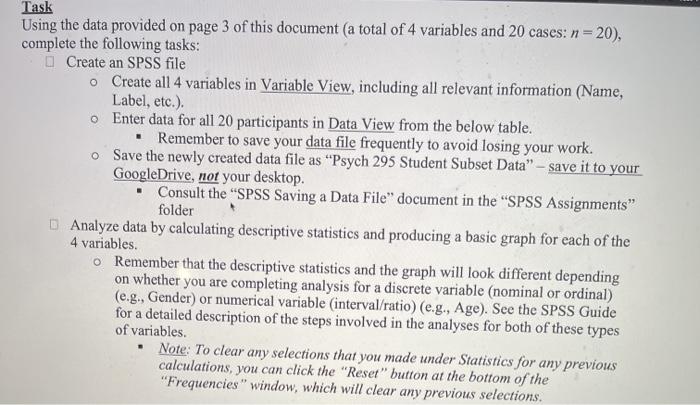
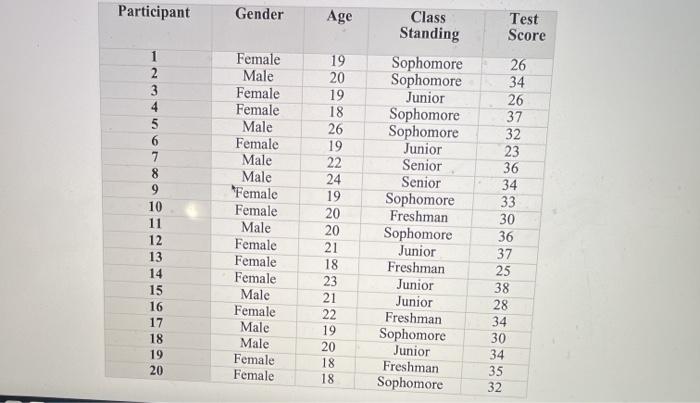
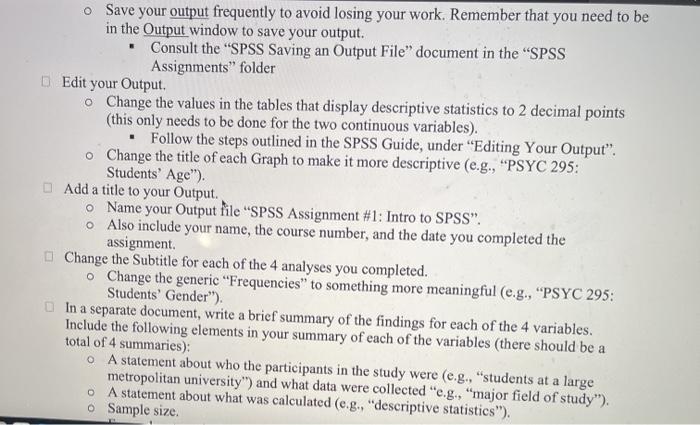
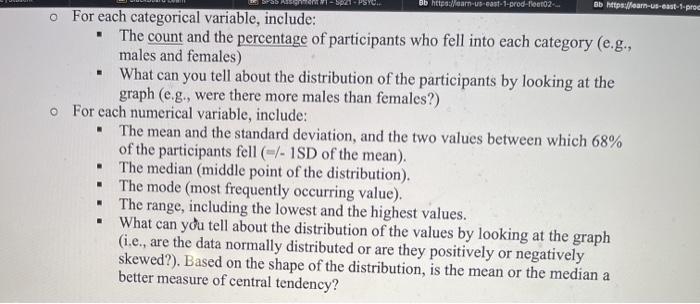
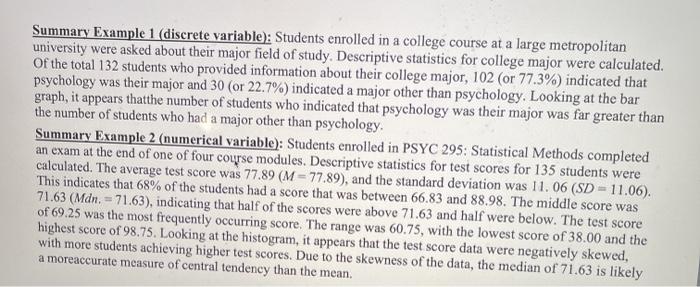
Task Using the data provided on page 3 of this document (a total of 4 variables and 20 cases: n=20), complete the following tasks: O Create an SPSS file o Create all 4 variables in Variable View, including all relevant information (Name, Label, etc.). Enter data for all 20 participants in Data View from the below table. . Remember to save your data file frequently to avoid losing your work. o Save the newly created data file as "Psych 295 Student Subset Data" - save it to your GoogleDrive, not your desktop. Consult the "SPSS Saving a Data File" document in the SPSS Assignments" folder Analyze data by calculating descriptive statistics and producing a basic graph for each of the 4 variables. o Remember that the descriptive statistics and the graph will look different depending on whether you are completing analysis for a discrete variable (nominal or ordinal) (e.g., Gender) or numerical variable interval/ratio) (e.g., Age). See the SPSS Guide for a detailed description of the steps involved in the analyses for both of these types of variables. Note: To clear any selections that you made under Statistics for any previous calculations, you can click the "Reset" button at the bottom of the "Frequencies" window, which will clear any previous selections. Participant Gender Age Test Score 26 1 2 3 4 5 6 7 8 9 10 11 12 13 14 15 16 17 18 19 20 Female Male Female Female Male Female Male Male 'Female Female Male Female Female Female Male Female Male Male Female Female 19 20 19 18 26 19 22 24 19 20 20 21 18 23 21 22 19 20 18 18 Class Standing Sophomore Sophomore Junior Sophomore Sophomore Junior Senior Senior Sophomore Freshman Sophomore Junior Freshman Junior Junior Freshman Sophomore Junior Freshman Sophomore 34 26 37 32 23 36 34 33 30 36 37 25 38 28 34 30 34 35 32 Save your output frequently to avoid losing your work. Remember that you need to be in the Output window to save your output. Consult the SPSS Saving an Output File document in the "SPSS Assignments" folder Edit your Output o Change the values in the tables that display descriptive statistics to 2 decimal points (this only needs to be done for the two continuous variables). Follow the steps outlined in the SPSS Guide, under "Editing Your Output". o Change the title of each Graph to make it more descriptive (e.g., "PSYC 295: Students' Age"). Add a title to your Output. Name your Output file SPSS Assignment #1: Intro to SPSS. Also include your name, the course number, and the date you completed the assignment Change the Subtitle for each of the 4 analyses you completed. Change the generic "Frequencies" to something more meaningful (e.g., "PSYC 295: Students' Gender"). In a separate document, write a brief summary of the findings for each of the 4 variables. Include the following elements in your summary of each of the variables (there should be a total of 4 summaries): A statement about who the participants in the study were (e.g., "students at a large metropolitan university) and what data were collected "e.g., "major field of study"). A statement about what was calculated (e.g., "descriptive statistics"). o Sample size. O Bb https://car-us-cast-1-prod-fear02 Bb https://learn-us-east-1.pro . o For each categorical variable, include: The count and the percentage of participants who fell into each category (e.g., males and females) . What can you tell about the distribution of the participants by looking at the graph (e.g., were there more males than females?) For each numerical variable, include: . The mean and the standard deviation, and the two values between which 68% of the participants fell (-/- 1SD of the mean). The median (middle point of the distribution). The mode (most frequently occurring value). The range, including the lowest and the highest values. What can you tell about the distribution of the values by looking at the graph (i.e., are the data normally distributed or are they positively or negatively skewed?). Based on the shape of the distribution, is the mean or the median a better measure of central tendency? . . . Summary Example 1 (discrete variable): Students enrolled in a college course at a large metropolitan university were asked about their major field of study. Descriptive statistics for college major were calculated. of the total 132 students who provided information about their college major, 102 (or 77.3%) indicated that psychology was their major and 30 (or 22.7%) indicated a major other than psychology. Looking at the bar graph, it appears thatthe number of students who indicated that psychology was their major was far greater than the number of students who had a major other than psychology Summary Example 2 (numerical variable): Students enrolled in PSYC 295: Statistical Methods completed an exam at the end of one of four course modules. Descriptive statistics for test scores for 135 students were calculated. The average test score was 77.89 (M = 77.89), and the standard deviation was 11.06 (SD = 11.06). This indicates that 68% of the students had a score that was between 66.83 and 88.98. The middle score was 71.63 (Mdn. = 71.63), indicating that half of the scores were above 71.63 and half were below. The test score of 69.25 was the most frequently occurring score. The range was 60.75, with the lowest score of 38.00 and the highest score of 98.75. Looking at the histogram, it appears that the test score data were negatively skewed, with more students achieving higher test scores. Due to the skewness of the data, the median of 71.63 is likely a moreaccurate measure of central tendency than the mean. Task Using the data provided on page 3 of this document (a total of 4 variables and 20 cases: n=20), complete the following tasks: O Create an SPSS file o Create all 4 variables in Variable View, including all relevant information (Name, Label, etc.). Enter data for all 20 participants in Data View from the below table. . Remember to save your data file frequently to avoid losing your work. o Save the newly created data file as "Psych 295 Student Subset Data" - save it to your GoogleDrive, not your desktop. Consult the "SPSS Saving a Data File" document in the SPSS Assignments" folder Analyze data by calculating descriptive statistics and producing a basic graph for each of the 4 variables. o Remember that the descriptive statistics and the graph will look different depending on whether you are completing analysis for a discrete variable (nominal or ordinal) (e.g., Gender) or numerical variable interval/ratio) (e.g., Age). See the SPSS Guide for a detailed description of the steps involved in the analyses for both of these types of variables. Note: To clear any selections that you made under Statistics for any previous calculations, you can click the "Reset" button at the bottom of the "Frequencies" window, which will clear any previous selections. Participant Gender Age Test Score 26 1 2 3 4 5 6 7 8 9 10 11 12 13 14 15 16 17 18 19 20 Female Male Female Female Male Female Male Male 'Female Female Male Female Female Female Male Female Male Male Female Female 19 20 19 18 26 19 22 24 19 20 20 21 18 23 21 22 19 20 18 18 Class Standing Sophomore Sophomore Junior Sophomore Sophomore Junior Senior Senior Sophomore Freshman Sophomore Junior Freshman Junior Junior Freshman Sophomore Junior Freshman Sophomore 34 26 37 32 23 36 34 33 30 36 37 25 38 28 34 30 34 35 32 Save your output frequently to avoid losing your work. Remember that you need to be in the Output window to save your output. Consult the SPSS Saving an Output File document in the "SPSS Assignments" folder Edit your Output o Change the values in the tables that display descriptive statistics to 2 decimal points (this only needs to be done for the two continuous variables). Follow the steps outlined in the SPSS Guide, under "Editing Your Output". o Change the title of each Graph to make it more descriptive (e.g., "PSYC 295: Students' Age"). Add a title to your Output. Name your Output file SPSS Assignment #1: Intro to SPSS. Also include your name, the course number, and the date you completed the assignment Change the Subtitle for each of the 4 analyses you completed. Change the generic "Frequencies" to something more meaningful (e.g., "PSYC 295: Students' Gender"). In a separate document, write a brief summary of the findings for each of the 4 variables. Include the following elements in your summary of each of the variables (there should be a total of 4 summaries): A statement about who the participants in the study were (e.g., "students at a large metropolitan university) and what data were collected "e.g., "major field of study"). A statement about what was calculated (e.g., "descriptive statistics"). o Sample size. O Bb https://car-us-cast-1-prod-fear02 Bb https://learn-us-east-1.pro . o For each categorical variable, include: The count and the percentage of participants who fell into each category (e.g., males and females) . What can you tell about the distribution of the participants by looking at the graph (e.g., were there more males than females?) For each numerical variable, include: . The mean and the standard deviation, and the two values between which 68% of the participants fell (-/- 1SD of the mean). The median (middle point of the distribution). The mode (most frequently occurring value). The range, including the lowest and the highest values. What can you tell about the distribution of the values by looking at the graph (i.e., are the data normally distributed or are they positively or negatively skewed?). Based on the shape of the distribution, is the mean or the median a better measure of central tendency? . . . Summary Example 1 (discrete variable): Students enrolled in a college course at a large metropolitan university were asked about their major field of study. Descriptive statistics for college major were calculated. of the total 132 students who provided information about their college major, 102 (or 77.3%) indicated that psychology was their major and 30 (or 22.7%) indicated a major other than psychology. Looking at the bar graph, it appears thatthe number of students who indicated that psychology was their major was far greater than the number of students who had a major other than psychology Summary Example 2 (numerical variable): Students enrolled in PSYC 295: Statistical Methods completed an exam at the end of one of four course modules. Descriptive statistics for test scores for 135 students were calculated. The average test score was 77.89 (M = 77.89), and the standard deviation was 11.06 (SD = 11.06). This indicates that 68% of the students had a score that was between 66.83 and 88.98. The middle score was 71.63 (Mdn. = 71.63), indicating that half of the scores were above 71.63 and half were below. The test score of 69.25 was the most frequently occurring score. The range was 60.75, with the lowest score of 38.00 and the highest score of 98.75. Looking at the histogram, it appears that the test score data were negatively skewed, with more students achieving higher test scores. Due to the skewness of the data, the median of 71.63 is likely a moreaccurate measure of central tendency than the mean
Step by Step Solution
There are 3 Steps involved in it

Get step-by-step solutions from verified subject matter experts
 Study Help