







Question: TASK1: (4pts) Write the HTML, CSS, and JavaScript to create the page shown below. The page includes a label, a textbox and a button. When
TASK1: (4pts) Write the HTML, CSS, and JavaScript to create the page shown below. The page includes a label, a textbox and a button. When the page loads, it should appear as shown in Figure1. The user can enter the names of the courses he/she wishes to register one at a time and then clicks on the Add Course button. Figure 2 shows how the page appears after the user adds the two courses as shown. After the user clicks the add button, the value the user enters and the remove course button are added as list items inside an unordered list. When the user clicks the remove course button, the corresponding course is deleted from the list as shown in Figure 3
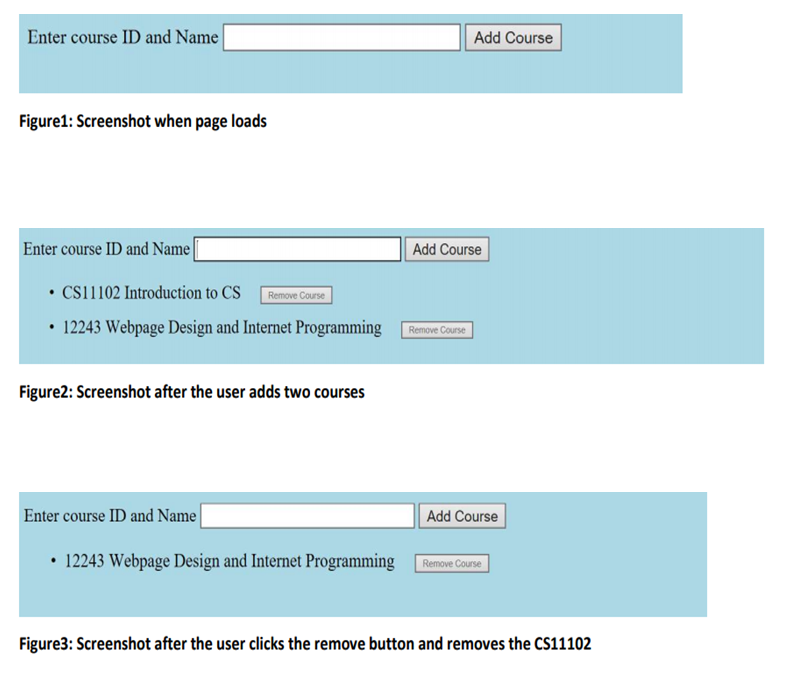
Enter course ID and Name Add Course Figure1: Screenshot when page loads Enter course ID and Name Add Course . CS11102 Introduction to CS Remove Course 12243 Webpage Design and Internet Programming Remove Course Figure2: Screenshot after the user adds two courses Enter course ID and Name Add Course 12243 Webpage Design and Internet Programming Remove Course Figure3: Screenshot after the user clicks the remove button and removes the CS11102
Step by Step Solution
There are 3 Steps involved in it

Get step-by-step solutions from verified subject matter experts
 Study Help