







Question: Task#1. Design and implement C/C++ program (a2part1.c or a2part1.cpp, and its executable named a2part1) to create directories and files, and/or to navigate the directories as
Task#1. Design and implement C/C++ program (a2part1.c or a2part1.cpp, and its executable named a2part1) to create directories and files, and/or to navigate the directories as shown below.
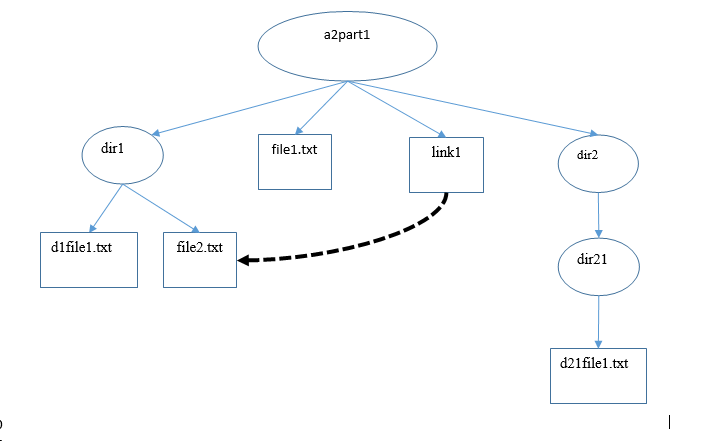
Before and after each call (e.g., to create a file or to create a directory), your program should print a message with a time-stamp (e.g., " ** created dir1 at 2018.09.29 13:59 **").
Task#2. After completing Task#1, extend your program in a2part1, to display each directory entry information (files and directories) of current directory, and with "chdir" call to change to its subdirectory. Your program should keep track of the directory structure so that your program may navigate all the subdirectories from the top directory (a2part1).
Note. If you cannot do Task#1 here, you may use the example done in Assignment1 Part1 for this Task.
Output the current working directory as your program changes its current working directory so that your reader should be able to follow the execution of your program as it navigates (into its subdirectories or out of its subdirectories).
You should use "readdir" in APUE 4.22 and "stat" in APUE4.2 to display each directory entry information (similar to what "ls -l" command displays).
Note. Your program should not use any of "system( )" calls for this part (otherwise, your grade for this part will be 0).
Task#3. Extend your program
(1) to change the access-attribute of "file2.txt" to "rw- rw- r--" using "chmod" call (in APUE 4.9).
(2) to open a file "file1.txt" in dir1 for "write" and output the list of directory entries of this directory ("dir1"), and then close the file.
Note. Your program should not use any of "system( )" calls for this part (otherwise, your grade for this part will be 0).
Task#4. Use "ls -lR" command to show all the directories and files (with detailed file information) of the directory "a2part1" to show that your program ran successfully. This is done by running a command as shown below.
{cslinux1:~/cs3377/a2part1} ls -lR
.:
total 8
drwx--x--x 2 rkm010300 cs 4096 Jan 8 2018 dir1
drwx--x--x 2 rkm010300 cs 4096 Jan 8 2018 dir2
-rw------- 1 rkm010300 cs 0 Jan 8 2018 file1
-rw------- 2 rkm010300 cs 0 Jan 8 2018 link1
./dir1:
total 0
-rw------- 1 rkm010300 cs 0 Jan 8 2018 dir1file1
./dir2:
total 0
-rw------- 2 rkm010300 cs 0 Jan 8 2018 dir2file1
Task#5. Provide Makefile to compile the program to generate its executable, and its session log of the execution.
a2parti dir1 file1.txt inkl dir2 d1file1.txt file2.txt dir21 d21file1.txt
Step by Step Solution
There are 3 Steps involved in it

Get step-by-step solutions from verified subject matter experts
 Study Help