







Question: Tasks: For our basic web browser, we will first focus on being able to keep a list of bookmarks (as local file or as http
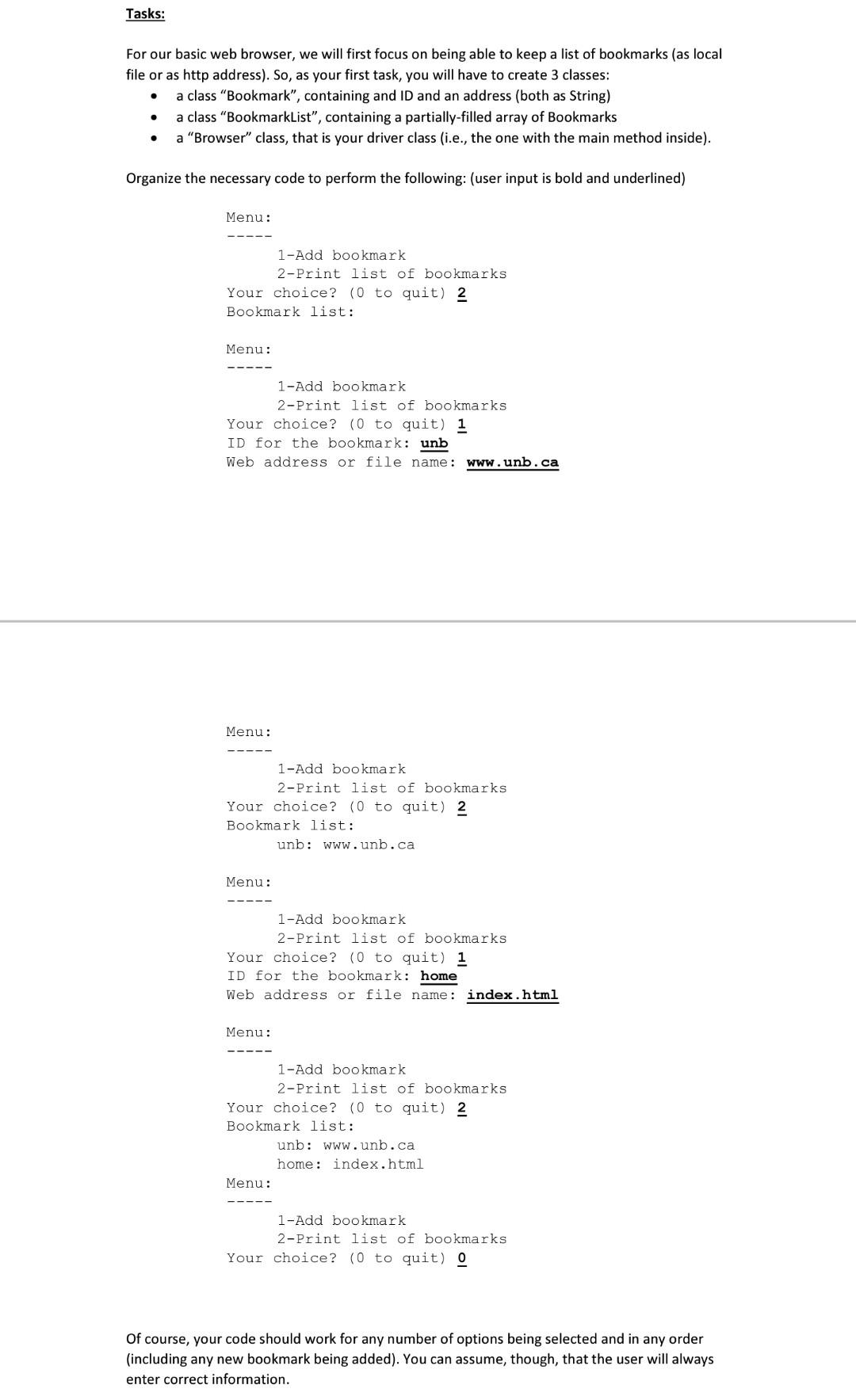
Tasks: For our basic web browser, we will first focus on being able to keep a list of bookmarks (as local file or as http address). So, as your first task, you will have to create 3 classes: a class "Bookmark, containing and ID and an address (both as String) a class "BookmarkList, containing a partially-filled array of Bookmarks a "Browser" class, that is your driver class (i.e., the one with the main method inside). . Organize the necessary code to perform the following: (user input is bold and underlined) Menu: 1-Add bookmark 2-Print list of bookmarks Your choice? (0 to quit) 2 Bookmark list: Menu: 1-Add bookmark 2-Print list of bookmarks Your choice? (0 to quit) 1 ID for the bookmark: unb Web address or file name: www.unb.ca Menu: 1-Add bookmark 2-Print list of bookmarks Your choice? (0 to quit) 2 Bookmark list: unb: www.unb.ca Menu: 1-Add bookmark 2-Print list of bookmarks Your choice? (0 to quit) 1 ID for the bookmark: home Web address or file name: index.html Menu: 1-Add bookmark 2-Print list of bookmarks Your choice? (0 to quit) 2 Bookmark list: unb: www.unb.ca home: index.html Menu: 1-Add bookmark 2-Print list of bookmarks Your choice? (0 to quit) 0 Of course, your code should work for any number of options being selected and in any order (including any new bookmark being added). You can assume, though, that the user will always enter correct information
Step by Step Solution
There are 3 Steps involved in it

Get step-by-step solutions from verified subject matter experts
 Study Help