



Question: TCN Output is wrong and I am not sure why though. I got an output of this graph, anyone knows why is it the case?
TCN Output is wrong and I am not sure why though.
I got an output of this graph, anyone knows why is it the case? What did I do that is wrong?
I am guessing that I didn't format my data well which probably is that case since TCN is 1D CNN + convolution but I'm not sure exactly on how to convert it. Can anyone help?
import numpy as np import matplotlib.pyplot as plt import pandas as pd from tensorflow.keras import Input, Model from tensorflow.keras.layers import Dense from tqdm.notebook import tqdm from tcn import TCN plt.style.use('seaborn') import pandas as pd from sklearn.preprocessing import MinMaxScaler from sklearn import preprocessing from sklearn.metrics import mean_squared_error from sklearn.metrics import mean_absolute_error from sklearn.metrics import r2_score from math import sqrt from tensorflow.keras.layers import * from tensorflow.keras.models import * from tensorflow.keras.optimizers import Adam import tensorflow.keras.backend as K import pandas_datareader as pdd import math np.random.seed(100) df = pdd.DataReader('AAPL', data_source='yahoo', start='2012-01-01', end='2020-12-31') df data = df.filter(['Close']) dataset = data.values len(dataset) training_data_size = math.ceil(len(dataset)*0.7) training_data_size scaler = MinMaxScaler(feature_range=(0,1)) scaled_data = scaler.fit_transform(dataset) scaled_data train_data = scaled_data[0:training_data_size,:] x_train = [] y_train = [] for i in range(60, len(train_data)): x_train.append(train_data[i-60:i, 0]) y_train.append(train_data[i,0]) if i 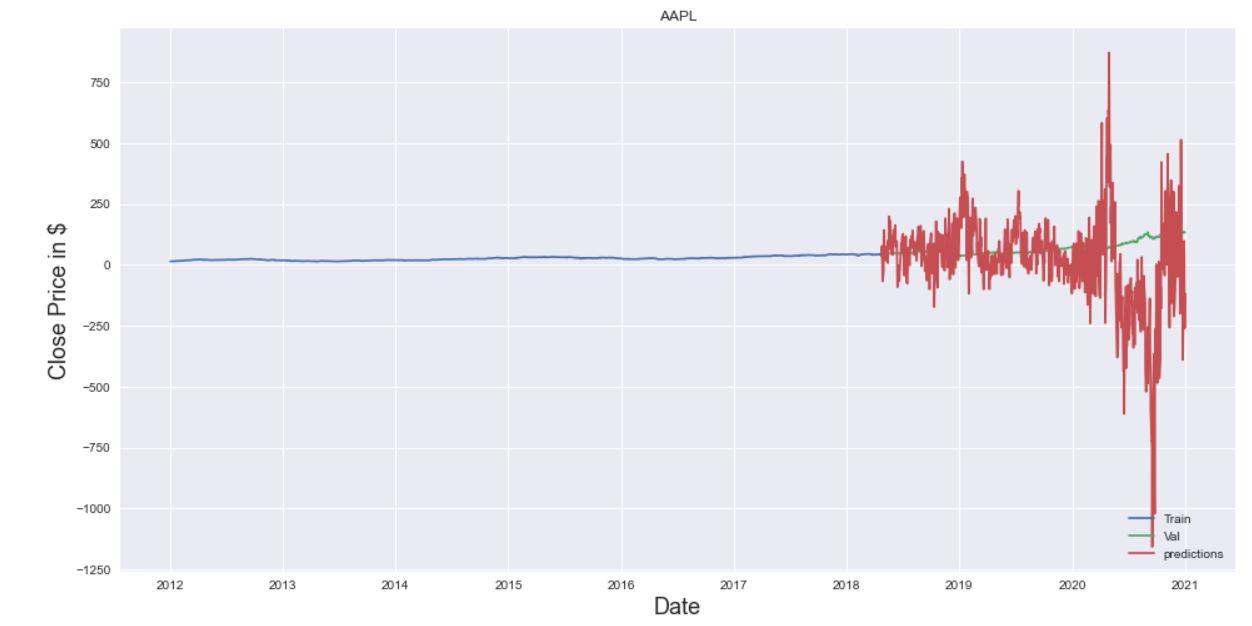
AAPL 750 500 250 0 Close Price in $ -250 -500 -750 -1000 Train Val predictions -1250 2012 2013 2014 2015 2016 2017 2018 2019 2020 2021 Date AAPL 750 500 250 0 Close Price in $ -250 -500 -750 -1000 Train Val predictions -1250 2012 2013 2014 2015 2016 2017 2018 2019 2020 2021 Date
Step by Step Solution
There are 3 Steps involved in it
1 Expert Approved Answer
Step: 1 Unlock

Question Has Been Solved by an Expert!
Get step-by-step solutions from verified subject matter experts
Step: 2 Unlock
Step: 3 Unlock