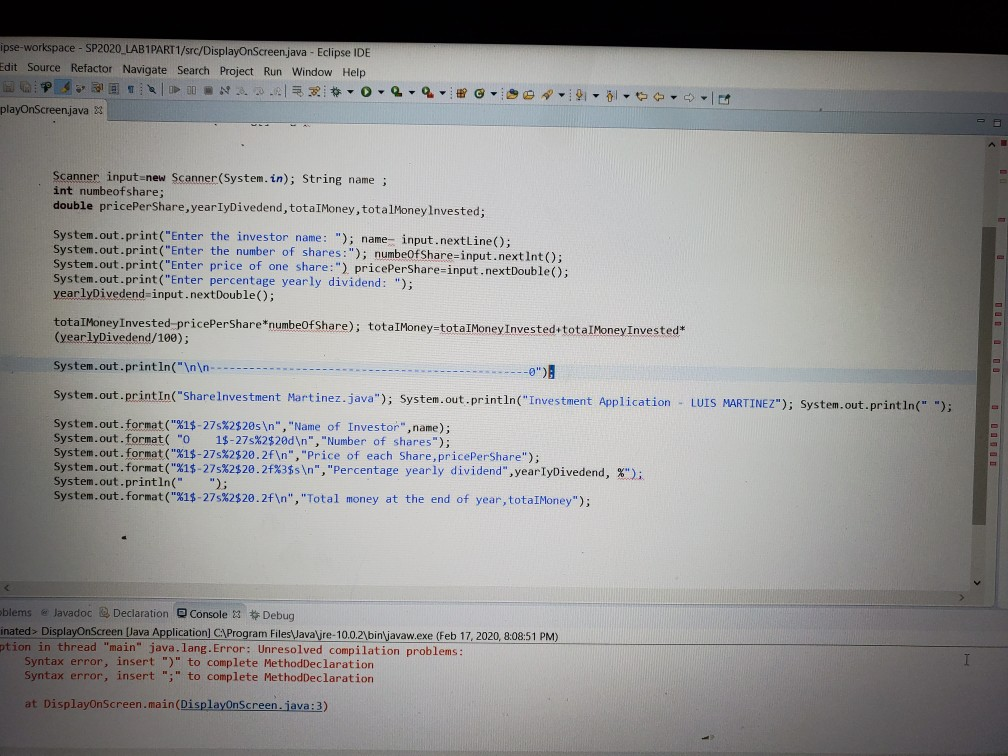
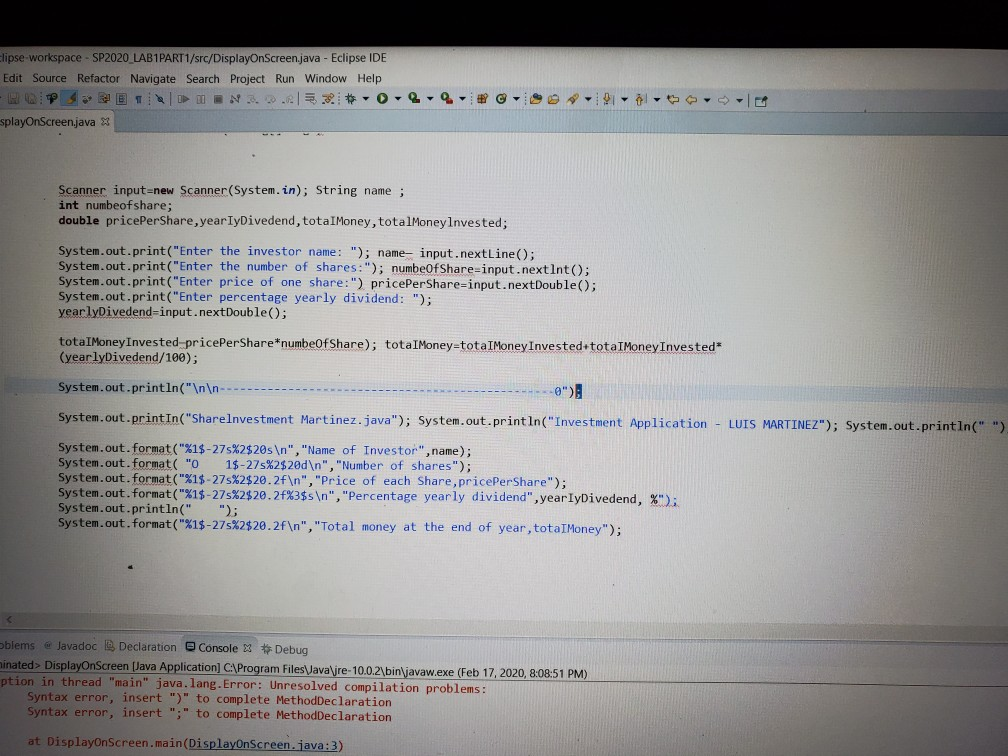
Tell me who to fix the code to it on Eclipse IDE
the lab requirements are
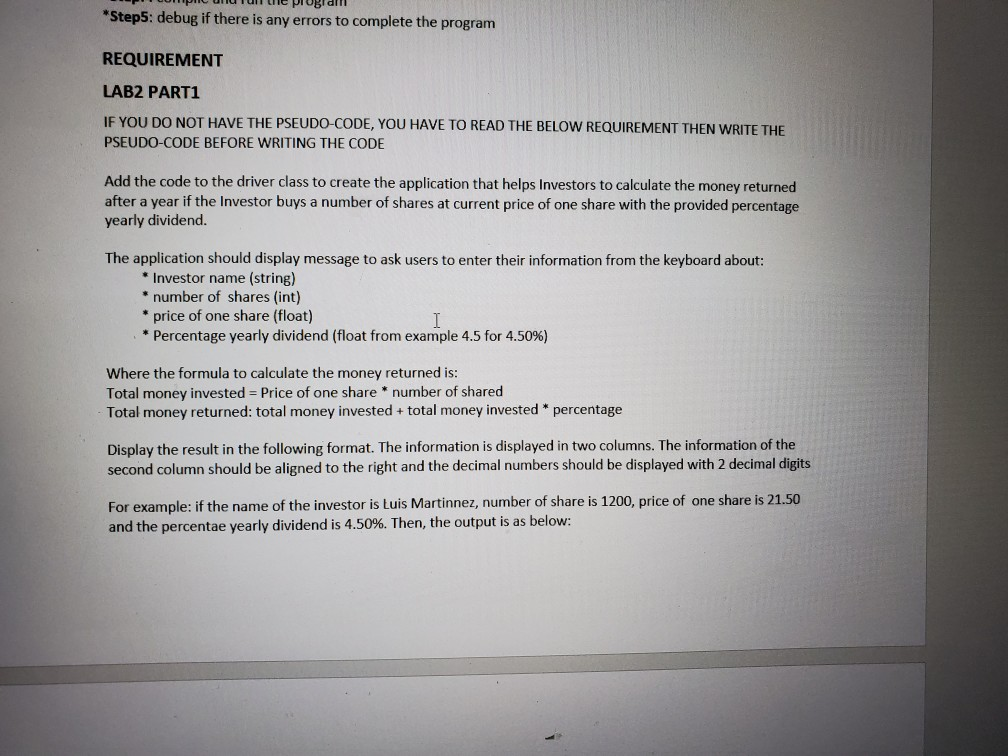
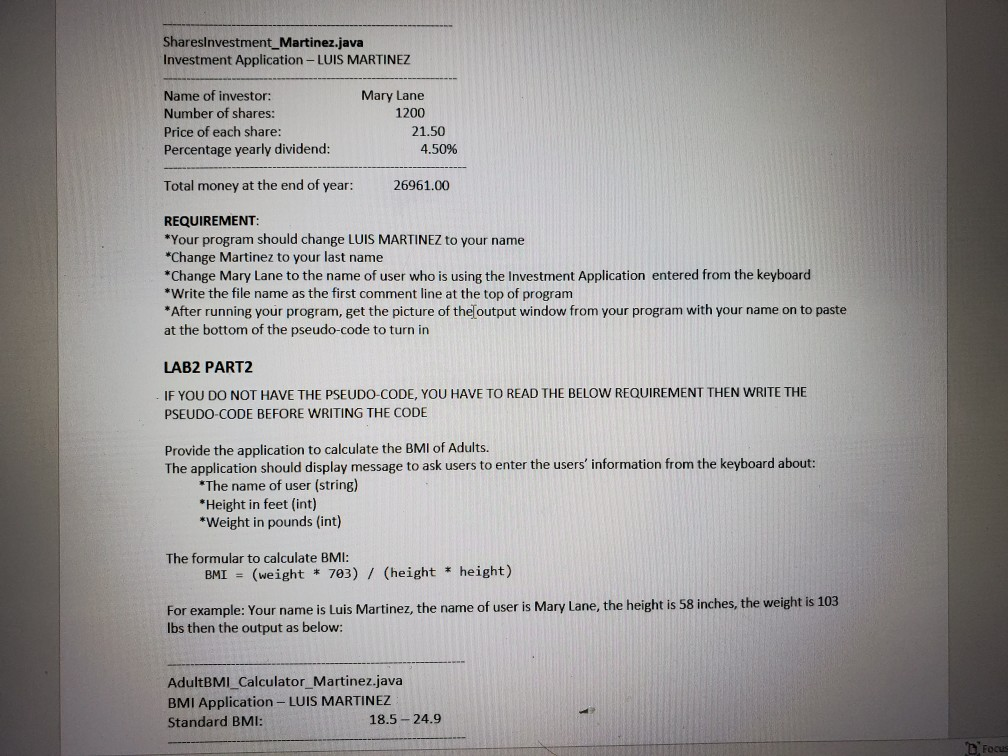
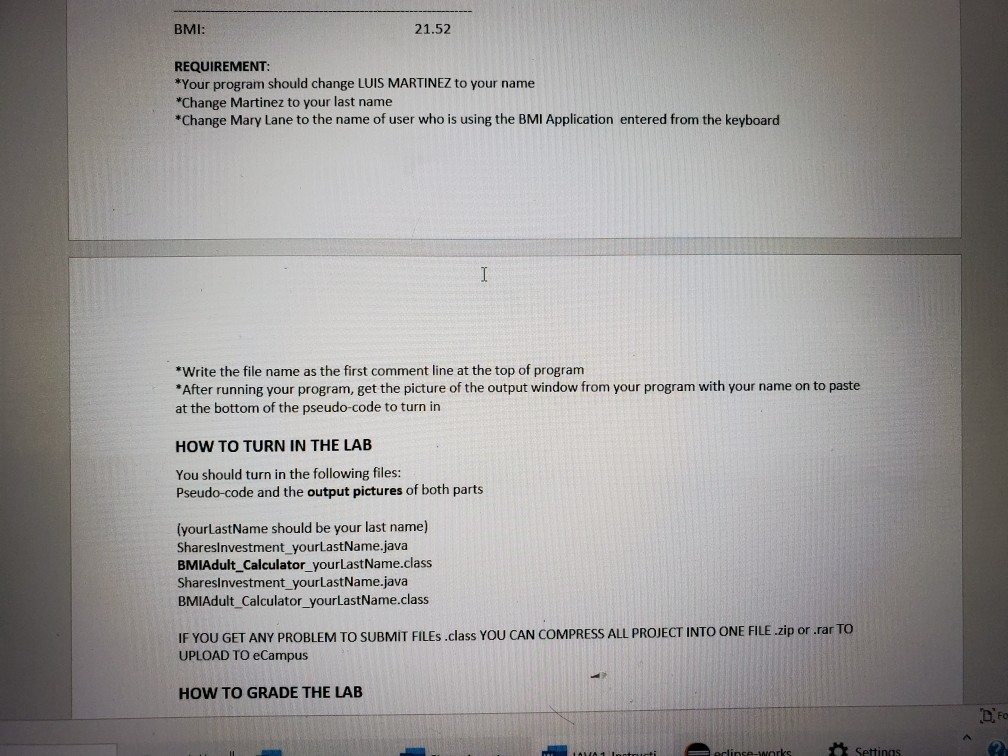
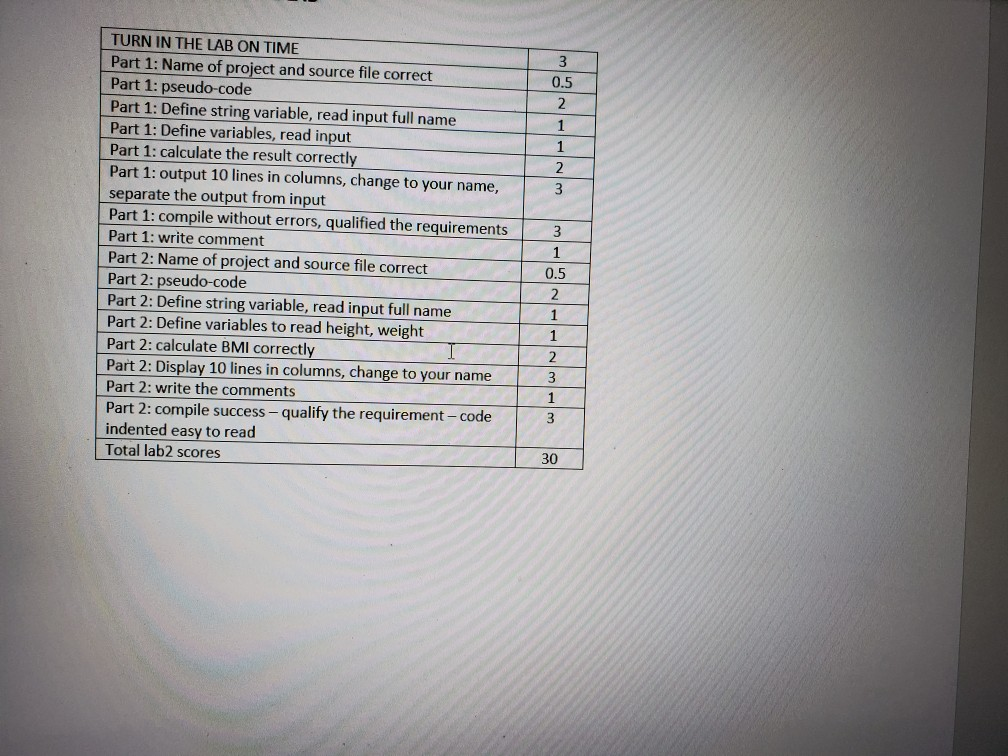
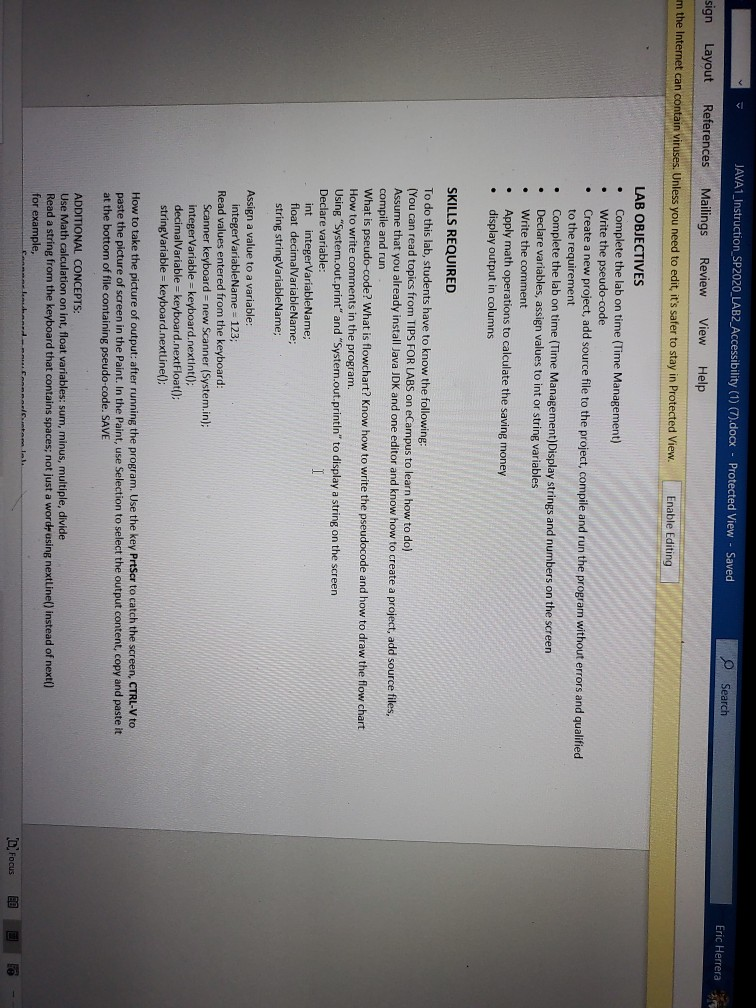
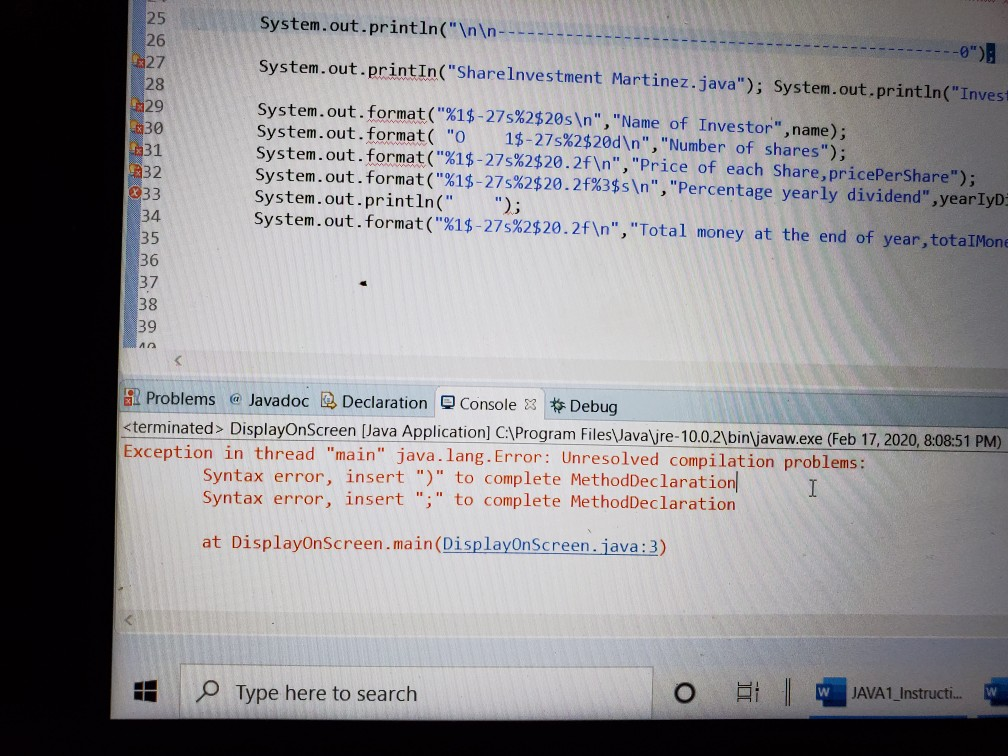
pse-workspace - SP2020 LAB1PART1/src/DisplayOnScreenjava - Eclipse IDE dit Source Refactor Navigate Search Project Run Window Help OPT ION. 30 ...9 playOnScreenjava -9 -9- - - Scanner input new Scanner(System.in); String name int numbeofshare; double pricePerShare, year IyDivedend, totalMoney, totalMoney Invested; System.out.print("Enter the investor name: "); name input.nextLine(); System.out.print("Enter the number of shares:"); numbeOfShare-input.nextInt(); System.out.print("Enter price of one share:") pricePerShare=input.nextDouble(); System.out.print("Enter percentage yearly dividend: "); yearlyDivedend input.nextDouble(); totalMoney Invested pricePerShare*numbeOfShare); totalMoney=totalMoney Invested totalMoney Invested* (yearlyDivedend/100); System.out.println(" ----------- -------- ------ ------ ---0") System.out.print In("ShareInvestment Martinez.java"); System.out.println("Investment Application - LUIS MARTINEZ"); System.out.println(" "); System.out.format("%1$-27s%2520s ", "Name of Investor", name); System.out.format("o 1$-27s%2$20d ", "Number of shares"); System.out.format("%1$-27s%2$20.2f ","Price of each Share,pricePerShare"); System.out.format("%1$-27s%2$20.2f%3$s ", "Percentage yearly dividend",year IyDivedend,%"); System.out.println(" "); System.out.format("%1$-27s%2$20.2f ", "Total money at the end of year, totalMoney"); blems e Javadoc Declaration Console X Debug nated DisplayOnScreen (Java Application) C:\Program Files\Java' jre- 10.0.2\binjavaw.exe (Feb 17, 2020, 8:08:51 PM) tion in thread "main" java.lang. Error: Unresolved compilation problems: Syntax error, insert ")" to complete MethodDeclaration Syntax error, insert ";" to complete MethodDeclaration at DisplayOnScreen.main(DisplayOnScreen.java:3) lipse workspace - SP2020_LAB1PART1/src/DisplayOnScreen java - Eclipse IDE Edit Source Refactor Navigate Search Project Run Window Help splayOnScreenjava X Scanner input-new Scanner(System.in); String name ; int numbeofshare; double pricePerShare, year IyDivedend, totalMoney, totalMoneyInvested; System.out.print("Enter the investor name: "); name- input.nextLine(); System.out.print("Enter the number of shares:"); numbeOfShare=input.nextInt(); System.out.print("Enter price of one share:") pricePerShare=input.nextDouble(); System.out.print("Enter percentage yearly dividend: "); yearlyDivedend=input.nextDouble(); totalMoney Invested pricePerShare*numbeOf Share); totalMoney=totaIMoney Invested totalMoney Invested* (yearlyDivedend/100); System.out.println(" ------- System.out.printIn("Sharelnvestment Martinez.java"); System.out.println("Investment Application - LUIS MARTINEZ"); System.out.println(" "). System.out.format("%1$-27s%2$20s ","Name of Invest System.out.format( "O 1$-27s%2$20d ", "Number of shares"); System.out.format("X1$-27s%2$20.2f ","Price of each Share,pricePerShare"); System.out.format("%1$-27s%2$20.2f%3$s ", "Percentage yearly dividend", year IyDivedend, %'); System.out.println(" "); System.out.format("%1$-27s%2$20.2f ", "Total money at the end of year, totalMoney"); blems a Javadoc Declaration Console x Debug Inated DisplayOnScreen (Java Application C:\Program FilesVava jre- 10.0.2\bin\javaw.exe (Feb 17, 2020, 8:08:51 PM) ption in thread "main" java.lang.Error: Unresolved compilation problems: Syntax error, insert ")" to complete MethodDeclaration Syntax error, insert ";" to complete MethodDeclaration at DisplayOnScreen.main(DisplayOnScreen.java:3) NM System.out.println(" ---- ---------------9") 1627 System.out.printIn("ShareInvestment Martinez.java"); System.out.println("Invest 28 429 w30 431 System.out.format("%1$-27s%2$20s ","Name of Investor", name): System.out.format( "O 1$-27s%2$20d ", "Number of shares"); System.out.format("%1$-27s%2$20.2f ","Price of each Share, pricePerShare"); System.out.format("%1$-27s%2$20.2f%3$s ", "Percentage yearly dividend", yearlyd. System.out.println(" "); System.out.format("%1$-27s%2$20.2f ", "Total money at the end of year, totalMone 9 Problems @ Javadoc Declaration Console x * Debug DisplayOnScreen (Java Application] C:\Program Files\Java\jre-10.0.2\bin\javaw.exe (Feb 17, 2020, 8:08:51 PM) Exception in thread "main" java.lang. Error: Unresolved compilation problems: Syntax error, insert ")" to complete MethodDeclaration Syntax error, insert ";" to complete MethodDeclaration at DisplayOnScreen.main(DisplayOnScreen.java:3) Type here to search O A AVAL Instructiva UUMI UN Tui le Pr Bidili *Step5: debug if there is any errors to complete the program REQUIREMENT LAB2 PART1 IF YOU DO NOT HAVE THE PSEUDO-CODE, YOU HAVE TO READ THE BELOW REQUIREMENT THEN WRITE THE PSEUDO-CODE BEFORE WRITING THE CODE Add the code to the driver class to create the application that helps Investors to calculate the money returned after a year if the Investor buys a number of shares at current price of one share with the provided percentage yearly dividend. The application should display message to ask users to enter their information from the keyboard about: * Investor name (string) * number of shares (int) * price of one share (float) * Percentage yearly dividend (float from example 4.5 for 4.50%) Where the formula to calculate the money returned is: Total money invested Price of one share * number of shared Total money returned: total money invested + total money invested * percentage Display the result in the following format. The information is displayed in two columns. The information of the second column should be aligned to the right and the decimal numbers should be displayed with 2 decimal digits For example: if the name of the investor is Luis Martinnez, number of share is 1200, price of one share is 21.50 and the percentae yearly dividend is 4.50%. Then, the output is as below: SharesInvestment_Martinez.java Investment Application - LUIS MARTINEZ Name of investor: Number of shares: Price of each share: Percentage yearly dividend: Mary Lane 1200 21.50 4.50% Total money at the end of year: 26961.00 REQUIREMENT: *Your program should change LUIS MARTINEZ to your name *Change Martinez to your last name *Change Mary Lane to the name of user who is using the Investment Application entered from the keyboard *Write the file name as the first comment line at the top of program *After running your program, get the picture of the output window from your program with your name on to paste at the bottom of the pseudo-code to turn in LAB2 PART2 - IF YOU DO NOT HAVE THE PSEUDO-CODE, YOU HAVE TO READ THE BELOW REQUIREMENT THEN WRITE THE PSEUDO-CODE BEFORE WRITING THE CODE Provide the application to calculate the BMI of Adults. The application should display message to ask users to enter the users' information from the keyboard about: *The name of user (string) *Height in feet (int) *Weight in pounds (int) The formular to calculate BMI: BMI = (weight * 703) / (height * height) For example: Your name is Luis Martinez, the name of user is Mary Lane, the height is 58 inches, the weight is 103 lbs then the output as below: AdultBMI_Calculator_Martinez.java BMI Application - LUIS MARTINEZ Standard BMI: 18.5 -24.9 D Focus BMI: 21.52 REQUIREMENT: *Your program should change LUIS MARTINEZ to your name *Change Martinez to your last name *Change Mary Lane to the name of user who is using the BMI Application entered from the keyboard *Write the file name as the first comment line at the top of program * After running your program, get the picture of the output window from your program with your name on to paste at the bottom of the pseudo-code to turn in HOW TO TURN IN THE LAB You should turn in the following files: Pseudo-code and the output pictures of both parts (yourLastName should be your last name) Sharesinvestment_yourLastName.java BMIAdult_Calculator_yourLastName.class Sharesinvestment your LastName.java BMIAdult_Calculator_yourLastName.class IF YOU GET ANY PROBLEM TO SUBMIT FILES .class YOU CAN COMPRESS ALL PROJECT INTO ONE FILE .zip or rar TO UPLOAD TO eCampus HOW TO GRADE THE LAB erlinse-works Settings 3 0.5 TURN IN THE LAB ON TIME Part 1: Name of project and source file correct Part 1: pseudo-code Part 1: Define string variable, read input full name ! Part 1: Define variables, read input Part 1: calculate the result correctly Part 1: output 10 lines in columns, change to your name, separate the output from input Part 1: compile without errors, qualified the requirements Part 1: write comment Part 2: Name of project and source file correct Part 2: pseudo-code Part 2: Define string variable, read input full name Part 2: Define variables to read height, weight Part 2: calculate BMI correctly I Part 2: Display 10 lines in columns, change to your name Part 2: write the comments Part 2: compile success - qualify the requirement - code indented easy to read Total lab2 scores 3 1 0.5 2 1 2 3 1 3 30 - JAVA1_Instruction_SP2020_LAB2_Accessibility (1) (7).docx - Protected View - Saved Search Eric Herrera sign Layout References Mailings Review View Help om the Internet can contain viruses. Unless you need to edit it's safer to stay in Protected View Enable Editing LAB OBJECTIVES Complete the lab on time (Time Management) Write the pseudo-code Create a new project, add source file to the project, compile and run the program without errors and qualified to the requirement Complete the lab on time (Time Management)Display strings and numbers on the screen Declare variables, assign values to int or string variables Write the comment Apply math operations to calculate the saving money display output in columns SKILLS REQUIRED To do this lab, students have to know the following: (You can read topics from TIPS FOR LABS on eCampus to learn how to do) Assume that you already install Java JDK and one editor and know how to create a project, add source files, compile and run What is pseudo-code? What is flowchart? Know how to write the pseudocode and how to draw the flow chart How to write comments in the program. Using "System.out.print" and "System.out.println" to display a string on the screen Declare variable: int integerVariableName; float decimalVariableName; string stringVariableName; Assign a value to a variable: integerVariableName = 123; Read values entered from the keyboard: Scanner keyboard = new Scanner (System.in); integer Variable = keyboard.nextInt(); decimalVariable = keyboard.nextFloat(); string Variable = keyboard.nextLine(); How to take the picture of output: after running the program. Use the key PrtScr to catch the screen, CTRL-V to paste the picture of screen in the Paint. In the Paint, use Selection to select the output content, copy and paste it at the bottom of file containing pseudo-code. SAVE ADDITIONAL CONCEPTS: Use Math calculation on int, float variables: sum, minus, multiple, divide Read a string from the keyboard that contains spaces; not just a word using nextLine() instead of next() for example, Focus E2 fe




