







Question: temp, py x # -*- coding: utf-8 -*- Usage IAWNP Spyder Editor Here you can get help of any object by pressing Ctri+l in front
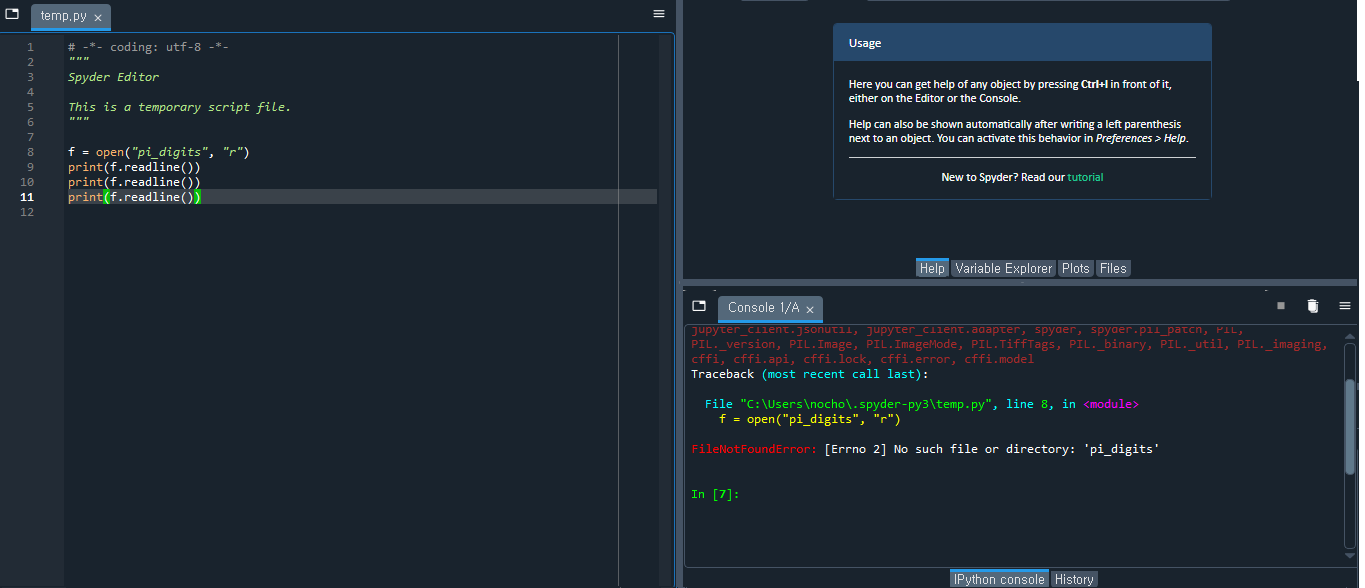
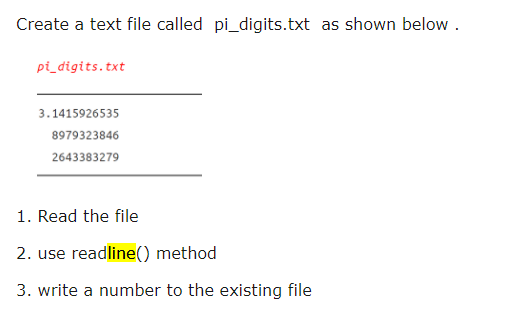
temp, py x # -*- coding: utf-8 -*- Usage IAWNP Spyder Editor Here you can get help of any object by pressing Ctri+l in front of it, either on the Editor or the Console. This is a temporary script file. 6 Help can also be shown automatically after writing a left parenthesis next to an object. You can activate this behavior in Preferences > Help. 8 f = open("pi_digits", "r") g print (f . readline() ) 10 print (f. readline()) New to Spyder? Read our tutorial 11 print(f . readline()) 12 Help Variable Explorer Plots Files Console 1/A x jupyter_client . jsonutil, jupyter_client . adapter, spyder, spyder . pil_patch, PIL, PIL. _version, PIL. Image, PIL. ImageMode, PIL . TiffTags, PIL._binary, PIL._util, PIL._imaging, cffi, cffi.api, cffi. lock, cffi.error, cffi.model Traceback (most recent call last) : File "C:\\Users\ ocho\\. spyder-py3\\temp.py", line 8, in
Step by Step Solution
There are 3 Steps involved in it

Get step-by-step solutions from verified subject matter experts
 Study Help