







Question: testcode -------------- import static org.junit.Assert.*; import java.io.*; import java.util.Scanner; import org.junit.Test; public class FileExercisesTest { private void createFile(String filename, String text){ try { PrintWriter output
testcode
--------------
import static org.junit.Assert.*;
import java.io.*;
import java.util.Scanner;
import org.junit.Test;
public class FileExercisesTest {
private void createFile(String filename, String text){
try {
PrintWriter output = new PrintWriter(new BufferedWriter(new FileWriter(filename)));
output.print(text);
output.close();
} catch (IOException ioe) {
fail("Unable to set up test environment, tried to (re)create file " + filename);
}
}
private void createFile(String filename, double[] nums){
try {
DataOutputStream out = new DataOutputStream(new FileOutputStream(filename));
out.writeInt(nums.length);
for (int counter = 0; counter
out.writeDouble(nums[counter]);
}
out.close();
} catch (IOException ioe) {
fail("Unable to set up test environment, tried to create file " + filename);
}
}
//Test with valid files
@Test
public void test1_getLetters() {
FileExercises fl = new FileExercises();
fl.getLetters("test1.txt", "t1.txt");
//Expected output
String expected = "HAWTTUOC";
//Read from the output file
try {
//Initialize scanner
Scanner scan = new Scanner(new FileInputStream("t1.txt"));
if (scan.hasNext()){
//Read the first line in the file
String line = scan.nextLine();
assertEquals("Strings don't match.", expected, line);
} else {
//If there is nothing in the file, then the test fails
fail("The output file is empty.");
}
} catch (FileNotFoundException fnfe){
//If cannot open output file, then test fails
fail("Cannot open the output file.");
}
}
@Test
public void test2_getLetters() {
//Initialize FileExercises
FileExercises fl = new FileExercises();
fl.getLetters("test2.txt", "t2.txt");
//Expected output
String expected = "FRDMVSGHDLVK";
//Read from the output file
try {
//Initialize scanner
Scanner scan = new Scanner(new FileInputStream("t2.txt"));
if (scan.hasNext()){
//Read the first line in the file
String line = scan.nextLine();
assertEquals("Strings don't match.", expected, line);
} else {
//If there is nothing in the file, then the test fails
fail("The output file is empty.");
}
} catch (FileNotFoundException fnfe){
//If cannot open output file, then test fails
fail("Cannot open the output file.");
}
}
@Test
public void test3_getLetters() {
//Initialize FileExercises
FileExercises fl = new FileExercises();
fl.getLetters("test3.txt", "t3.txt");
//Expected output
String expected = "HW";
//Read from the output file
try {
//Initialize scanner
Scanner scan = new Scanner(new FileInputStream("t3.txt"));
if (scan.hasNext()){
//Read the first line in the file
String line = scan.nextLine();
assertEquals("Strings don't match.", expected, line);
} else {
//If there is nothing in the file, then the test fails
fail("The output file is empty.");
}
} catch (FileNotFoundException fnfe){
//If cannot open output file, then test fails
fail("Cannot open the output file.");
}
}
//Test with input file name as null
@Test
public void test4_getLetters_nullInputFile() {
//Initialize FileExercises
FileExercises fl = new FileExercises();
fl.getLetters(null, "t4.txt");
//Expected output
String expected = "NullPointerException";
//Read from the output file
try {
//Initialize scanner
Scanner scan = new Scanner(new FileInputStream("t4.txt"));
if (scan.hasNext()){
//Read the first line in the file
String line = scan.nextLine();
assertEquals("Strings don't match.", expected, line);
} else {
//If there is nothing in the file, then the test fails
fail("The output file is empty.");
}
} catch (FileNotFoundException fnfe){
//If cannot open output file, then test fails
fail("Cannot open the output file.");
}
}
//Test with the input file doesn't exist
@Test
public void test5_getLetters_InvalidInputFileName() {
//Initialize FileExercises
FileExercises fl = new FileExercises();
fl.getLetters("", "t5.txt");
//Expected output
String expected = "FileNotFoundException";
//Read from the output file
try {
//Initialize scanner
Scanner scan = new Scanner(new FileInputStream("t5.txt"));
if (scan.hasNext()){
//Read the first line in the file
String line = scan.nextLine();
assertEquals("Strings don't match.", expected, line);
} else {
//If there is nothing in the file, then the test fails
fail("The output file is empty.");
}
} catch (FileNotFoundException fnfe){
//If cannot open output file, then test fails
fail("Cannot open the output file.");
}
}
@Test
public void test_count_wordNotInFile4() {
//Initialize FileExercises
FileExercises fl = new FileExercises();
// run the test
int actual = fl.count("zero", "test4.txt");
// verify result
assertEquals("The word 'zero' does not appear in the file", 0, actual);
}
@Test
public void test_count_wordOnceInFile4() {
//Initialize FileExercises
FileExercises fl = new FileExercises();
// run the test
int actual = fl.count("word", "test4.txt");
// verify result
assertEquals("The word 'word' appears once in the file", 1, actual);
}
@Test
public void test_count_wordTwiceInFile4() {
//Initialize FileExercises
FileExercises fl = new FileExercises();
// run the test
int actual = fl.count("is", "test4.txt");
// verify result
assertEquals("The word 'is' appears twice in the file", 2, actual);
}
@Test
public void test_count_wordManyTimesInFile4() {
//Initialize FileExercises
FileExercises fl = new FileExercises();
// run the test
int actual = fl.count("and", "test4.txt");
// verify result
assertEquals("The word 'and' appears three times in the file and multiple times on a single line", 3, actual);
}
@Test
public void test_count_invalidFileName() {
//Initialize FileExercises
FileExercises fl = new FileExercises();
// run the test
int actual = fl.count("and", "invalid.txt");
// verify result
assertEquals("The file invalid.txt does not exist", -1, actual);
}
@Test
public void test_append_validFile() {
//Initialize FileExercises
FileExercises fl = new FileExercises();
// run the test
fl.append("two", "test5.txt");
//Read from the output file
try {
//Initialize scanner
Scanner scan = new Scanner(new FileInputStream("test5.txt"));
if (scan.hasNext()){
//Read the first line in the file
String line = scan.nextLine();
assertEquals("Expected 'one' to remain on first line in file", "one", line);
} else {
//If there is nothing in the file, then the test fails
fail("The output file is empty.");
}
if (scan.hasNext()){
//Read the second line in the file
String line = scan.nextLine();
assertEquals("Expected 'two' to be added to the file", "two", line);
} else {
//If there is nothing in the file, then the test fails
fail("The output file does not have additional line.");
}
if (scan.hasNext()){
fail("The file to append to had more lines than expected");
}
} catch (FileNotFoundException fnfe){
//If cannot open output file, then test fails
fail("Cannot open the output file.");
}
createFile("test5.txt", "one ");
}
@Test
public void test_append_newFile() {
//Initialize FileExercises
FileExercises fl = new FileExercises();
// run the test
fl.append("new", "t6.txt");
//Read from the output file
try {
//Initialize scanner
Scanner scan = new Scanner(new FileInputStream("t6.txt"));
if (scan.hasNext()){
//Read the first line in the file
String line = scan.nextLine();
assertEquals("Expected 'new' to be first line in new file", "new", line);
} else {
//If there is nothing in the file, then the test fails
fail("The output file is empty.");
}
if (scan.hasNext()){
fail("The file to append to had more lines than expected");
}
scan.close();
} catch (FileNotFoundException fnfe){
//If cannot open output file, then test fails
fail("Cannot open the output file.");
}
File f = new File("t6.txt");
if (!f.delete()){
fail("Unable to delete file created for test. Make sure to manually delete t6.txt to prevent further failed tests.");
}
}
@Test
public void test_sumNumbers_invalidFileName() {
//Initialize FileExercises
FileExercises fl = new FileExercises();
// run the test
double actual = fl.sumNumbers("invalid.bin");
// verify result
assertEquals("The file invalid.bin does not exist", -1.0, actual, 0.0000001);
}
@Test
public void test_sumNumbers_oneNumInFile() {
double[] nums = {5.56};
createFile("one.bin", nums);
//Initialize FileExercises
FileExercises fl = new FileExercises();
// run the test
double actual = fl.sumNumbers("one.bin");
// verify result
assertEquals("The file contains one number: 5.56", 5.56, actual, 0.0000001);
}
@Test
public void test_sumNumbers_fiveNumsInFile() {
double[] nums = {5.56, -1.56, 756.0, 45.5, -10.5};
createFile("one.bin", nums);
//Initialize FileExercises
FileExercises fl = new FileExercises();
// run the test
double actual = fl.sumNumbers("one.bin");
// verify result
assertEquals("The file contains five numbers: 5.56, -1.56, 756.0, 45.5, -10.5", 795.0, actual, 0.0000001);
}
@Test
public void test_sumNumbers_manyNumsInFile() {
double[] nums = {5.56, -1.56, 756.0, 45.5, -10.5, -456.765, 0.0, 21.345, -234.56, 4.35, 0.009, 41.3, 21.5, -0.034};
createFile("one.bin", nums);
//Initialize FileExercises
FileExercises fl = new FileExercises();
// run the test
double actual = fl.sumNumbers("one.bin");
// verify result
assertEquals("The file contains many numbers", 192.145, actual, 0.0000001);
}
}
-------------------------------
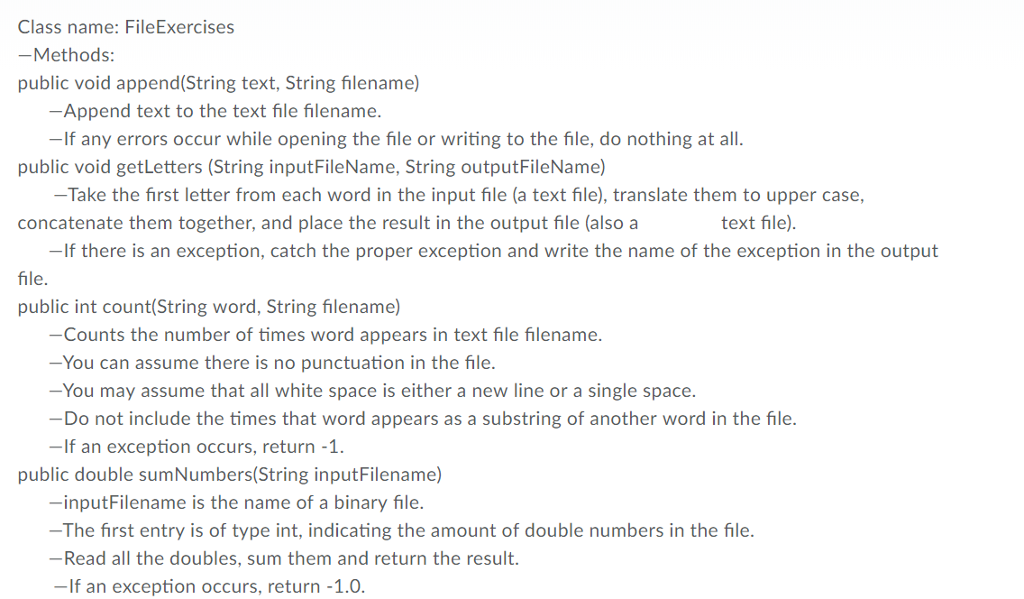
lass name:Filel xercis -Methods: public void append(String text, String filename) Append text to the text file filename. -If any errors occur while opening the file or writing to the file, do nothing at all. public void getLetters (String inputFileName, String outputFileName) Take the first letter from each word in the input file (a text file), translate them to upper case, concatenate them together, and place the result in the output file (also a text file) -If there is an exception, catch the proper exception and write the name of the exception in the output file public int count(String word, String filename) -Counts the number of times word appears in text file filename. -You can assume there is no punctuation in the file -You may assume that all white space is either a new line or a single space. Do not include the times that word appears as a substring of another word in the file -If an exception occurs, return -1 public double sumNumbers(String inputFilename) -inputFilename is the name of a binary file -The first entry is of type int, indicating the amount of double numbers in the file. -Read all the doubles, sum them and return the result. -If an exception occurs, return -1.0
Step by Step Solution
There are 3 Steps involved in it

Get step-by-step solutions from verified subject matter experts
 Study Help