







Question: Text Field - Current value (Amperes). 2. Text Field - Resistance value (Ohms. 3. Button - calculates the voltage (Volts). 4. Text Field - calculated
Text Field - Current value (Amperes). 2. Text Field - Resistance value (Ohms. 3. Button - calculates the voltage (Volts). 4. Text Field - calculated value from Ohm's law (not editable). 5. Panel - when the mouse is not in the area the color is blue, when it is in the area the color is green. You must be able to "drag" the mouse, see example. 6. Label - status bar that shows if the mouse is in the panel area or not, or if you are dragging the panel. 7. Combo Box - combo with 7 items, should show 3 when you click on it. When choosing an "item ' in the combo box there should be a message (showMessage) saying which one you chose. 8. Radio Buttons - plain should be the default. Depending on what you choose, you must change the text "I'm Cuban", plain, bold, italic or bold & italic. 9. List - list of items up to 7. Must be multiple selections. 10. Text Field - that says "I'm Cuban", non-editable. 11. Button - button that shows "Show how many items was selected!". should display a message (showMessage) of how many items were selected.
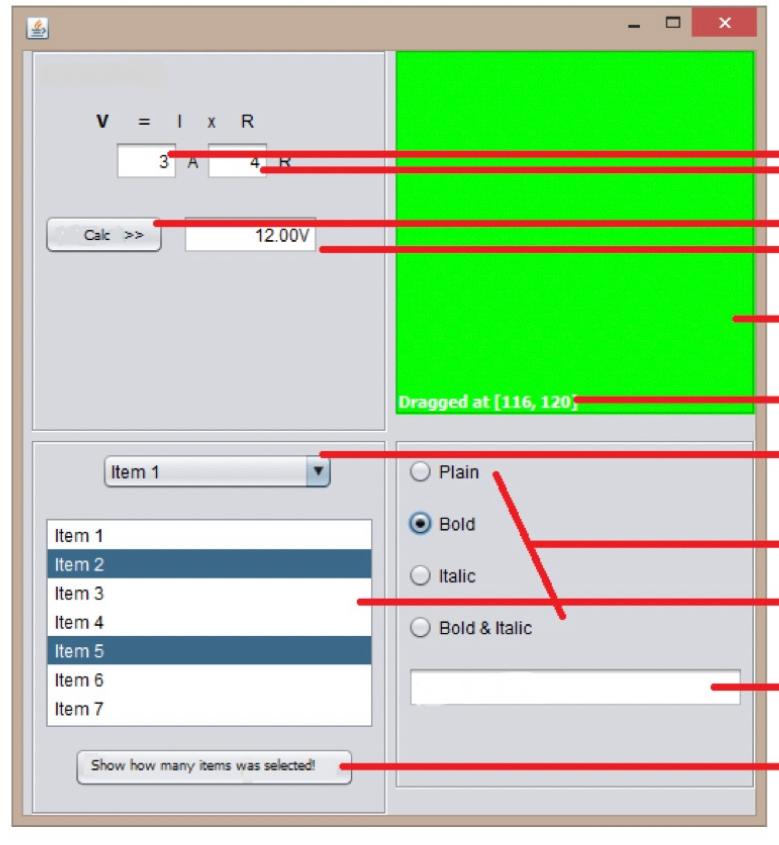
\begin{tabular}{|l|} \hline Item 1 \\ \hline Item 2 \\ \hline Item 3 \\ Item 4 \\ \hline Item 5 \\ \hline Item 6 \\ Item 7 \\ \hline \end{tabular} Plain Bold Show how many items was selectedl Italic Bold \& Italic
Step by Step Solution
There are 3 Steps involved in it
1 Expert Approved Answer
Step: 1 Unlock

Question Has Been Solved by an Expert!
Get step-by-step solutions from verified subject matter experts
Step: 2 Unlock
Step: 3 Unlock
 Study Help