







Question: The application is to be designed and implemented within a .Net framework. It will be implemented using the 3-tier application architecture that we have discussed
The application is to be designed and implemented within a .Net framework. It will be implemented using the 3-tier application architecture that we have discussed in class. The entire application will be developed using Microsoft
Visual Studio 2013 using the Language C#. For the database environment, you will use Microsoft SQL Server.
Phase # 2 Requirements:
In this phase of the project, you will design and implement a Windows project that connects to a local SQL Server database.
1. Database: create the following tables in a local database. After the database tables are created, you must enter sample data for testing your project.
>
Database Table: Employee
Column Name
Data
Type
Comment
EmployeeID
int
identity
Name
nvarchar (30)
PhoneNumber
nvarchar (15)
RoomNumber
nvarchar (10)
PayMonths
int
PaymentMonth
double
2. Code Development. You are required to create a Windows application. The application provides the features that maintain the information on Employees.
The requirements of the application are described as follows:
a. You must create an Employee class, representing data used in your application. Your class will have all the attributes in the table and corresponding constructors.
b. You must create a local database that will be included in your project. (Hint: see our manual)
c. You will create a Dynamic Link Library (dll) named DeptDLL. This dll will calculate the total payment for each employee and show this total in a messagebox when a user clicks on an employee row in the datagridview. After creating the dll make sure you copy it inside your project folder and only after that reference it in your project
d. You will use table adaptors, data source, binding source, buttons and a datagridview to select, insert, update and delete data into your database. Your datagridview will display the data in your table.
e. While the Select button will be displayed from the start of the program, the other buttons (insert, delete, update, and navigation buttons) will be created at runtime (after a user clicks on the Select button). You must zip your answer file from your solution folders that contains all of your project files.
The GUI should look as followed:
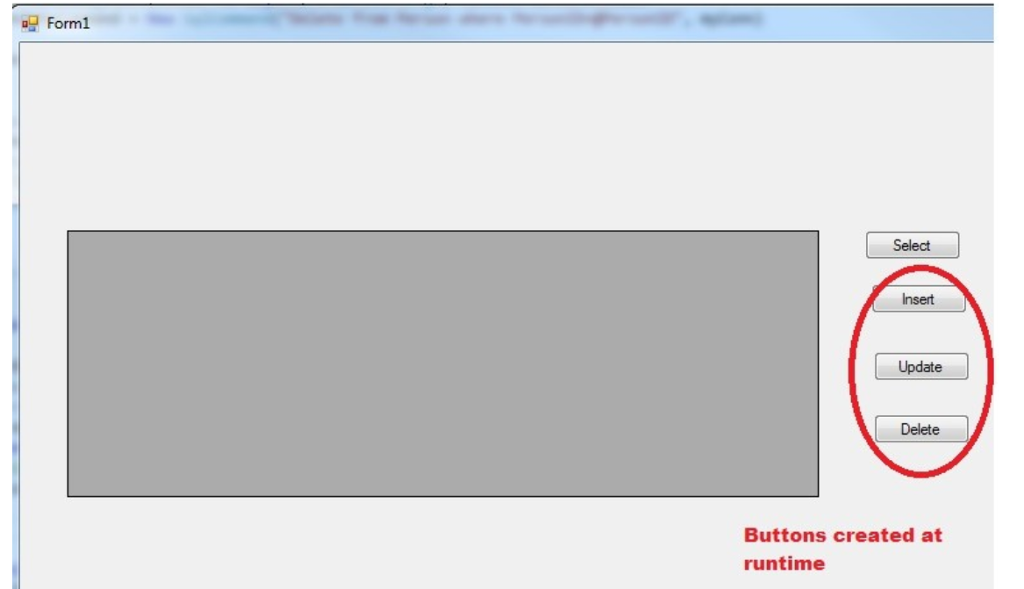
Form1 Insert Update Delete Buttons created at runtime
Step by Step Solution
There are 3 Steps involved in it

Get step-by-step solutions from verified subject matter experts
 Study Help