







Question: The assignment is in the photo, and the starter code is below: import javafx.application.Application; import javafx.stage.*; import javafx.scene.*; import javafx.scene.control.*; import javafx.scene.layout.*; import javafx.event.*; import
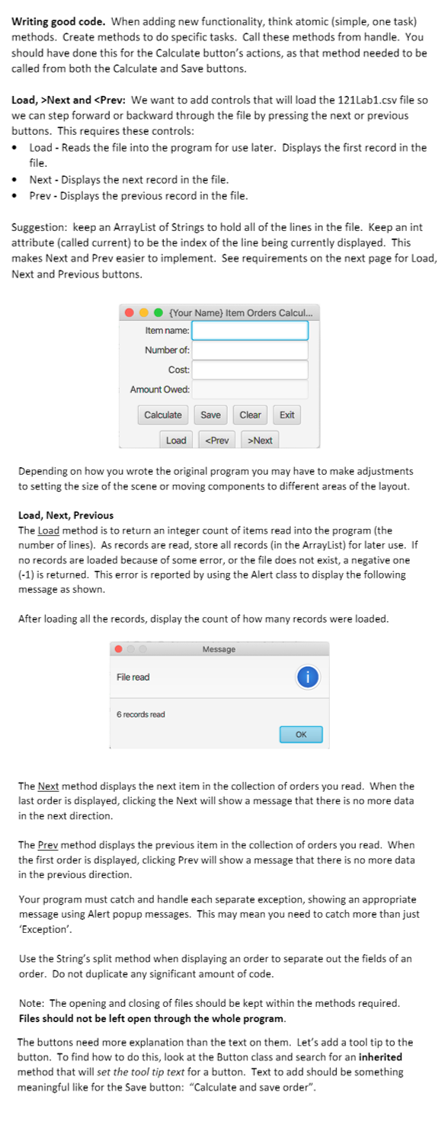
The assignment is in the photo, and the starter code is below:
import javafx.application.Application; import javafx.stage.*; import javafx.scene.*; import javafx.scene.control.*; import javafx.scene.layout.*; import javafx.event.*; import javafx.geometry.*; import java.io.*;
public class OrderSystem extends Application implements EventHandler
// attributes private Stage stage; private Scene scene; // GridPane private VBox root = new VBox(10); private GridPane gpTop = new GridPane(); private FlowPane fpBot = new FlowPane(10,10);
// labels private Label lblName = new Label("Item Name: "); private Label lblNum = new Label("Number: "); private Label lblCost = new Label("Cost: "); private Label lblAmount = new Label("Amount owned: ");
// text fields private TextField tfName = new TextField(); private TextField tfNum = new TextField(); private TextField tfCost = new TextField(); private TextField tfAmount = new TextField();
// buttons private Button btn1 = new Button("Calculate"); private Button btn2 = new Button("Save"); private Button btn3 = new Button("Clear"); private Button btn4 = new Button("Exit");
public static final String FILE_NAME ="121Lab1.csv";
public void start(Stage _stage) throws Exception { //save stage as attribute this.stage = _stage; stage.setTitle("My Item Orders Calculator"); gpTop.addRow(0,lblName, tfName); GridPane.setHalignment(lblName, HPos.RIGHT); gpTop.addRow(1,lblNum, tfNum); GridPane.setHalignment(lblNum, HPos.RIGHT); gpTop.addRow(2,lblCost, tfCost); GridPane.setHalignment(lblCost, HPos.RIGHT); gpTop.addRow(3,lblAmount, tfAmount); GridPane.setHalignment(lblAmount, HPos.RIGHT); gpTop.setAlignment(Pos.CENTER); public static void main(String[] args) { launch(args); } // add buttons fpBot.getChildren().addAll(btn1, btn2, btn3, btn4); fpBot.setAlignment(Pos.CENTER); // add grid and flowpane root.getChildren().addAll(gpTop,fpBot); // create scene of specified size scene = new Scene(root, 400, 150); // add action handler to all buttons btn1.setOnAction(this); btn2.setOnAction(this); btn3.setOnAction(this); btn4.setOnAction(this); // conect scene with stage stage.setScene(scene); // display stage (window) stage.show(); // set amount field to not editable tfAmount.setEditable(false); }
@Override public void handle(ActionEvent evt) { Button btn = (Button)evt.getSource(); switch(btn.getText()) { case "Calculate": calculateAmount(); break; case"Save": //calculate amount calculateAmount(); // save to csv file in append mode String name = tfName.getText(); String number = tfNum.getText(); String cost = tfCost.getText(); String amount = tfAmount.getText(); FileWriter writer = null; if(!name.equals("") && !number.equals("") && !cost.equals("") && !amount.equals("")) { try { //open file in append mode writer = new FileWriter(FILE_NAME,true); writer.append("'"+name+"'"); writer.append(","); writer.append(number); writer.append(","); writer.append(cost); writer.append(","); writer.append(amount); writer.append(' '); } catch (Exception e) { System.exit(0); } try { writer.flush(); writer.close(); } catch (Exception e) { System.exit(0); } } break; case "Clear": tfName.setText(""); tfNum.setText(""); tfCost.setText(""); tfAmount.setText(""); break; case "Exit": System.exit(0); break; } }
// method to calculate amount private void calculateAmount() { try { String sN1 = tfNum.getText(); String sN2 = tfCost.getText(); double dN1 = Double.parseDouble(sN1); double dN2 = Double.parseDouble(sN2); double dAmt = dN1 * dN2; // set formatting to two decimal places String formatted = String.format("%.2f", dAmt); tfAmount.setText("" + formatted); } catch(Exception e) { System.exit(0); } }
}
Writing good code. When adding new functionality, think atomic (simple, one task) methods. Create methods to do specific tasks. Call these methods from handle. You should have done this for the Calculate button's actions, as that method needed to be called from both the Calculate and Save buttons. Load,>Next and
Step by Step Solution
There are 3 Steps involved in it

Get step-by-step solutions from verified subject matter experts
 Study Help