







Question: The assignment: You would like local clients ( e . g . Windows 1 0 ) to receive IP information automatically so you don t
The assignment:
You would like local clients eg Windows to receive IP information automatically so you
dont have to enter static values just like your laptop on campus The clients should still be able
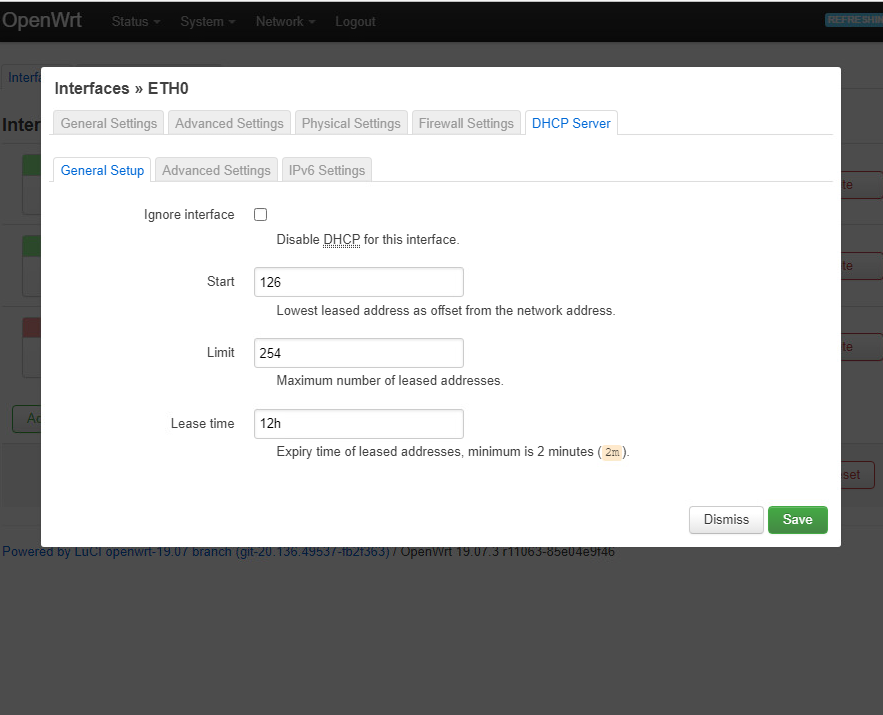
I am not sure on what to put here: the first image in the start and limit
to communicate on the same network segment. Lets do that here.
Install
Open your router configuration page
For the interface that is connected to your network for client machines, click Edit
Under the DHCP Server tab, click on Setup DHCP Server
Enter the start IP as well as the limit of the number of DHCP client addresses hint: look
at your diagram
Under Advanced Settings in DHCPOptions, enter the IP of the DNS server the clients
should use in the format IP where IP is the IP of your DNS server
Click on Save and then Save & Apply
Ignore interface
Disable DHCP for this interface.
Start
Lowest leased address as offset from the network address.
Limit
Maximum number of leased addresses.
Lease time
Expiry time of leased addresses, minimum is minutes m
second image: that's my DNS IP and the last image is my topology of my network
Ignore interface
Disable DHCP for this interface.
Start
Lowest leased address as offset from the network address.
Limit
Maximum number of leased addresses.
Lease time
Expiry time of leased addresses, minimum is minutes m
Dynamic
DHCP
Force
IPvNetmask
DHCPOptions
Dynamically allocate DHCP addresses for clients. If disabled, only clients having static leases
will be served.
Force DHCP on this network even if another server is detected.
Override the netmask sent to clients. Normally it is calculated from the subnet that is served.
Define additional DHCP options, for example which
advertises different DNS servers to clients.
Step by Step Solution
There are 3 Steps involved in it
1 Expert Approved Answer
Step: 1 Unlock

Question Has Been Solved by an Expert!
Get step-by-step solutions from verified subject matter experts
Step: 2 Unlock
Step: 3 Unlock
 Study Help